Proposals
AI proposal generator: brief in, priced proposal out
An AI proposal generator takes a short description of a job and returns a complete proposal: the opening, the approach, a pricing table and the terms. The useful ones keep your numbers exactly as you typed them and leave the document fully editable.
What the AI actually writes
The draft follows a fixed section order and always carries exactly one pricing table, with at most 40 line items, and the terms arrive as numbered clauses you can edit one by one. The pricing settings come with it: currency, deposit and how long the offer stays open. Because the table is a real priced component rather than a picture of one, the subtotal, the GST line, the deposit and the balance are worked out from the items, not typed by the model. Change a quantity later and every total follows.
Your prices are not up for negotiation
Price hints are authoritative. If the brief says the design phase is $2,400, an item lands at exactly $2,400, and the screen says so under Client and pricing. If you give no prices at all, the items arrive with blank prices for you to fill in, which is safer than a model guessing your rates. This is the main difference from asking a general chatbot to draft a proposal, where numbers drift between paragraphs and the table rarely adds up.
It reads up on the client first
Before writing, one web research step runs on the client. It reads the client website when you give one, otherwise it looks up the company name, and when nothing else is known it works from your brief and any files. The findings ground the opening sections so the proposal talks about the client business rather than in generalities, and the prompt forbids numbers beyond what the research found. You still read every sentence before it goes out.
From draft to accepted
The draft opens in the builder on the document canvas. From there it can be sent to up to five recipients, each with a private tracked link. The client reads it as pages, ticks any optional extras, and accepts with a typed name, a drawn signature and a consent box. Acceptance creates the invoices, and a pay link takes the card payment through Stripe Checkout on a paid plan.
Where a hand written proposal still wins
A generator is quickest for the common shape: a service, a scope, a price and terms. A tender response with a mandated schedule, a government panel form or a proposal that must follow a buyer template is better written by hand into that template, because the AI lays out its own section order. Use the generated draft for the price table and the terms, and paste the narrative into the format the buyer requires.
How it works, in three steps
Step 1
Describe the job
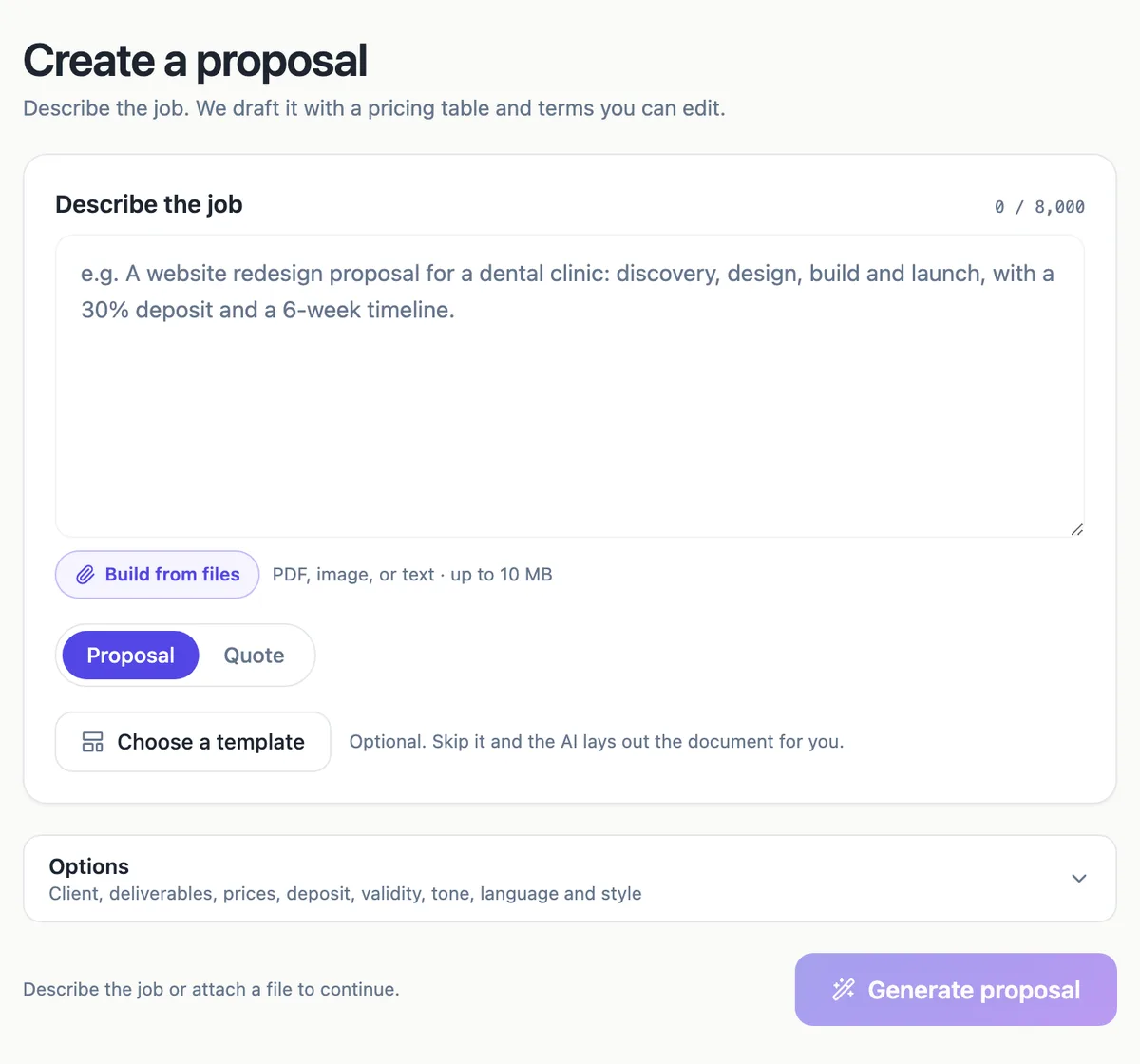
Write what you are offering, for whom, and any prices you already know, up to 8,000 characters. Attach a brief or an old quote if you have one.
Step 2
Set the options
Pick a client or add one, list deliverables, type price hints, set the deposit percent and how many days the offer is valid.
Step 3
Generate and edit
Press Generate proposal. The draft opens in the builder, where the text, the items and the pricing settings stay editable.
The full walkthrough with screenshots is in the guide Send a proposal and get paid.
Limits worth knowing
- The prompt holds up to 8,000 characters, less than the 10,000 of the other generators.
- Attaching files (5 files, 10 MB each) needs the Starter plan or above.
- Every new proposal costs 1 credit, and generation also bills its model use.
- The free plan keeps up to 3 proposals; Starter keeps 25; Pro and above are unlimited.
Questions people ask
Will the AI change the prices I give it?
No. Price hints are treated as fixed: every number you give becomes a line item at exactly that price. The model writes descriptions around them and can add items you did not price, which arrive blank so you notice them. Totals, GST and the deposit are computed from the items by the pricing table, so the arithmetic is never written by the model.
Can it write a proposal from an old document?
Yes, on the Starter plan or above. Build from files accepts up to five files of 10 MB each, as PDF, plain text or PNG, JPG, WebP and GIF images. A previous proposal, a client brief or a scope email works well. The generator reads them alongside your description, so keep the description short and use it to say what is different this time.
How long does a proposal take to generate?
It runs as a background job with three stages shown on screen: writing the proposal, pricing the work and laying out the pages. A research step on the client comes first. Most of the wait is the writing stage, and you can leave the page open while it works. The finished draft opens in the builder automatically.
Is the proposal legally binding once the client accepts?
The click acceptance records a typed name, a drawn signature and a consent statement saying the electronic acceptance is binding, along with the time, IP address, browser and a hash of the content. Whether a particular proposal forms a contract depends on its terms and the law that governs it, so read the terms the AI drafts as a starting point, not legal advice.
Can I edit the proposal after it is generated?
Everything stays editable: headings, paragraphs, the order of sections, every item and every pricing setting. The AI assistant can also make changes for you, including seven pricing operations such as adding an item or setting the deposit, and those wait for you to apply them. Once a proposal is accepted it locks, and you duplicate it to make a new one.
Does it work for quotes as well as proposals?
Yes. The Proposal and Quote switch on the same screen changes the document kind, the wording of the generator and the templates offered. A quote suits a trade job with a short scope and a price, and a proposal suits a project that needs an approach and a timeline as well. Both use the same pricing table, acceptance and invoicing.
Make your own proposal
The button opens the generator with this use case already described. Change the wording to match yours, generate, then edit anything you like.
Create a proposal with OneCraftRelated pages
A proposal with a pricing table that does its own sums
A proposal with a pricing table shows the client exactly what each part of the work costs and how the total is reached. The table should be built from line items, so a change to one quantity updates the subtotal, the tax, the deposit and the balance without anyone retyping a figure.
AI quote generator for trades and service jobs
An AI quote generator turns a few lines about a job into an itemised quote with prices, tax and terms. For a trade or service business the point is speed on site: describe the job once, check the numbers, and send a link the customer can accept from a phone.
Proposal templates for services and trades
Proposal templates give a business a known section order and sample prices to start from, instead of a blank page. There are 18 here: 12 proposals for services such as web design, consulting and bookkeeping, and 6 quotes for jobs such as repairs, landscaping and catering.
More finished work of this kind is on the proposal examples hub.
Written and checked by the OneCraft team. Last checked .