Proposals
A proposal with a pricing table that does its own sums
A proposal with a pricing table shows the client exactly what each part of the work costs and how the total is reached. The table should be built from line items, so a change to one quantity updates the subtotal, the tax, the deposit and the balance without anyone retyping a figure.
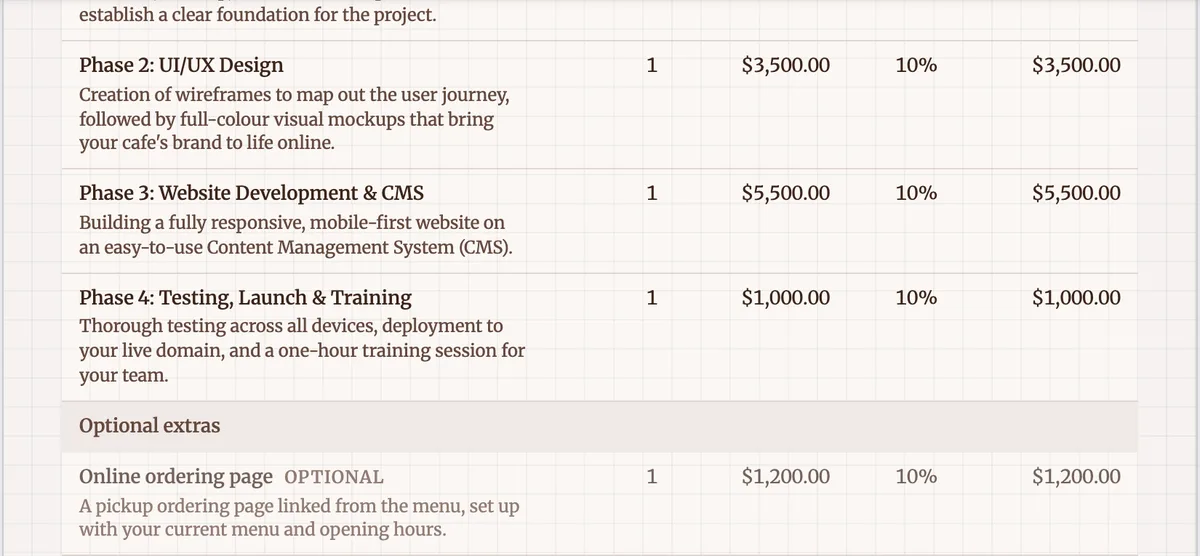
One table, built from items
Every proposal has room for one pricing table, and the component greys out in the toolkit once it is on the page. It is not a drawn table with numbers typed into cells. It reads the proposal items, so a line is a record with a name, a description, a quantity, a unit price, a unit label, a tax rate, a discount and an optional group heading. The table draws those records and the totals are computed in whole cents, rounded half up at every step.
The columns and the summary
The columns are Item, Qty, Unit price, Tax, Discount and Amount. Quantity can be hidden for fixed fee work, and Tax and Discount only appear when an item actually has a rate and the toggle is on, so a simple quote does not carry empty columns. Under the items come Subtotal, Discount, the tax line, which reads Includes GST when prices are tax inclusive, and Total, followed by Deposit due now and Balance when the proposal takes a deposit.
Groups and optional lines
A group label puts a heading row above its items, which is how a proposal separates project phases from optional extras. An item marked optional is labelled Optional in the table and is counted only when it is selected. In the builder, selected by default decides whether it starts ticked; in the client view the client changes that. The PDF and the client view use the same layout code, so what you price is what they see.
Long tables across pages
A proposal with many items will not fit on one page, and the table splits at a page break the way an accountant would expect: the title stays with the first part and the totals stay with the last. Height is estimated from the actual items, so the layout engine knows how much room the table needs. An empty table shows a dashed hint in the editor and renders nothing in the PDF, so a half finished draft never prints a blank grid.
Editing the numbers
Items are edited in the Pricing panel, with drag to reorder, duplicate and delete, and money typed in dollars and cents. Changes save on their own after a short pause, with a Saving and Saved badge. The AI assistant can also change the table: add, update or remove an item, apply a discount, set the deposit, set a tax rate or change the validity. Those changes show as a preview and wait for you to apply them, because they change what the client pays.
How it works, in three steps
Step 1
Add or generate the items
Generate a proposal with price hints, or open the Pricing panel and add items by hand with a name, quantity and unit price.
Step 2
Set tax and groups
Give each item its tax rate, add group labels such as Project phases and Optional extras, and choose whether prices include tax.
Step 3
Check the table on the page
The table on the canvas updates as you edit. Show or hide the quantity, tax and discount columns from the component settings.
The full walkthrough with screenshots is in the guide Send a proposal and get paid.
Limits worth knowing
- One pricing table per proposal.
- Up to 200 items, each with a name of up to 200 characters and a description of up to 2,000.
- Quantities can have up to three decimal places.
- Card payments of the total or deposit need Stripe connected on a paid plan.
Questions people ask
Can I hide the quantity column?
Yes. A fixed fee proposal reads better without a column of ones, so quantity can be hidden on the table. Tax and Discount columns only appear when at least one item has a rate and the toggle is on. The underlying items keep their quantities, so totals are unaffected, and you can show the column again at any time.
How are totals rounded?
Totals are calculated in integer cents and rounded half up at every step, the same way on the server and in the browser, with a shared set of test cases that both must pass. That means the total in the builder, in the client view, on the PDF and on the invoice is the same figure to the cent, including the GST line and the deposit.
Can prices include GST instead of adding it?
Yes. Turn on Prices include tax in the Pricing panel and each line is treated as GST inclusive. The summary then shows an Includes GST line instead of adding tax on top. Consumer facing businesses often quote inclusive prices, and Australian law expects the total price to be shown prominently to consumers.
Can I give a discount on one line?
Each item can carry its own discount, and a Discount column appears in the table when one does and the toggle is on. The summary shows the total discount on its own line before tax. A discount across the whole proposal can also be applied through the AI assistant, which previews the change before you accept it.
What currency does the table use?
AUD by default, with GST as the tax label. You can choose another currency per proposal, and the tax label follows: GST for AUD and NZD, VAT for GBP and EUR, otherwise Tax. Once a Stripe account is connected, its currency pins the proposal currency so the pay link charges in the same currency the table shows.
Make your own proposal
The button opens the generator with this use case already described. Change the wording to match yours, generate, then edit anything you like.
Create a proposal with OneCraftRelated pages
A quote with optional extras the client chooses
A quote with optional extras lists the core job at a fixed price and offers add ons the client can take or leave. Done online, the client ticks the extras they want, sees the new total straight away, and accepts that exact selection.
A proposal expiry date that actually expires
A proposal expiry date says how long the offer stands. It protects you from a client accepting months later at prices that no longer cover your costs, and it gives the client a reason to decide.
AI proposal generator: brief in, priced proposal out
An AI proposal generator takes a short description of a job and returns a complete proposal: the opening, the approach, a pricing table and the terms. The useful ones keep your numbers exactly as you typed them and leave the document fully editable.
More finished work of this kind is on the proposal examples hub.
Sources
Written and checked by the OneCraft team. Last checked .