Proposals
Edit a proposal with AI, with pricing kept under your control
Editing a proposal with AI means asking for a change in plain words, such as shorten the introduction or add a second site visit at $180, and getting it made in the document. The danger is a model quietly changing what the client pays, so every money change should wait for your approval.
What it can change
The assistant edits text in the proposal: headings, paragraphs, list items and the other written parts, addressed by where they sit in the document. It also has seven pricing operations: add an item, update an item, remove an item, apply a discount, set the deposit, set a tax rate and set the validity. Anything outside that vocabulary, such as the theme, the layout or images, is changed in the builder by hand.
Money changes wait for you
Any turn that includes a pricing operation shows as a preview and does nothing until you press Apply, because it changes what the client pays. Each change is listed in words with its before and after, such as add Logo refresh, 1 at $400.00, set deposit to 50% or valid for 30 days. Text changes show the old and new wording. A proposal that had a pending change when you left the page asks again when you return.
Undo the last turn
If an applied change was not what you wanted, Undo reverses the last turn. It restores the document text and also writes back any items or pricing settings the turn changed, so a deposit set by the assistant goes back to what it was. The builder own undo covers your manual edits to the document; the Pricing panel edits are not on that stack.
Writing good requests
Name the part you mean: the About us paragraph, the second term, the design phase item. Give numbers exactly, with units and prices. Ask for one kind of change at a time, so the preview is easy to check. The assistant keeps the last five turns of the conversation with a summary of each, so follow ups like make that shorter work, but a fresh, specific request is still more reliable than a long thread.
Costs and limits
Chat bills the model use of each turn in credits, on top of the 1 credit the proposal cost when it was created. Once a proposal is accepted it is locked and the assistant cannot change it; duplicate it first. Changes made by the assistant are saved through the same paths as your own, so the next send includes them as a new version.
How it works, in three steps
Step 1
Open the assistant
In the builder, press the AI assistant button at the bottom right.
Step 2
Ask for the change
Describe it in plain words, naming the section or item and giving exact numbers.
Step 3
Check and apply
Read the before and after. Text changes apply; pricing changes wait for Apply. Undo reverses the last turn.
The full walkthrough with screenshots is in the guide Send a proposal and get paid.
Limits worth knowing
- The assistant edits text and seven pricing operations only; not layout, theme or images.
- Pricing changes always wait for Apply.
- Each turn bills model use in credits.
- Accepted proposals are locked; duplicate to edit.
Questions people ask
Can the AI change my prices without asking?
No. Any turn that adds, updates or removes an item, applies a discount, sets the deposit, sets a tax rate or changes the validity is shown as a preview and waits for you to press Apply. The preview lists each change with its before and after amounts, so you can see exactly what the client would pay.
Can it change the design of the proposal?
No. The assistant works on the text and on the pricing operations. Theme, fonts, colours, layout and images are changed in the builder with the Theme button and the canvas. If you ask for a design change, the assistant will say it cannot do it, and you can make the change by hand.
What if it changes the wrong paragraph?
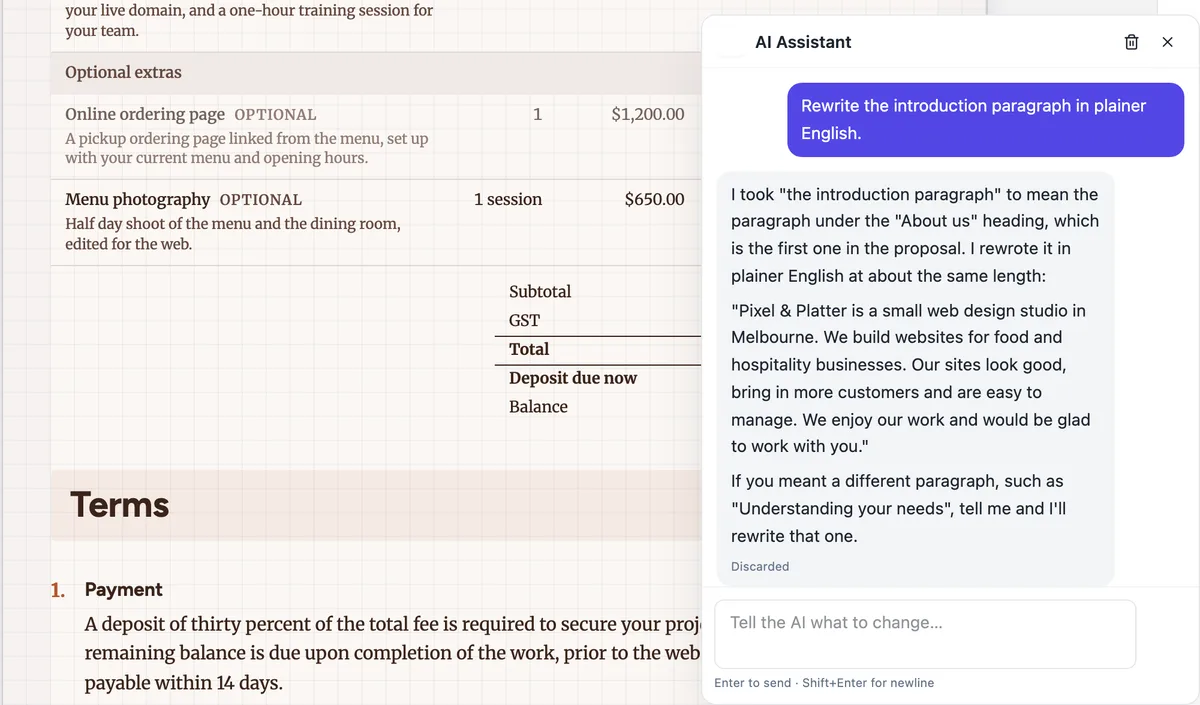
It says which part it took you to mean, as in the figure, and you can discard the change or undo it after applying. Then ask again naming the section precisely, for example the paragraph under Understanding your needs. Being specific about where a change goes matters more than how the change is worded.
Does using the assistant cost credits?
Yes. Each turn bills its model use in credits, just as generation does. The proposal itself cost 1 credit when it was created. Short, specific requests use less than long conversations. Editing by hand in the builder and the Pricing panel costs nothing beyond the proposal.
Can I use it after sending the proposal?
Yes, until the client accepts. Changes made after sending affect only your draft; the client keeps seeing the version you sent. Send again to give them the update as a new version. Once the proposal is accepted it locks and the assistant can no longer change it.
Make your own proposal
The button opens the generator with this use case already described. Change the wording to match yours, generate, then edit anything you like.
Create a proposal with OneCraftRelated pages
A proposal with a deposit that invoices itself
A proposal with a deposit asks the client to pay part of the price up front before work starts. The deposit should be visible in the pricing table and, once the client accepts, turn straight into an invoice they can pay that day.
A proposal expiry date that actually expires
A proposal expiry date says how long the offer stands. It protects you from a client accepting months later at prices that no longer cover your costs, and it gives the client a reason to decide.
Edit a document with AI
The chat panel is a rewriting tool. It can reach the text of every block on the page, including the ones nested inside a container, and it deliberately cannot touch anything structural.
More finished work of this kind is on the proposal examples hub.
Written and checked by the OneCraft team. Last checked .