Proposals
A proposal expiry date that actually expires
A proposal expiry date says how long the offer stands. It protects you from a client accepting months later at prices that no longer cover your costs, and it gives the client a reason to decide.
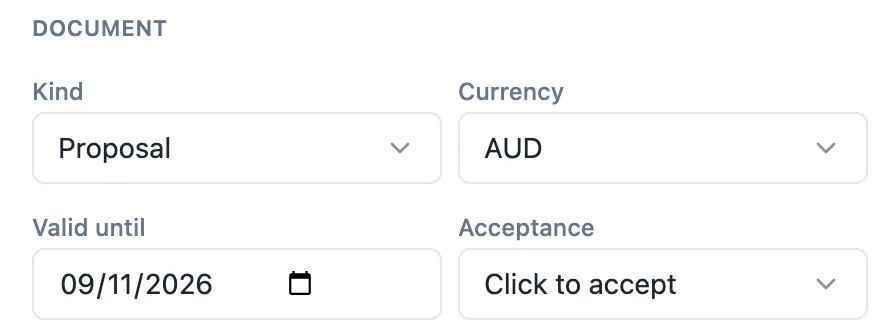
Three places to set it
The generator has Valid for (days), which defaults to 30 and becomes the valid until date when the draft is created. The Pricing panel has Valid until as a date, which you can change at any time before sending. The Send dialog shows Valid until again, defaulting to the date on the proposal, and changing it there updates the proposal. The AI assistant can also set the validity on request, as a previewed change.
How expiry is enforced
Every recipient link carries the proposal expiry. A daily sweep moves any proposal that is sent or viewed and past its date to expired, writes an expired event to the timeline and notifies you. From then on acceptance is refused. A proposal that is still a draft, already accepted or declined is not touched by the sweep.
What the client sees
Throughout, the top of the client view shows Valid until with the date. After it passes, the proposal is still readable but marked expired, with a note giving the date it was valid until and asking the client to contact you for an updated version. The accept button no longer works. The page stays available, so the client can still refer to the offer.
Extending or renewing an offer
To extend, change the date in the Pricing panel and send again. If nothing else changed, the same version is reused with the new links; if prices changed, a new version is created and the old links can no longer accept. Either way the client gets a fresh link, which is also a natural moment to follow up.
Choosing a period
Validity should reflect how fast your costs move and how long the client needs to decide. Fourteen days suits trades with volatile material prices; thirty days suits most services; longer suits projects that need board approval. State the validity in the terms as well, and say what happens after it, such as a re quote at current prices.
How it works, in three steps
Step 1
Set the validity
In the generator, set Valid for (days), or set Valid until in the Pricing panel.
Step 2
Confirm it when sending
The Send dialog shows Valid until; adjust it if this client needs longer.
Step 3
Let expiry run
After the date, the daily sweep marks the proposal expired and acceptance is refused.
The full walkthrough with screenshots is in the guide Send a proposal and get paid.
Limits worth knowing
- Expiry is checked once a day, so a proposal is marked expired on the daily run after its date.
- Only sent or viewed proposals are expired; drafts, accepted and declined ones are not.
- An expired proposal cannot be accepted; send it again with a new date to revive it.
- Links expire with the proposal date.
Questions people ask
What is the default validity?
Thirty days. The generator Valid for (days) field starts at 30, and the draft valid until date is set that many days from creation. Templates carry their own validity in days, applied when a proposal is created from them. You can change the date at any time before the client accepts.
Can the client accept on the last day?
Yes. The proposal stays acceptable until the daily sweep marks it expired after the date has passed. The valid until date shown to the client is the last day of the offer. If you need a precise cut off time, set the date a day earlier, because the sweep runs once a day.
What happens to an expired proposal?
Its status becomes expired, an event is added to the timeline and you are notified. The client can still open and read it, with a notice that it has expired and a prompt to contact you. Acceptance is refused. Send it again with a new date if you want to renew the offer.
Does an expired proposal still count toward my plan limit?
Plan caps count proposals in your account, so an expired proposal still takes a place until you remove it. On the free plan, with a cap of 3, tidy up old proposals you will not revive. On Pro and above proposals are unlimited, so expired ones can stay as a record.
Should the expiry date also be in the terms?
Yes. The valid until date controls the link, but the terms are what the client reads and agrees to. A validity clause saying the offer stands until the date and that work after it is re quoted at current prices keeps the document and the system consistent. Generated proposals usually include one.
Make your own proposal
The button opens the generator with this use case already described. Change the wording to match yours, generate, then edit anything you like.
Create a proposal with OneCraftRelated pages
A proposal with a pricing table that does its own sums
A proposal with a pricing table shows the client exactly what each part of the work costs and how the total is reached. The table should be built from line items, so a change to one quantity updates the subtotal, the tax, the deposit and the balance without anyone retyping a figure.
A quote with optional extras the client chooses
A quote with optional extras lists the core job at a fixed price and offers add ons the client can take or leave. Done online, the client ticks the extras they want, sees the new total straight away, and accepts that exact selection.
Proposal templates for services and trades
Proposal templates give a business a known section order and sample prices to start from, instead of a blank page. There are 18 here: 12 proposals for services such as web design, consulting and bookkeeping, and 6 quotes for jobs such as repairs, landscaping and catering.
More finished work of this kind is on the proposal examples hub.
Written and checked by the OneCraft team. Last checked .