Proposals
A proposal with a deposit that invoices itself
A proposal with a deposit asks the client to pay part of the price up front before work starts. The deposit should be visible in the pricing table and, once the client accepts, turn straight into an invoice they can pay that day.
Percent or fixed
The deposit setting has three types: none, percent of total, or a fixed amount. A percent deposit is capped at 100 and is worked out from the total including tax, so when the client ticks an extra, the deposit grows with it. A fixed deposit stays the same whatever is selected. The generator can set it too: type a deposit percent in the options and the draft arrives with it already in place.
Deposit and balance on the page
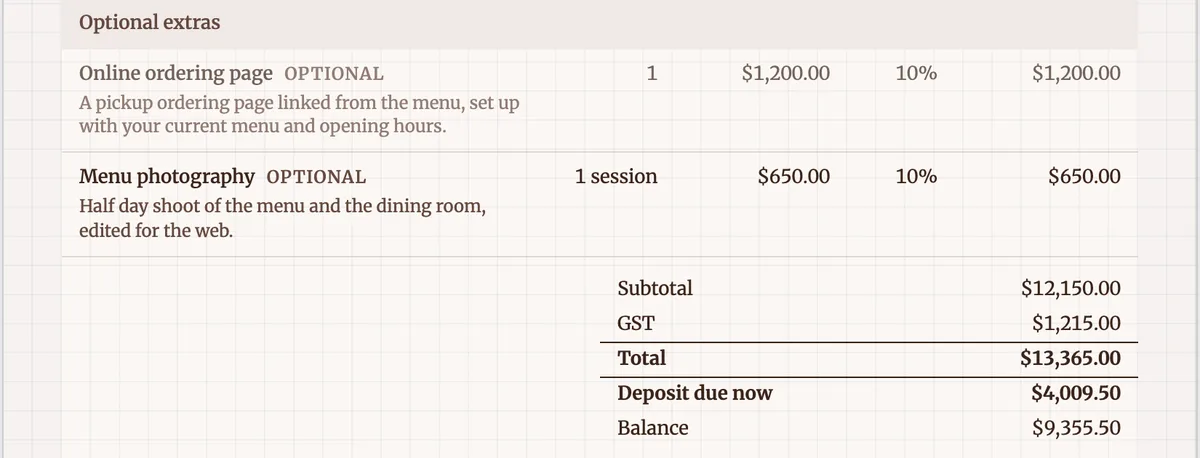
When a deposit is set, the pricing table adds two lines under the total: Deposit due now and Balance. They follow every change to the items or the selection, in the builder, in the client view and on the PDF. The client therefore sees the amount to pay today before accepting, which is fairer than discovering it on an invoice afterwards.
What acceptance creates
On acceptance two invoices are made. The deposit invoice is issued with a single deposit line, due the same day, and emailed. The balance invoice is a draft that lists the accepted items, shows the deposit as already paid and carries the note Less deposit received, so its amount due is the balance. You issue the balance invoice when the work reaches the point your terms say it is due.
Paying the deposit straight away
The acceptance screen shows the deposit invoice with a Pay deposit now button when card payments are available, and the email carries the same pay link. Pay now opens Stripe Checkout through your own connected Stripe account. Without Stripe, the pay page shows your bank details and you mark the invoice paid when the transfer arrives.
Setting a sensible deposit
A deposit should cover the cost you carry before the client could walk away: materials, booked time, subcontractors. For services, a third is common on project work, and trades often deposit the materials. Say in the terms whether it is refundable and when the balance falls due. Australian consumer law treats unfair terms in standard form contracts seriously, so a deposit that is really a penalty is worth avoiding.
How it works, in three steps
Step 1
Open the Pricing panel
In the builder, open Pricing and find the Deposit section.
Step 2
Choose the type and amount
Pick Percent of total or a fixed amount and type the value. The table shows Deposit due now and Balance immediately.
Step 3
Send and let acceptance invoice it
Send the proposal. When the client accepts, the deposit invoice is issued due that day and the balance invoice waits as a draft.
The full walkthrough with screenshots is in the guide Send a proposal and get paid.
Limits worth knowing
- A percent deposit can be at most 100.
- The deposit invoice is due the day of acceptance; its terms are not adjustable before acceptance.
- Card payment of the deposit needs a connected Stripe account on a paid plan.
- The deposit line carries no separate tax rate; the balance invoice carries the GST on the full items.
Questions people ask
Is the deposit calculated before or after GST?
After. A percent deposit is taken from the total including tax, so a 30% deposit on a $13,365 total including GST is $4,009.50. The balance invoice then lists every item with its GST and shows the deposit as already paid, so the tax is accounted for once, on the full items, rather than split across two invoices.
Can the client pay the deposit by card?
Yes, when you have connected Stripe, which needs a paid plan. The acceptance screen and the invoice email both carry a pay link, and Pay now opens Stripe Checkout. The payment lands in your own Stripe account, minus Stripe fees and a platform fee of 2% on Starter, 1% on Pro or 0.5% on Pro+. Without Stripe the client pays to your bank details.
What if the client never pays the deposit?
The deposit invoice is emailed to the client at acceptance but stays Issued; click Send on it in the Invoices tab to start its reminders on the preset you choose. Gentle sends on the due date and a week later; standard and firm send more often, up to six reminders. Whether you start work before the deposit arrives is a business decision your terms should spell out.
Can I change the deposit after sending?
Change it in the Pricing panel and send again. The new settings become a new version, and only links to the latest version can be accepted. A client who opens an old link is asked to open the newest one. Once a proposal is accepted it locks, and you would duplicate it to offer different terms.
Can I take a deposit without a proposal?
The deposit flow belongs to accepted proposals. For a job agreed by phone, create an invoice by hand with New invoice, put the deposit amount on one line, issue it and send the pay link. It will not be tied to a later balance invoice automatically, so note the deposit on the final invoice yourself.
Make your own proposal
The button opens the generator with this use case already described. Change the wording to match yours, generate, then edit anything you like.
Create a proposal with OneCraftRelated pages
Accept a proposal online in one dialog
Accepting a proposal online should take the client a minute: confirm what they are buying, put their name to it and agree to the terms. The record of that moment needs to be strong enough to rely on later.
AI invoice generator that starts from the quote
An AI invoice generator saves the most time when the invoice does not have to be written at all. Here the AI writes the quote or proposal, and the invoices are created from its accepted items, so the numbers on the invoice are the numbers the client agreed to.
Stripe invoice payments into your own account
Taking invoice payments through Stripe means the client pays by card on a Stripe hosted checkout page and the money lands in your Stripe account. The invoice should mark itself paid without you checking a bank feed.
More finished work of this kind is on the proposal examples hub.
Written and checked by the OneCraft team. Last checked .