Proposals
AI invoice generator that starts from the quote
An AI invoice generator saves the most time when the invoice does not have to be written at all. Here the AI writes the quote or proposal, and the invoices are created from its accepted items, so the numbers on the invoice are the numbers the client agreed to.
What the AI writes, and what it does not
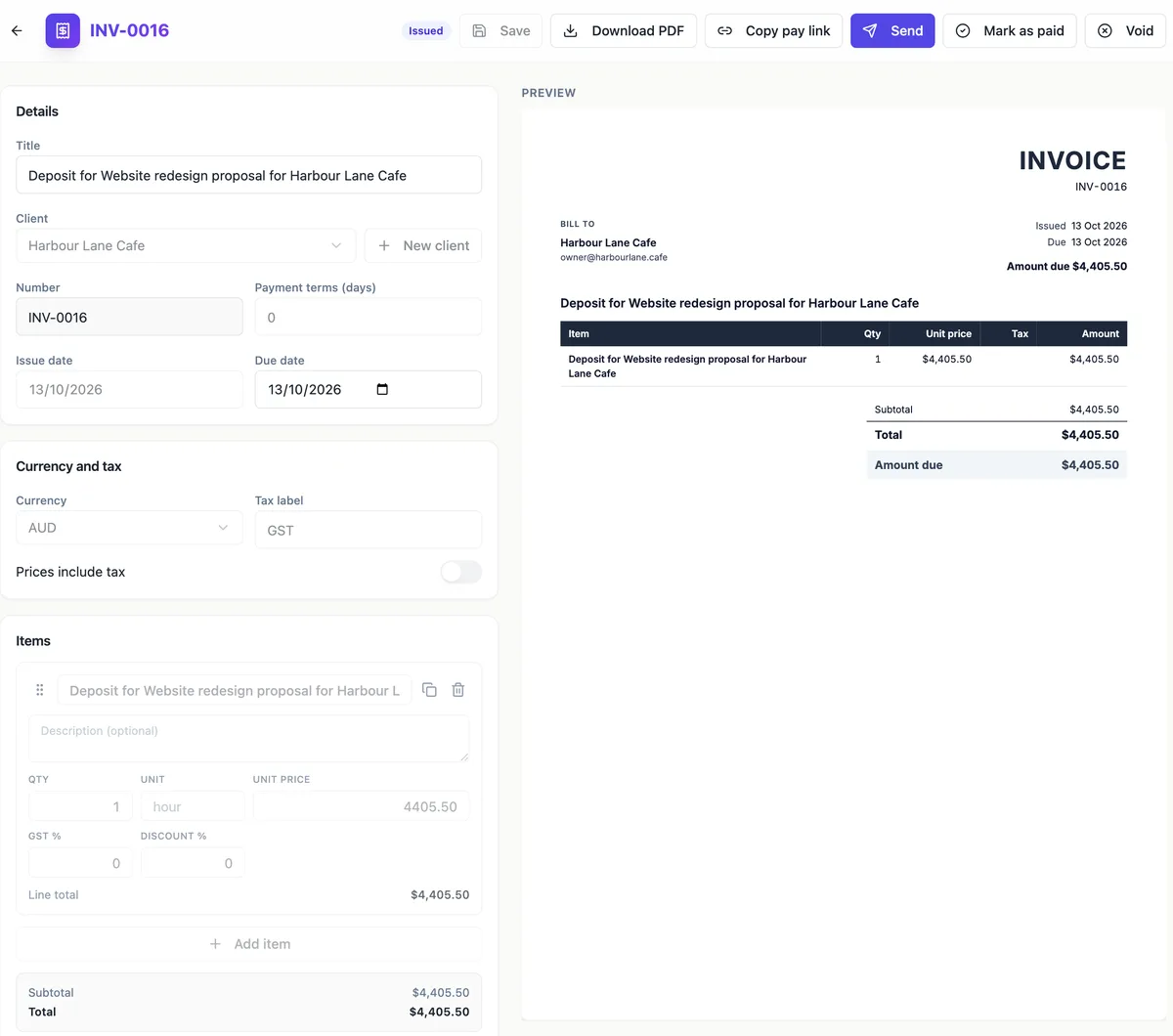
The AI writes proposals and quotes. It does not write invoices directly, and this page will not pretend otherwise. What it saves you is the retyping: the line items the AI drafted and you approved become the invoice lines when the client accepts. An invoice can also be started from scratch with New invoice, or created from a proposal with Create invoice in the Pricing panel, both in a form with a live preview.
Invoices made at acceptance
When a client accepts a proposal with a deposit, two invoices appear: a deposit invoice, issued and due that day, and a draft balance invoice listing the accepted items, with the deposit already shown as paid and a note saying so. Without a deposit there is a single issued invoice due in 14 days. Every issued invoice is emailed to the client, and invoices made this way do not count toward the plan cap.
Numbers, status and the paper trail
Invoices get numbers in the INV-0001 style when issued, never while they are drafts, so a cancelled draft does not leave a gap. The status moves through draft, issued, sent, viewed, overdue, paid and void. A draft is fully editable; once issued, only the title, notes, bank details and due date can change, and a paid invoice is read only. That mirrors how an accounts team expects an invoice to behave.
Getting paid
An issued invoice has a pay link. The client opens a pay page with the amount due, the items, the PDF and your bank details, and on a paid plan with Stripe connected a Pay now button opens Stripe Checkout. The money goes to your own Stripe account. Reminders can follow up on a preset schedule, from gentle to firm, up to six times per invoice.
Check the tax invoice details yourself
In Australia a tax invoice must show certain details, including the seller identity and ABN, the date, a description of what was sold and the GST. The invoice sheet carries the bill to block, dates, items, tax and totals, and the business block from your default brand kit. Read the ATO list against your first invoice and add anything missing, such as your ABN, in the notes.
How it works, in three steps
Step 1
Win the work first
Generate a proposal or quote, send it, and let the client accept online.
Step 2
Open the invoices
Acceptance issues the deposit invoice or the single invoice, and the balance waits as a draft under the Invoices tab.
Step 3
Send and collect
Send the invoice or copy its pay link, and set a reminder preset so unpaid invoices are chased for you.
The full walkthrough with screenshots is in the guide Send a proposal and get paid.
Limits worth knowing
- The AI does not write invoices; invoices come from accepted items or the invoice form.
- Invoices: Free 10, Starter 100, Pro and above unlimited; invoices made at acceptance do not count.
- Card payment needs a connected Stripe account on a paid plan; otherwise clients pay to the bank details shown.
- There are no recurring invoices; a monthly fee is one line with month as the unit.
Questions people ask
Can the AI write an invoice from a description?
No. The generator writes proposals and quotes only. Invoices are made from accepted proposal items, from the Create invoice button in a proposal Pricing panel, or by hand with New invoice. For a job that never had a quote, the invoice form is quick: a title, a client, the items and the terms, with the preview updating as you type.
Does the invoice include GST?
Each line carries its own tax rate, and the tax label defaults to GST for AUD. The preview shows the subtotal, the GST and the total, or Includes GST when prices are set as tax inclusive. A deposit invoice is a single deposit line with no rate of its own, and the balance invoice carries the full items with their GST and the deposit shown as paid.
Can I set up a monthly invoice that repeats?
There are no recurring invoices or subscriptions. A monthly retainer is written as one line item with month as its unit, and each month you create a new invoice, for example by duplicating the proposal or using New invoice. If you bill dozens of retainers every month, a dedicated accounting tool with recurring invoices will suit you better.
What happens when the client pays by bank transfer?
Bank details print on the invoice and the pay page, and you mark the invoice as paid by hand when the money arrives. Card payments through Stripe Checkout are confirmed automatically and the invoice moves to paid. There is no PayPal or direct debit option, and OneCraft never holds the money; card payments land in your own Stripe account.
Can I download the invoice as a PDF?
Yes. Download PDF in the invoice editor renders the invoice on the server from the same A4 sheet you see in the preview, and the client can download it from the pay page. Rendering a PDF is charged in credits by page count once the file exists, so a failed render costs nothing. There is no Word export.
Make your own proposal
The button opens the generator with this use case already described. Change the wording to match yours, generate, then edit anything you like.
Create a proposal with OneCraftRelated pages
Turn an accepted quote into an invoice without retyping
Turning an accepted quote into an invoice should not mean copying lines from one document to another. Here acceptance creates the invoices from the items the client actually chose, at the quantities they chose, so the invoice and the agreed quote match to the cent.
Stripe invoice payments into your own account
Taking invoice payments through Stripe means the client pays by card on a Stripe hosted checkout page and the money lands in your Stripe account. The invoice should mark itself paid without you checking a bank feed.
A proposal with a deposit that invoices itself
A proposal with a deposit asks the client to pay part of the price up front before work starts. The deposit should be visible in the pricing table and, once the client accepts, turn straight into an invoice they can pay that day.
More finished work of this kind is on the proposal examples hub.
Written and checked by the OneCraft team. Last checked .