Proposals
Stripe invoice payments into your own account
Taking invoice payments through Stripe means the client pays by card on a Stripe hosted checkout page and the money lands in your Stripe account. The invoice should mark itself paid without you checking a bank feed.
Connect your own Stripe account
Card payments run through Stripe Connect. In Settings, Payments, Connect with Stripe links your own Stripe account, and the money goes straight to you; OneCraft does not hold it. Connecting needs a paid plan, because card payments are switched off on the free plan. Once connected, your Stripe account currency pins the currency of your proposals and invoices, so a pay link always charges in the currency the invoice shows.
How a payment flows
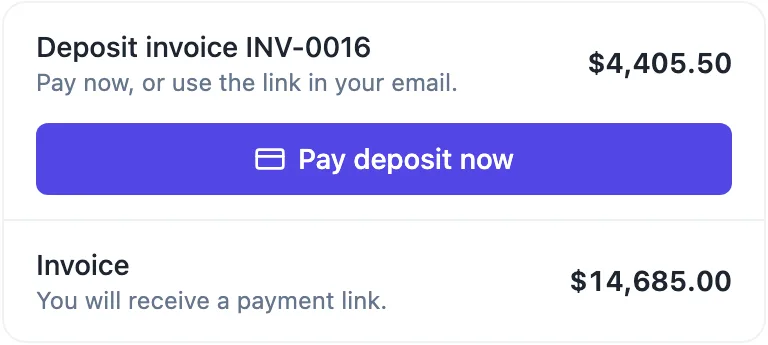
Pay now on the pay page, or Pay deposit now after acceptance, creates a Stripe Checkout session for the amount due as a destination charge to your account. The client pays on Stripe hosted page. When Stripe confirms, the payment amount is added to the invoice and the invoice turns paid once the total is covered. A paid event goes on the proposal timeline and you are notified. An unfinished checkout session expires after about a day and the client simply starts again.
Fees
Two fees apply. Stripe charges its own processing fees, set by Stripe and listed on its pricing page. The platform adds a fee per payment by plan: 2% on Starter, 1% on Pro and 0.5% on Pro+. On a $4,405.50 deposit that platform fee is $88.11 on Starter, $44.06 on Pro and $22.03 on Pro+, before Stripe fees. Bank transfers you mark as paid by hand carry no platform fee.
Checks that protect the amount
Before a payment is recorded, its amount, currency and reference are checked against the pending payment for that invoice, and a payment that does not match is refused. Each invoice has at most one open checkout at a time, and repeat notifications from Stripe are ignored, so a client clicking twice does not pay twice and a retried webhook does not mark a payment twice.
Refunds
Refunds are issued in your Stripe account. When Stripe reports a full or partial refund, the payment is marked refunded or partially refunded, the amount paid on the invoice is reduced, and an invoice that is no longer covered goes back to issued. You are notified. There is no refund button inside the invoice editor; Stripe is where money moves.
How it works, in three steps
Step 1
Connect Stripe
On a paid plan, open Settings, Payments and connect your Stripe account.
Step 2
Issue and send
Issue the invoice and send it, or let proposal acceptance issue and email it.
Step 3
Client pays by card
The client presses Pay now, pays on Stripe Checkout, and the invoice marks itself paid.
The full walkthrough with screenshots is in the guide Send a proposal and get paid.
Limits worth knowing
- Card payments need a paid plan and a connected Stripe account.
- Platform fee per payment: Starter 2%, Pro 1%, Pro+ 0.5%; Stripe fees on top.
- Stripe Checkout only; no PayPal, no direct debit.
- Pay now charges the full amount due.
Questions people ask
Does the money go through OneCraft?
No. Payments are destination charges to your own connected Stripe account, so the money lands with you, and your Stripe account pays out to your bank on its own schedule. The platform fee for your plan is deducted as part of the charge. OneCraft never holds client funds.
Which cards and wallets can clients use?
Whatever Stripe Checkout offers for your account and the client location, which Stripe manages from your Stripe dashboard. Checkout is a page hosted by Stripe, so card details never touch the pay page. Payment methods outside Stripe, such as PayPal or direct debit, are not available.
Can I use a different currency from my Stripe account?
Once Stripe is connected, its currency is applied to proposals and invoices and the currency control becomes read only, so the invoice and the charge always match. Before connecting, you can choose any currency per proposal. If you bill in two currencies, that has to be handled in Stripe, outside this flow.
Why is the balance invoice showing the full total?
The balance invoice lists every accepted item at full price, then shows the deposit as already paid, with a note reading Less deposit received. Its amount due, and the amount a client pays from its pay link, is the balance. Listing the full items keeps the GST on the whole job on one invoice.
Can I take card payments on the free plan?
No. Connecting Stripe needs a paid plan; on the free plan payments are disabled. Free accounts can still issue invoices with pay links, and the pay page shows the amount due, the items, the PDF and your bank details, so clients can pay by transfer and you mark the invoice paid.
Make your own proposal
The button opens the generator with this use case already described. Change the wording to match yours, generate, then edit anything you like.
Create a proposal with OneCraftRelated pages
Turn an accepted quote into an invoice without retyping
Turning an accepted quote into an invoice should not mean copying lines from one document to another. Here acceptance creates the invoices from the items the client actually chose, at the quantities they chose, so the invoice and the agreed quote match to the cent.
A proposal with a deposit that invoices itself
A proposal with a deposit asks the client to pay part of the price up front before work starts. The deposit should be visible in the pricing table and, once the client accepts, turn straight into an invoice they can pay that day.
AI invoice generator that starts from the quote
An AI invoice generator saves the most time when the invoice does not have to be written at all. Here the AI writes the quote or proposal, and the invoices are created from its accepted items, so the numbers on the invoice are the numbers the client agreed to.
More finished work of this kind is on the proposal examples hub.
Written and checked by the OneCraft team. Last checked .