Proposals
Turn an accepted quote into an invoice without retyping
Turning an accepted quote into an invoice should not mean copying lines from one document to another. Here acceptance creates the invoices from the items the client actually chose, at the quantities they chose, so the invoice and the agreed quote match to the cent.
With a deposit: two invoices
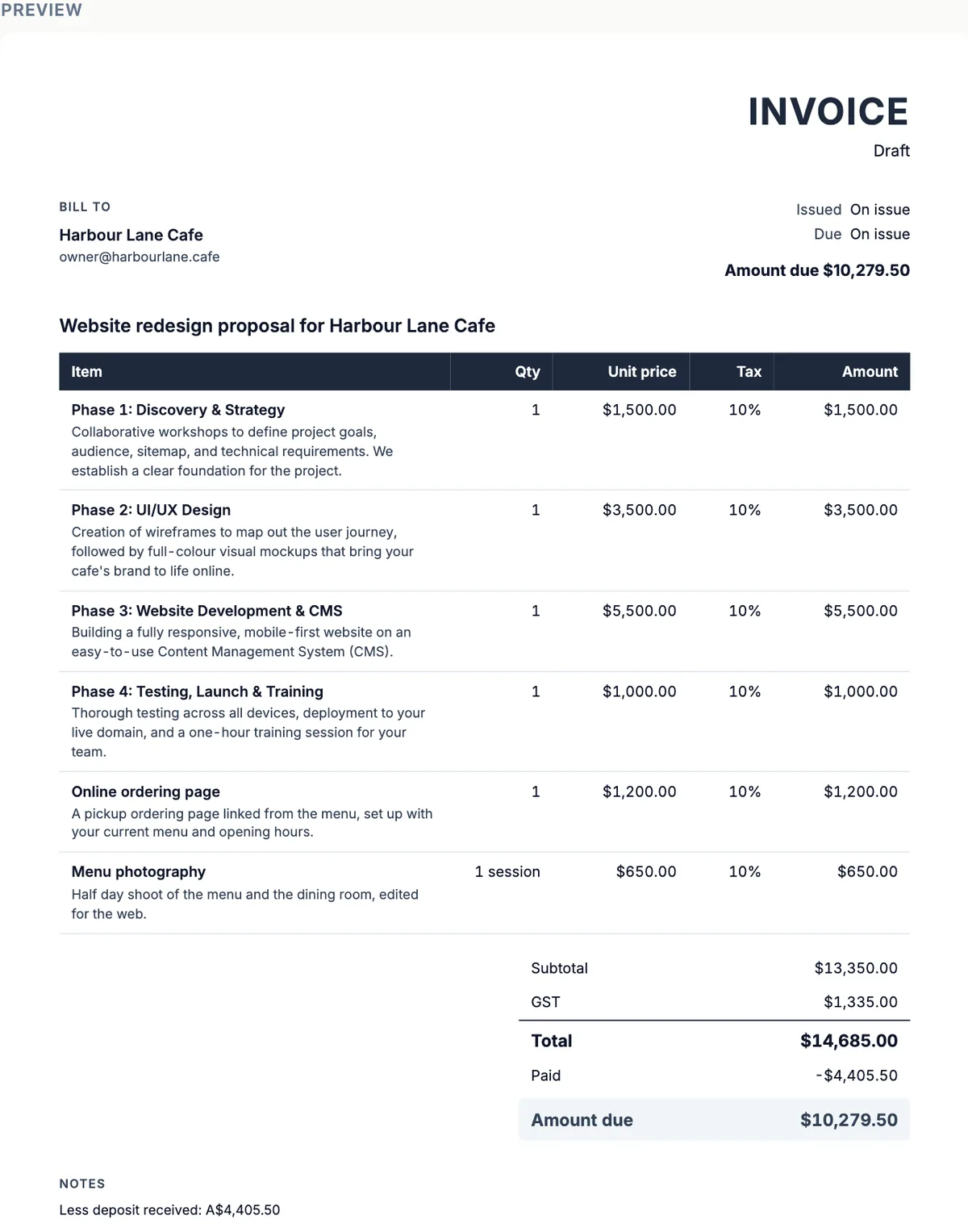
If the proposal takes a deposit, acceptance creates a deposit invoice with one line for the deposit amount, issued and due that day, and a balance invoice as a draft. The balance invoice lists every accepted item with its quantity, unit price and tax, records the deposit as already paid and carries the note Less deposit received, so its amount due is the balance. Issue it when your terms say the balance falls due.
Without a deposit: one invoice
With no deposit, acceptance creates a single issued invoice with all the accepted items, due in 14 days. It is emailed to the client straight away with its pay link. Either way, invoices created at acceptance do not count toward the invoice cap of your plan.
Built from the selection
Only the items the client selected go onto the invoices, at the quantities they chose. An optional extra left unticked never reaches an invoice; one the client added does. The tax label, the tax inclusive setting, the currency and the client come from the proposal, and the invoices link back to the proposal and the acceptance.
Create invoice by hand
The Pricing panel of any proposal also has Create invoice from this proposal, which converts its items into a new invoice you can edit. Use it for work agreed outside the online acceptance, such as a quote the client accepted by phone. An invoice made this way counts toward the plan cap like any other.
Check before issuing the balance
The balance invoice is a draft so you can adjust it before it goes out: add an agreed variation, change the due date or add notes. Once issued, its money fields are locked, the number is assigned and the pay link is created. If the scope changed during the job, adjust the items on the draft rather than issuing a separate correction later.
How it works, in three steps
Step 1
Client accepts
The client accepts the quote online, choosing any extras.
Step 2
Invoices appear
The deposit invoice is issued and emailed, or a single invoice is issued if there is no deposit; the balance waits as a draft.
Step 3
Issue the balance
When the work reaches the agreed point, open the draft balance invoice, check it and issue it.
The full walkthrough with screenshots is in the guide Send a proposal and get paid.
Limits worth knowing
- Invoices created at acceptance do not count toward the plan invoice cap.
- The deposit invoice is due on the day of acceptance; a single invoice is due in 14 days.
- The balance invoice starts as a draft and must be issued by you.
- There are no recurring invoices.
Questions people ask
Do I have to retype anything?
No. The accepted lines, quantities, tax rates, currency, tax label and client all come from the proposal. You only add what the proposal did not have, such as bank details, notes or a later variation. Bank transfer details typed once on an invoice are a good thing to keep in a master proposal so they carry through.
Why does the balance invoice show the full total?
It lists every accepted line at full price so the GST on the whole job sits on one invoice, then shows the deposit as paid. The amount due is the balance. In the example, the total is $14,685.00, the deposit paid is $4,405.50 and the amount due is $10,279.50.
Is the deposit invoice a tax invoice?
It is issued with a number and a due date, as one line for the deposit with no tax rate of its own, and the GST is carried on the balance invoice with the full items. Whether the deposit needs its own tax invoice depends on when GST is attributable for your business, so check the ATO rules with your accountant.
Can I change the balance invoice?
Yes, while it is a draft. Add or edit items for agreed changes, set the due date and payment terms, and add notes and bank details. Once issued, only the title, notes, bank details and due date can change. A void invoice can be deleted if you need to start again.
What if the client accepts but the work is cancelled?
Void the invoices that should not be paid; a void invoice gets no reminders and its pay link shows a void notice. A deposit already paid by card can be refunded in your Stripe account, which reduces the amount paid recorded on the invoice. An accepted proposal itself cannot be voided, so record the cancellation in your notes.
Make your own proposal
The button opens the generator with this use case already described. Change the wording to match yours, generate, then edit anything you like.
Create a proposal with OneCraftRelated pages
AI invoice generator that starts from the quote
An AI invoice generator saves the most time when the invoice does not have to be written at all. Here the AI writes the quote or proposal, and the invoices are created from its accepted items, so the numbers on the invoice are the numbers the client agreed to.
An invoice with a pay link
An invoice with a pay link gives the client one place to see what they owe and pay it, instead of copying bank details from a PDF. The link can go in the invoice email, a text message or a chat.
Automatic invoice reminders, set per invoice
Automatic invoice reminders email the client before and after the due date until the invoice is paid, so chasing money stops depending on you remembering. The schedule should be firm enough to get paid and polite enough to keep the client.
More finished work of this kind is on the proposal examples hub.
Sources
Written and checked by the OneCraft team. Last checked .