Proposals
An invoice with a pay link
An invoice with a pay link gives the client one place to see what they owe and pay it, instead of copying bank details from a PDF. The link can go in the invoice email, a text message or a chat.
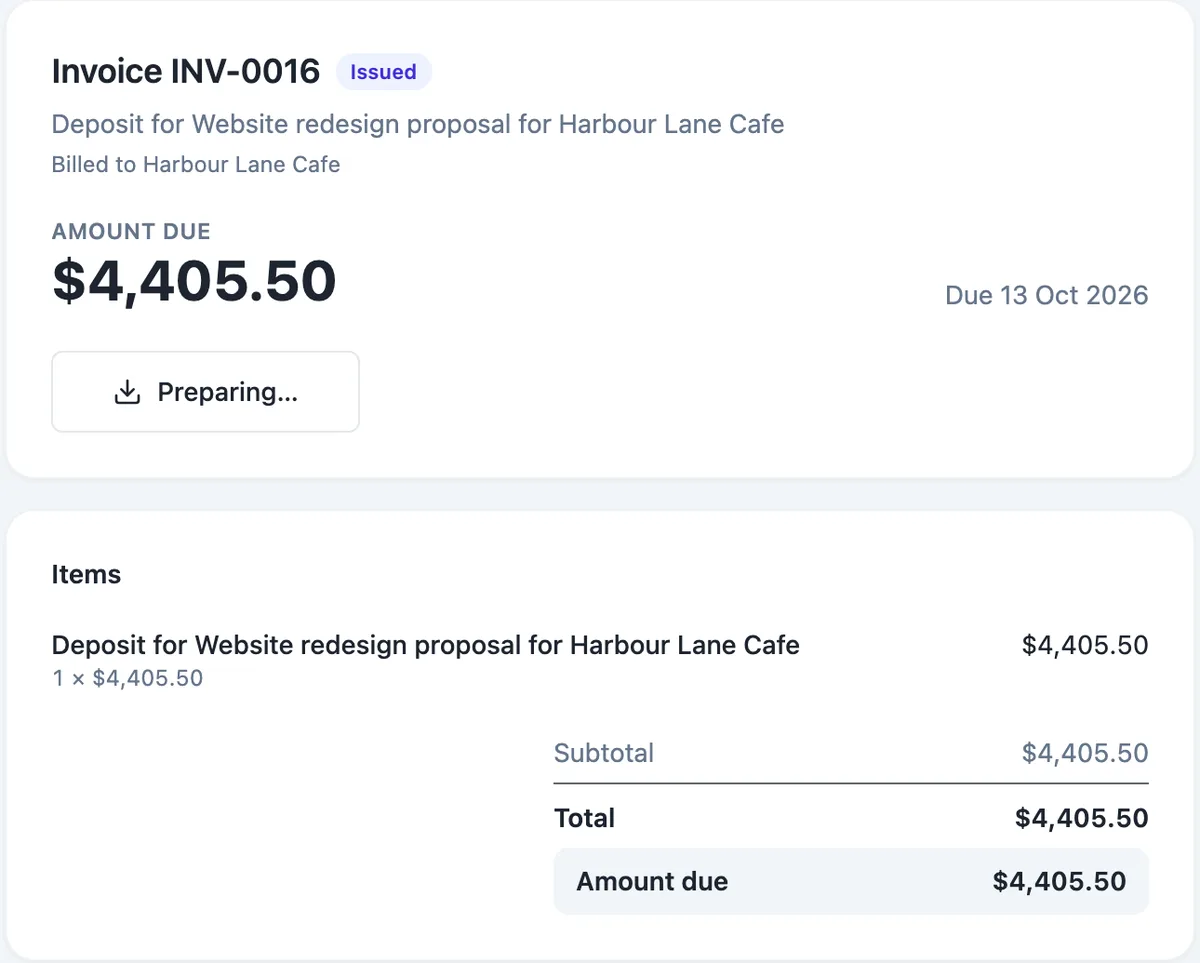
One link per invoice
Every issued invoice has a pay token, and its pay link opens a public page at /proposals/pay/ followed by the token. The client needs no account. In the invoice editor, Copy pay link puts it on your clipboard, and Send emails the invoice with the link. Invoices issued when a proposal is accepted are emailed with their links automatically.
What the page shows
The page shows your business block, the invoice number and status, the title, who it is billed to, the amount due in large type and the due date. Below are the items as a compact list with the subtotal, total and amount due, the PDF button, and your bank details exactly as you typed them in the invoice. When a payment has already been made, the amount due reflects it.
Pay now, with Stripe connected
When your Stripe account is connected and something is due, the page adds Pay now. It opens Stripe Checkout for the amount due through your connected account, and the payment lands with you. After paying, the client returns to a page that confirms the payment and offers the receipt; if they cancel or the payment fails, they can try again from the same link.
Without Stripe
On the free plan, or before connecting Stripe, the pay page still works as a clean summary: amount due, items, PDF and bank details. The client pays by transfer and you press Mark as paid in the invoice editor when the money arrives. Reminders still go out on the schedule you chose, each carrying the link.
When the link stops working
A link to a void invoice shows a void notice. A paid invoice shows its paid state, and Pay now disappears once nothing is due, so a client cannot pay twice by accident. A wrong or unknown token shows a page saying the link is unavailable.
How it works, in three steps
Step 1
Issue the invoice
Issue a draft invoice, or let acceptance issue it. Only issued invoices have a pay link.
Step 2
Send or copy the link
Press Send to email the invoice with its link, or Copy pay link to share it yourself.
Step 3
Record the payment
Card payments through Stripe mark the invoice paid automatically; mark bank transfers as paid by hand.
The full walkthrough with screenshots is in the guide Send a proposal and get paid.
Limits worth knowing
- Pay links exist for issued invoices, not drafts.
- Pay now needs a connected Stripe account, which needs a paid plan.
- Bank details print as plain text exactly as typed.
- No PayPal or direct debit; card payment is Stripe Checkout only.
Questions people ask
Can the client pay part of an invoice?
Pay now charges the amount due in full. Partial payments by card are not offered on the pay page. Where a deposit is involved, the proposal flow creates a separate deposit invoice and a balance invoice, each with its own pay link, which covers the usual reason for paying in parts.
Is the pay link safe to send by text message?
The link carries a long random token and shows only that invoice: the amount, the items, your business details and your bank details. It does not let anyone change the invoice or see your other invoices. Card details are entered on Stripe Checkout, never on the pay page, so the link itself holds nothing a card thief can use.
What does the client see after paying?
A return page checks the payment status every few seconds for up to a minute. Once Stripe confirms it, the client sees a thank you with a receipt link and the PDF. If they cancelled or the payment failed, they see Payment not completed with a Try again button back to the pay page.
Can I take payment on a draft invoice?
No. A draft has no number and no pay link. Issue it first; the number is assigned in the INV-0001 style, the pay token is created, and Copy pay link becomes available. Issuing also fixes the money fields, so the client pays exactly what the issued invoice says.
Do reminders include the pay link?
Yes. Reminders are sent on the preset you choose, from gentle to firm, and each one points the client back to the pay page. Once the invoice is paid, by card or marked paid by hand, reminders stop because nothing is due.
Make your own proposal
The button opens the generator with this use case already described. Change the wording to match yours, generate, then edit anything you like.
Create a proposal with OneCraftRelated pages
Stripe invoice payments into your own account
Taking invoice payments through Stripe means the client pays by card on a Stripe hosted checkout page and the money lands in your Stripe account. The invoice should mark itself paid without you checking a bank feed.
AI invoice generator that starts from the quote
An AI invoice generator saves the most time when the invoice does not have to be written at all. Here the AI writes the quote or proposal, and the invoices are created from its accepted items, so the numbers on the invoice are the numbers the client agreed to.
Turn an accepted quote into an invoice without retyping
Turning an accepted quote into an invoice should not mean copying lines from one document to another. Here acceptance creates the invoices from the items the client actually chose, at the quantities they chose, so the invoice and the agreed quote match to the cent.
More finished work of this kind is on the proposal examples hub.
Written and checked by the OneCraft team. Last checked .