Classic form
Change request form with an impact table
A change request form records a proposed change to a project and what it does to scope, time and cost, so someone can decide before the work starts. This one puts the impact in a four row table with days and cost per area and leaves the decision and notes at the end for the project board.
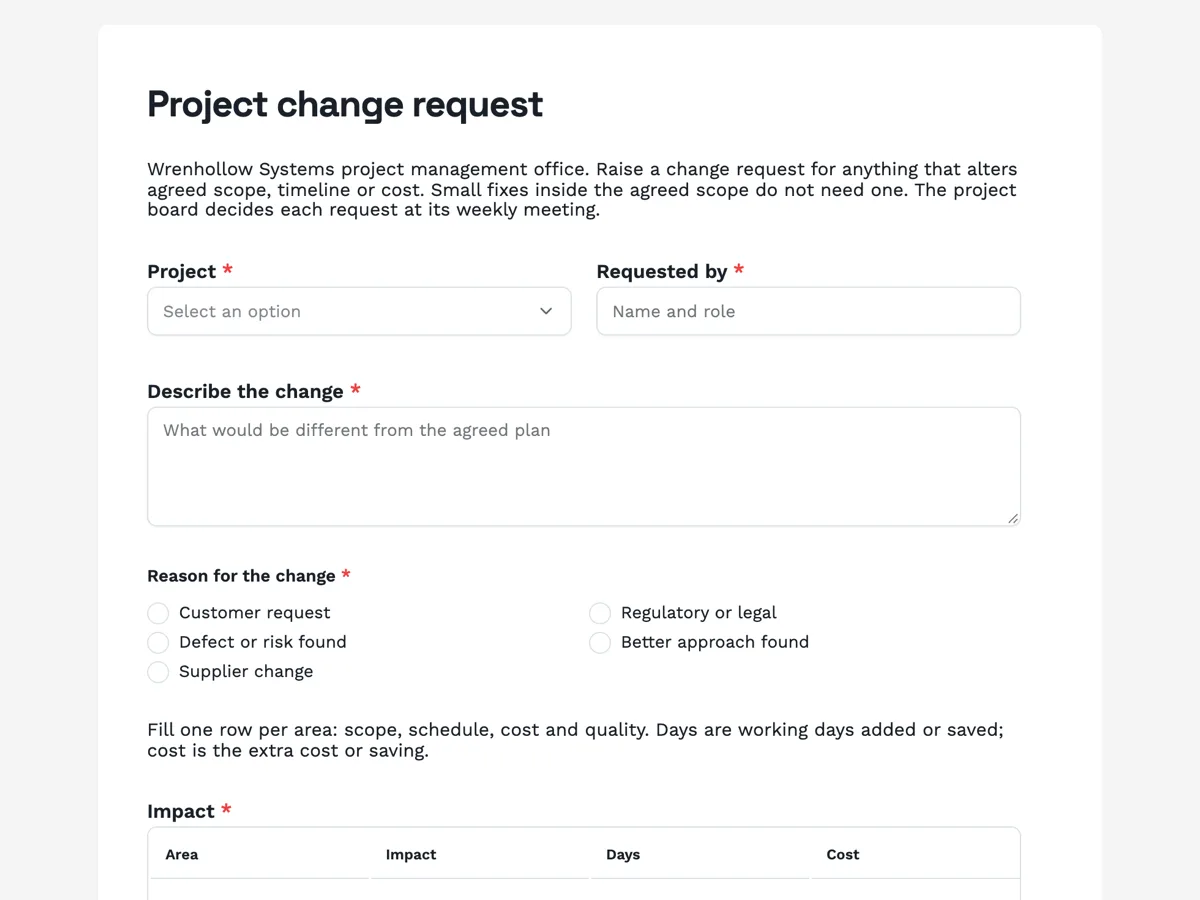
The form itself
A static copy of the finished form, exactly as it renders. Nothing here can be filled in or submitted, so read it as a reference and build your own from the button above.
Every field, and what it collects
The complete field list, in the order respondents meet it.
- ProjectDropdownRequired
- Options: Customer portal rebuild · Billing system migration · Warehouse scanner rollout · Data platform upgrade
- Requested byShort textRequired
- Describe the changeLong textRequired
- Reason for the changeSingle choiceRequired
- Options: Customer request · Regulatory or legal · Defect or risk found · Better approach found · Supplier change
- ImpactTableRequired
- Columns: Area · Impact · Days · Cost
- PrioritySingle choiceRequired
- Options: High, blocks delivery · Medium, needed this phase · Low, can wait
- Decision needed byDateRequired
- Supporting documentsFile upload
- Optional. Estimates, emails or a revised plan. PDF or image, up to three files.
- DecisionSingle choice
- Options: Approved · Approved with changes · Deferred · Rejected
- Board notesLong text
For the project board only
What each field on this form collects
Project, a dropdown of four, sits beside requested by. Describe the change is a long text. Reason is a two column radio of five, from customer request to supplier change. A paragraph explains the impact rows, then the impact table has four rows of area, impact, days and cost. Priority sits beside the date a decision is needed. Supporting documents is an optional upload. Under a heading for the project board, the decision radio and board notes are optional, left blank by the requester. Seven of the ten fields are required.
Why the decision field is on the form
A change request is only finished when someone decides it, and the decision belongs with the request. Leaving the decision radio optional lets the requester submit without filling it, while showing everyone what the board will record: approved, approved with changes, deferred or rejected. A submitted response cannot be edited, so the board records its decision by downloading the response PDF and marking it, or by filling a copy of the form at the meeting. Either way, the four outcomes are the same words every time.
Impact in four areas
Project management bodies such as the Association for Project Management describe change control as assessing each change for its effect on scope, schedule, cost and quality, then deciding and recording it. PRINCE2, published by AXELOS, uses the same idea with its issue and change control procedure. The table asks for one row per area, so a change that adds two days and no cost looks different from one that adds no days and a large cost. The form does not total the costs; the project manager does.
How to adapt this form
A construction company replaces the project list with job numbers and adds a variation price. A software team adds the ticket number and the release it affects. A small agency drops the board section and uses the e-signing add-on so the client signs the change.
What makes this form work
Four areas, days and cost
The impact table has a row each for scope, schedule, cost and quality, with days and cost columns. The board compares changes like for like.
Four fixed decision words
Approved, approved with changes, deferred and rejected are the only outcomes. Every request ends in one of the same four.
A date for the decision
Decision needed by sits beside priority. The board sees which requests block work this week and which can wait.
Questions people ask
When is a change request needed?
Whenever a change alters the agreed scope, timeline or cost, as the intro says. A bug fix inside scope does not need one; adding a feature does. The test is whether the person who approved the plan would expect to be asked. If yes, raise a request rather than absorbing the change quietly.
What does the impact table cover?
One row each for scope, schedule, cost and quality. Impact describes the effect in words, days gives working days added or saved, and cost gives the extra cost or saving. Writing a row for each area, even when the answer is none, shows the requester thought about all four.
Why is the decision field optional?
Because the requester does not make the decision. If it were required, requesters would have to guess. Optional means the request can be submitted with the decision blank, and the board section heading makes clear who fills it. The board records its decision in the meeting notes and on the response PDF.
What does approved with changes mean?
The board agrees to the change on conditions, such as a smaller scope, a later date or a cap on cost. The conditions go in the board notes. It is the most common outcome for large requests, because the board can keep the benefit while limiting the impact.
Should work stop while a change request is decided?
No. The thank-you screen says to keep working to the current plan until a decision is recorded. Starting the change early commits time and money before anyone has agreed to it. A high priority request that blocks delivery can be decided outside the weekly meeting.
Who can raise a project change request?
Anyone working on or paying for the project: the customer, a team member, a supplier contact or the project manager. Requested by records the name and role, and the reason radio shows where the change came from. The project manager usually fills in the impact table with the requester, because estimating days and cost needs the plan in front of them.
Build your own in about a minute
The button below opens the generator with this use case already described. Change the wording to match your own, generate, then edit anything you like.
Make one like thisOther form examples
Purchase requisition form with line items and an approver
A purchase requisition form asks permission to buy before anyone orders: what is needed, what it costs, which budget pays and who signs off. This one lists the items in a four line table with unit cost and supplier, takes the total and budget code, and lets the requester pick the approver by spend limit.
Staff requisition form for a new role or a backfill
A staff requisition form asks approval to hire before a job ad goes out: which role, why it is needed, what it will cost and who signs off. This one separates a new position from a backfill, asks who is leaving when it is a backfill, and requires the position description as a PDF.
Software request form with a data and security check
A software request form lets IT check a new tool before anyone signs up: what it costs, how many people need it, what data it will hold and whether it works with company sign in. This one adds a required question about alternatives, so the request shows the team looked at what the company already pays for.
Want the steps in the builder? Read Form builder components, then View, export and manage your responses. For everything this generator can do, see the form maker.
Sources
Written and checked by the OneCraft team. Last checked .