Classic form
Staff requisition form for a new role or a backfill
A staff requisition form asks approval to hire before a job ad goes out: which role, why it is needed, what it will cost and who signs off. This one separates a new position from a backfill, asks who is leaving when it is a backfill, and requires the position description as a PDF.
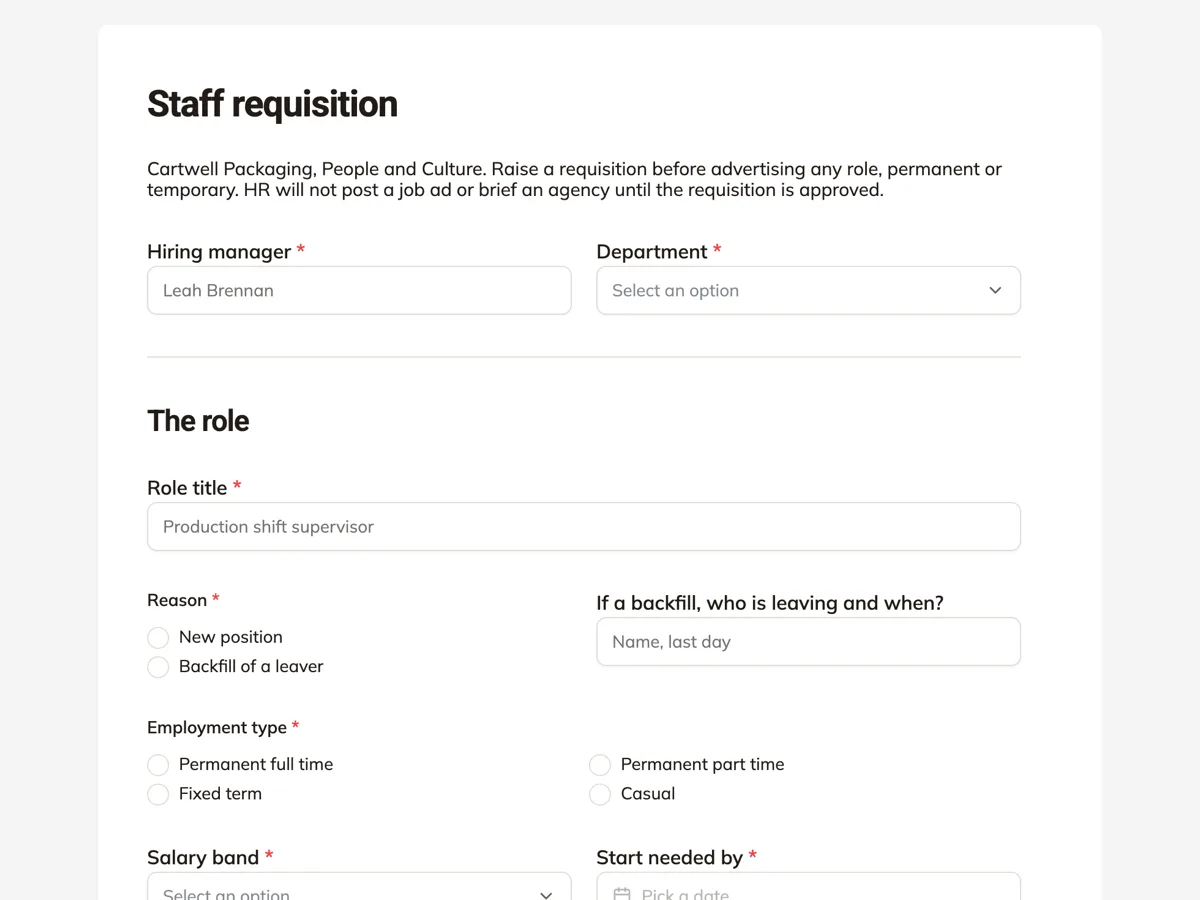
The form itself
A static copy of the finished form, exactly as it renders. Nothing here can be filled in or submitted, so read it as a reference and build your own from the button above.
Every field, and what it collects
The complete field list, in the order respondents meet it.
- Hiring managerShort textRequired
- DepartmentDropdownRequired
- Options: Production · Warehouse and dispatch · Maintenance · Quality · Sales · Finance · People and Culture
- Role titleShort textRequired
- ReasonSingle choiceRequired
- Options: New position · Backfill of a leaver
- If a backfill, who is leaving and when?Short text
- Employment typeSingle choiceRequired
- Options: Permanent full time · Permanent part time · Fixed term · Casual
- Salary bandDropdownRequired
- Options: Band 1, operator · Band 2, senior operator · Band 3, supervisor · Band 4, specialist · Band 5, manager
- Start needed byDateRequired
- Why is this role needed?Long textRequired
- Position descriptionFile uploadRequired
- The current position description, PDF only, one file up to 10 MB.
- ApproverDropdownRequired
- Options: Operations director · Commercial director · Chief financial officer
The role
What each field on this form collects
Hiring manager and department open the form. Role title follows. Reason is a radio of new position or backfill, beside an optional short text for who is leaving and when. Employment type is a two column radio of four. Salary band, from operator to manager, sits beside the start needed date. Why is this role needed is a required long text with a placeholder that asks about the budget. The position description is a required PDF upload, and the approver is a dropdown of three directors. Ten of the eleven fields are required.
New position or backfill
A backfill replaces someone already in the budget, so it is usually approved quickly. A new position adds cost, so it needs a stronger case. Asking the reason first tells the approver which kind of decision this is. The follow up field asks who is leaving and when, which lets HR plan the handover and check the leaver's last day. It is optional because new positions leave it blank. The justification placeholder then asks whether the budget already includes the role, the question every approver asks first.
Why the position description is required
HR writes the advert, sets the salary band and briefs the interview panel from the position description. A requisition without one stalls while HR chases it. Making the upload required, PDF only, means the current description arrives with the request. Workforce planning guidance from the CIPD treats each vacancy as a chance to ask whether the role should change, and the description is where that change gets written down.
How to adapt this form
A hospital adds the cost centre and the registration the role needs. A retailer hiring seasonal staff adds a headcount number and an end date. A small business with one approver removes the approver dropdown and sends the email alert straight to the owner.
What makes this form work
Backfill asks who is leaving
The optional field beside the reason radio names the leaver and their last day. HR can plan an overlap before the knowledge walks out the door.
The budget question is in the placeholder
The justification placeholder asks whether the budget includes the role. Managers answer the approver's first question before it is asked.
No requisition without a description
The required PDF upload means HR has the current position description from the start and can write the advert straight away.
Questions people ask
What is the difference between a staff requisition and a job ad?
A requisition is the internal approval to hire, raised by the manager. The job ad comes after, written by HR from the approved requisition and the position description. The intro says HR will not post an ad or brief an agency until the requisition is approved, which keeps hiring inside the budget.
Should a backfill need approval at all?
Many companies say yes, because a vacancy is the cheapest moment to change a role. The approver may decide the work can be shared, the role should be part time, or the band should change. Backfills are usually approved faster, and the reason radio lets the approver see that straight away.
Why ask for a salary band rather than a salary?
Bands keep pay consistent across the company, and the exact salary is set at offer stage. The manager picks the band that matches the role, and HR checks it against the position description. A request for a higher band than the description supports is a conversation, not a rejection.
Can a manager request several hires on one form?
This form covers one role. Three identical operator roles could share a form if the manager says so in the justification, but different roles need separate requisitions because each has its own description and band. A company that hires in volume can add a number of positions field.
Who sees the requisition after it is submitted?
The form owner, usually HR, sees every response and can export them. The owner can turn on an email alert to one address, such as the HR inbox, so each requisition arrives with all its answers. HR then sends it to the approver chosen in the dropdown.
How long should a staff requisition take to approve?
A backfill inside budget can be approved in a day or two; a new position often waits for a monthly review. The start needed by date tells HR how urgent it is, and a short lead time is the most common reason roles are filled late. Raising the requisition as soon as a resignation lands buys the most time.
Build your own in about a minute
The button below opens the generator with this use case already described. Change the wording to match your own, generate, then edit anything you like.
Make one like thisOther form examples
Change request form with an impact table
A change request form records a proposed change to a project and what it does to scope, time and cost, so someone can decide before the work starts. This one puts the impact in a four row table with days and cost per area and leaves the decision and notes at the end for the project board.
Software request form with a data and security check
A software request form lets IT check a new tool before anyone signs up: what it costs, how many people need it, what data it will hold and whether it works with company sign in. This one adds a required question about alternatives, so the request shows the team looked at what the company already pays for.
Travel request form with itinerary and estimate
A travel request form gets a work trip approved before anything is booked: why the trip is needed, the route, what it will cost and who signs off. This one sets the route out as a four leg itinerary table and puts the estimate, cash advance and travel policy tick on the same page as the manager who approves it.
Want the steps in the builder? Read Form builder components, then View, export and manage your responses. For everything this generator can do, see the form maker.
Written and checked by the OneCraft team. Last checked .