Classic form
Software request form with a data and security check
A software request form lets IT check a new tool before anyone signs up: what it costs, how many people need it, what data it will hold and whether it works with company sign in. This one adds a required question about alternatives, so the request shows the team looked at what the company already pays for.
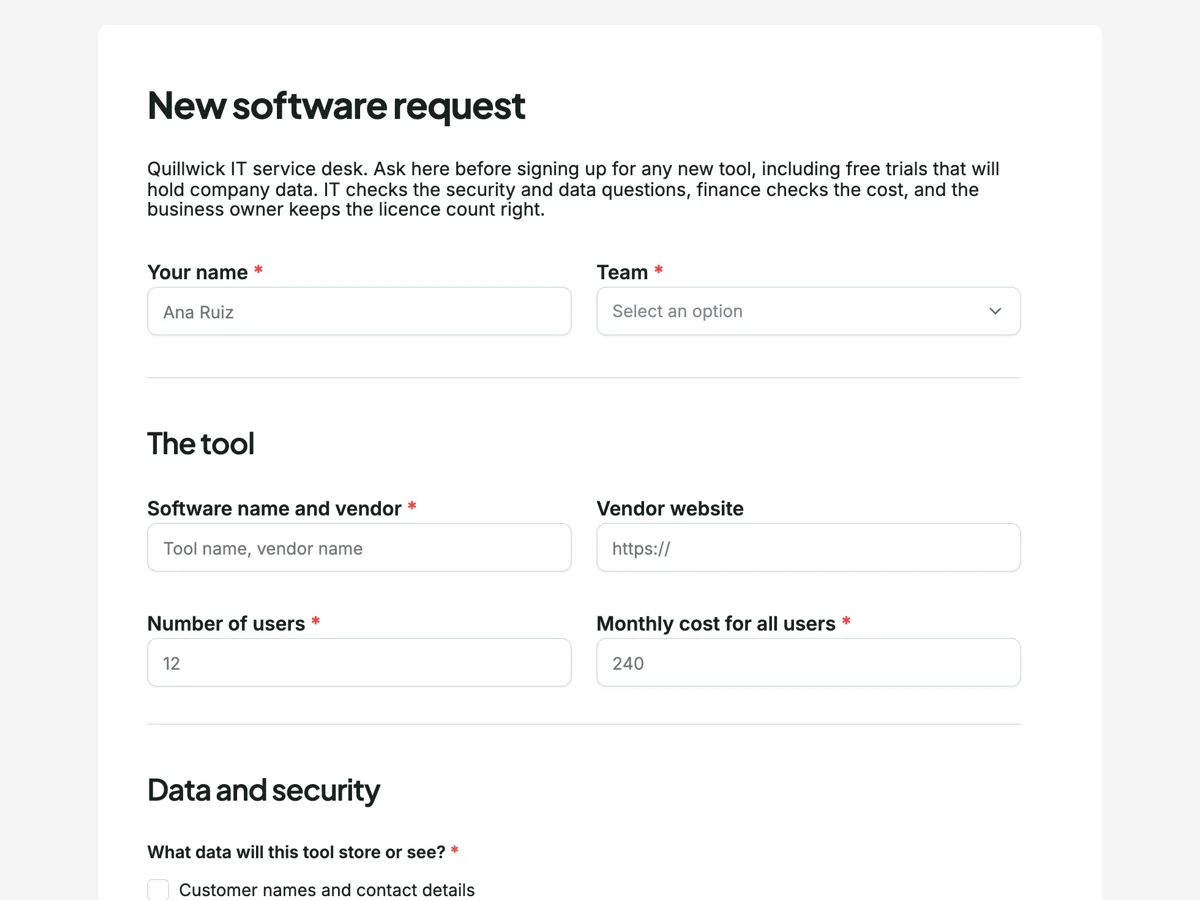
The form itself
A static copy of the finished form, exactly as it renders. Nothing here can be filled in or submitted, so read it as a reference and build your own from the button above.
Every field, and what it collects
The complete field list, in the order respondents meet it.
- Your nameShort textRequired
- TeamDropdownRequired
- Options: Sales · Marketing · Finance · People · Operations · Product · Engineering
- Software name and vendorShort textRequired
- Vendor websiteShort text
- Number of usersNumberRequired
- Monthly cost for all usersNumberRequired
- What data will this tool store or see?Multiple choiceRequired
- Options: Customer names and contact details · Payment or bank details · Employee records · Source code or internal documents · None of these, only public information
- Does it support single sign on with company accounts?Single choiceRequired
- Options: Yes, included in our plan · Yes, but only on a higher plan · No · Not sure
- What else did you consider, including tools the company already has?Long textRequired
- Business owner who will manage the licencesDropdownRequired
- Options: Head of sales · Marketing lead · Finance manager · People lead · Operations manager · Head of product · Engineering manager
The tool
Data and security
What each field on this form collects
Name and team share the first row. Software name and vendor sits beside an optional vendor website. Number of users and the monthly cost for all users share a row. The data checkbox lists four kinds of sensitive data and ends with none of these, only public information. Single sign on is a radio of four, including yes but only on a higher plan. Alternatives considered is a required long text, and the business owner is a dropdown of seven roles. Nine of the ten fields are required.
Why the data question decides the review
A tool that only sees public information is a cost question. A tool that holds payment details or employee records is a security and privacy question, and IT needs to know before anyone uploads a spreadsheet. The checkbox lets the requester say exactly which, and the last option means a low risk tool is answered honestly in one tick. Single sign on comes next because a tool on company accounts can be switched off for a leaver in one place. The yes but only on a higher plan answer flags a hidden cost early.
Routing it to the IT queue
The owner can connect the webhook add-on to the IT ticketing system. It sends one POST per submission with every answer keyed by its label, times out after 10 seconds and does not retry, so the receiving system should log what arrives. Frameworks such as the NIST Cybersecurity Framework and the CIS Critical Security Controls both start with knowing which software an organisation runs, which is what a request form like this records.
How to adapt this form
A school adds a question about student data and the age of the youngest user. A healthcare business adds health information to the data list and a question about where data is hosted. A startup with no IT team routes the webhook to a chat channel and drops the business owner field.
What makes this form work
A none of these answer for low risk tools
The data checkbox ends with only public information. A required question is answered honestly in one tick when the tool holds nothing sensitive.
Hidden costs show up early
The single sign on radio includes yes but only on a higher plan. IT and finance see the real price before approving the cheap one.
An owner for every licence
The business owner dropdown names who manages the seats. Renewals and leavers have a person attached from day one.
Questions people ask
Does a free trial need a software request?
The intro says yes when the trial will hold company data. Free trials are how most unapproved tools arrive: someone uploads a customer list to test a feature, and the data stays there after the trial ends. A request takes five minutes and lets IT say yes or suggest a tool the company already has.
Why ask for the monthly cost for all users?
Vendors price per user, per month or per year, and a requester comparing plans often quotes the cheapest. Asking for one monthly figure for everyone gives finance a number it can compare across requests. The form does not multiply users by price; the requester types the total.
What does single sign on support mean for IT?
It means staff log in with their company account rather than a separate password. When someone leaves, turning off their company account removes access to every connected tool at once. A tool without it needs its own offboarding step, which is easy to forget, so IT asks before approving.
Why must the requester name alternatives?
Most companies already pay for tools that overlap. The question asks what else was considered, including existing tools, and why each did not fit. It is required because a request that skips it often turns out to duplicate something the company already licenses, which costs money and spreads data across more vendors.
Who is the business owner of a software licence?
The person who decides who gets a licence, checks the user count at renewal and removes leavers. IT runs the security side, but the business owner knows who still needs the tool. The dropdown lists roles rather than names so the form survives staff changes.
What happens when a software request is declined?
IT explains why, usually a data risk, missing single sign on or an existing tool that already does the job, and often suggests the alternative. The requester can raise a new request if the facts change, such as the vendor adding single sign on. A declined response stays in the form, which shows the next requester the same tool was already reviewed.
Build your own in about a minute
The button below opens the generator with this use case already described. Change the wording to match your own, generate, then edit anything you like.
Make one like thisOther form examples
Change request form with an impact table
A change request form records a proposed change to a project and what it does to scope, time and cost, so someone can decide before the work starts. This one puts the impact in a four row table with days and cost per area and leaves the decision and notes at the end for the project board.
Staff requisition form for a new role or a backfill
A staff requisition form asks approval to hire before a job ad goes out: which role, why it is needed, what it will cost and who signs off. This one separates a new position from a backfill, asks who is leaving when it is a backfill, and requires the position description as a PDF.
Purchase requisition form with line items and an approver
A purchase requisition form asks permission to buy before anyone orders: what is needed, what it costs, which budget pays and who signs off. This one lists the items in a four line table with unit cost and supplier, takes the total and budget code, and lets the requester pick the approver by spend limit.
Want the steps in the builder? Read Automate your form with add-ons, then Form builder components. For everything this generator can do, see the form maker.
Sources
Written and checked by the OneCraft team. Last checked .