Classic form
Purchase requisition form with line items and an approver
A purchase requisition form asks permission to buy before anyone orders: what is needed, what it costs, which budget pays and who signs off. This one lists the items in a four line table with unit cost and supplier, takes the total and budget code, and lets the requester pick the approver by spend limit.
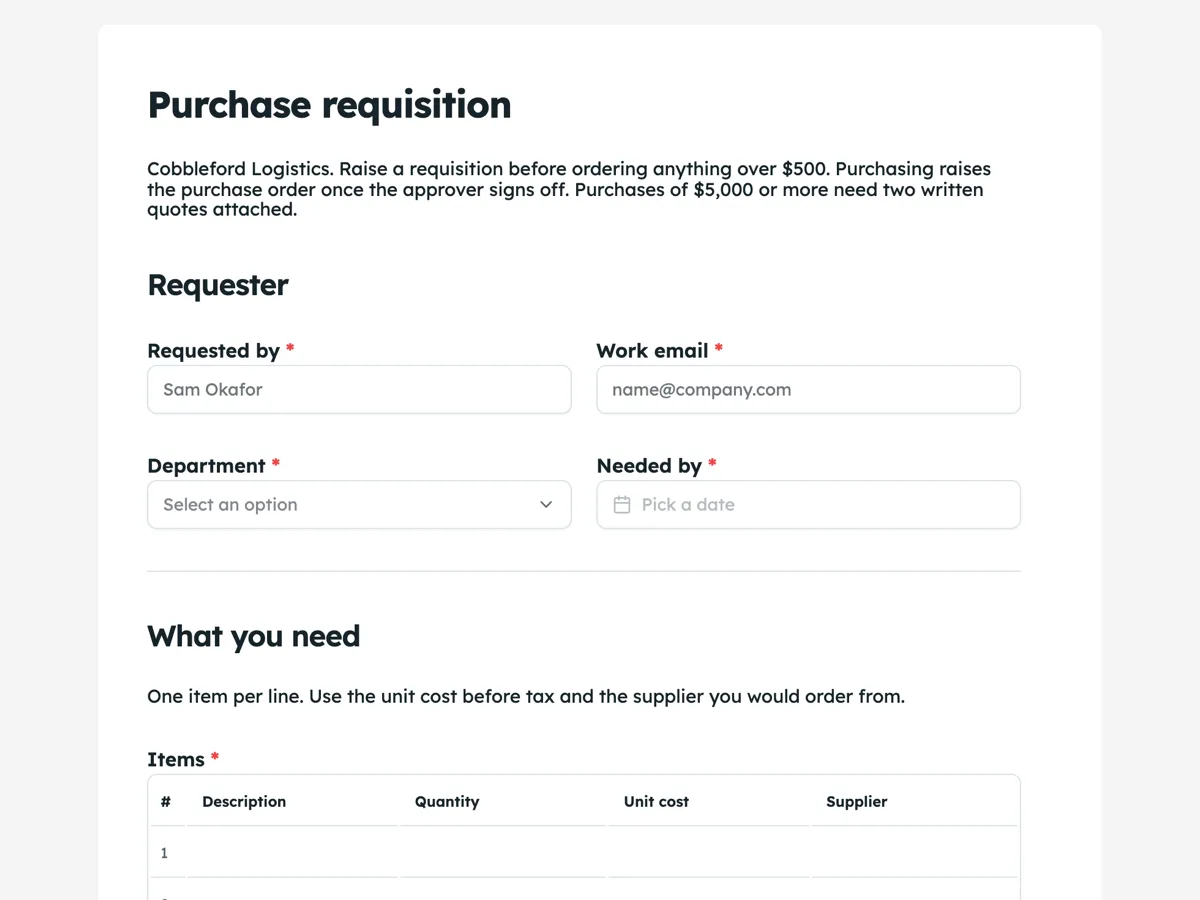
The form itself
A static copy of the finished form, exactly as it renders. Nothing here can be filled in or submitted, so read it as a reference and build your own from the button above.
Every field, and what it collects
The complete field list, in the order respondents meet it.
- Requested byShort textRequired
- Work emailShort textRequired
- DepartmentDropdownRequired
- Options: Warehouse · Transport · Workshop · Customer service · Finance · IT
- Needed byDateRequired
- ItemsTableRequired
- Columns: Description · Quantity · Unit cost · Supplier
- Total before taxNumberRequired
- Budget codeShort textRequired
- Why is this needed now?Long textRequired
- QuotesFile upload
- Two written quotes for $5,000 or more. PDF or image, up to three files, 10 MB each.
- ApproverDropdownRequired
- Options: Operations manager, up to $5,000 · Finance manager, up to $25,000 · General manager, over $25,000
Requester
What you need
What each field on this form collects
Requested by and work email open the form, then department sits beside a needed by date. A paragraph asks for one item per line, and the items table has four numbered rows of description, quantity, unit cost and supplier. Total before tax is a number beside the budget code. Why is this needed now is a long text. Quotes is an optional upload of up to three PDFs or images, with its rule shown under the label. The approver dropdown names three roles with their spend limits. Nine of the ten fields are required.
Why the approver is chosen by limit
Most purchasing delays come from a request sitting with the wrong person. Writing the spend limit into each approver option, up to $5,000, up to $25,000 and over, lets the requester route it correctly from the total they just typed. The form does not add up the table, so the total is typed by hand; purchasing checks it against the lines before raising the purchase order. The quotes upload is optional because most requests are small, but the intro and the upload note both state the two quote rule for $5,000 or more.
Routing the request
The owner can turn on the email alert add-on, which sends each submission to one address, such as the purchasing inbox, with every answer in the message. Purchasing then forwards it to the approver named in the dropdown. Because the alert goes to one address only, a company that wants approvers emailed directly connects the webhook add-on to its own workflow tool instead.
How to adapt this form
A school replaces the departments with faculties and adds a grant code. A construction firm adds a project number and a delivery site. A company that buys mostly from approved suppliers turns the supplier column into a note and adds a preferred supplier dropdown above the table.
What makes this form work
Spend limits on every approver
Each approver option names its limit. A $2,400 request goes to the operations manager the first time, not after a week in the wrong inbox.
Supplier on every line
The items table asks for the supplier per line, so purchasing can split a mixed request into one purchase order per supplier.
A reason tied to timing
Why is this needed now asks what happens if it waits. Approvers see urgency and cost together.
Questions people ask
What is the difference between a purchase requisition and a purchase order?
A requisition is an internal request to buy, raised by the person who needs something. A purchase order is the document sent to the supplier once the request is approved. This form is the requisition, and the thank-you screen tells the requester not to order directly, because purchasing sends the purchase order.
Does the form calculate the total from the line items?
No. The requester types the total before tax into its own field. That keeps the form simple, and purchasing checks the lines against the total when it raises the order. A mismatch is a quick sign that a line was missed or a quantity was mistyped.
Why four lines in the items table?
A table shows a fixed number of rows and cannot grow, and four covers most internal purchases, such as a set of tools or a few spare parts. A larger order can attach a quote with every line and use the table for the main items. Raising a separate requisition per supplier also keeps orders clean.
When should quotes be attached?
For any purchase of $5,000 or more, two written quotes go in the upload, as the intro says. Smaller purchases can skip it. The upload takes PDFs or images, up to three files of 10 MB each, which allows two quotes and a product sheet.
What does the budget code do?
It tells finance which budget pays, so the spend is charged to the right department and project. The placeholder shows the format the company uses. A wrong code is the most common reason finance sends a requisition back, so it is required and sits right beside the total.
Can the approver approve inside the form?
Not inside this form, which is filled in by the requester. Approval happens when the approver replies to purchasing or signs the purchase order. A company that wants a recorded decision can use the e-signing add-on so the named approver signs the submitted request.
Build your own in about a minute
The button below opens the generator with this use case already described. Change the wording to match your own, generate, then edit anything you like.
Make one like thisOther form examples
Budget request form with a cost breakdown and outcomes
A budget request form makes the case for money: how much, what it buys, what it achieves and why it beats the alternatives. This one does that for a council program bid, with a five line cost breakdown, start and end dates for the funding, measurable outcomes and a required answer on what doing nothing would mean.
Software request form with a data and security check
A software request form lets IT check a new tool before anyone signs up: what it costs, how many people need it, what data it will hold and whether it works with company sign in. This one adds a required question about alternatives, so the request shows the team looked at what the company already pays for.
Change request form with an impact table
A change request form records a proposed change to a project and what it does to scope, time and cost, so someone can decide before the work starts. This one puts the impact in a four row table with days and cost per area and leaves the decision and notes at the end for the project board.
Want the steps in the builder? Read Automate your form with add-ons, then View, export and manage your responses. For everything this generator can do, see the form maker.
Sources
Written and checked by the OneCraft team. Last checked .