Classic form
Travel request form with itinerary and estimate
A travel request form gets a work trip approved before anything is booked: why the trip is needed, the route, what it will cost and who signs off. This one sets the route out as a four leg itinerary table and puts the estimate, cash advance and travel policy tick on the same page as the manager who approves it.
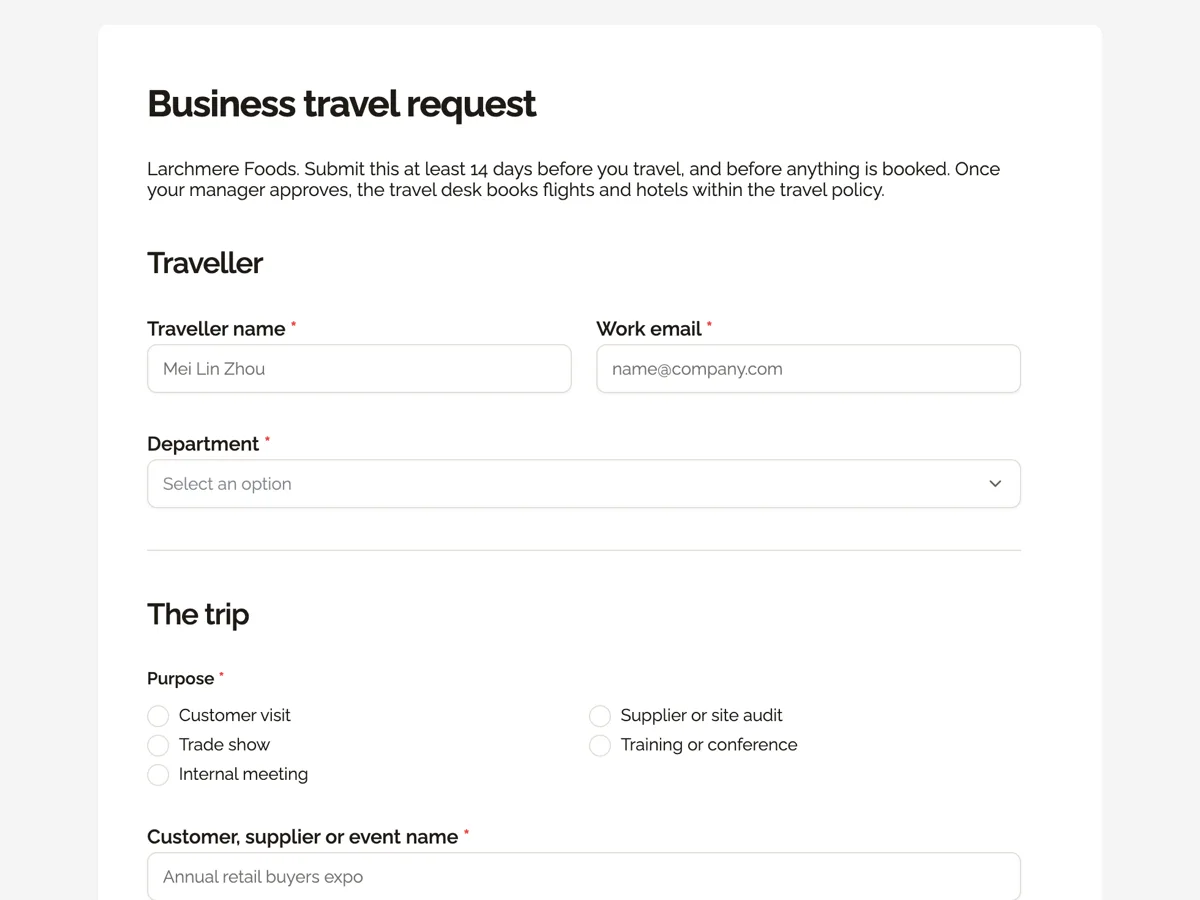
The form itself
A static copy of the finished form, exactly as it renders. Nothing here can be filled in or submitted, so read it as a reference and build your own from the button above.
Every field, and what it collects
The complete field list, in the order respondents meet it.
- Traveller nameShort textRequired
- Work emailShort textRequired
- DepartmentDropdownRequired
- Options: Sales · Supply chain · Quality · Production · Marketing · Finance
- PurposeSingle choiceRequired
- Options: Customer visit · Supplier or site audit · Trade show · Training or conference · Internal meeting
- Customer, supplier or event nameShort textRequired
- ItineraryTableRequired
- Columns: Date · From · To · Mode
- Accommodation nightsNumberRequired
- Estimated total costNumberRequired
- Cash advanceSingle choiceRequired
- Options: No advance, I will use the company card · Advance for meals and incidentals, settled within 7 days of return
- Travel policyMultiple choiceRequired
- Options: I have read the travel policy: economy class, hotels within the city rate, receipts for every claim
- Approving managerDropdownRequired
- Options: Head of sales · Head of supply chain · Quality manager · Production manager · Marketing director · Finance director
- Anything the travel desk should knowLong text
Traveller
The trip
What each field on this form collects
Traveller name and work email sit side by side, with department below. Purpose is a two column radio of five reasons, and the next field names the customer, supplier or event. A paragraph explains how to fill the itinerary, a four row table of date, from, to and mode. Accommodation nights and the estimated total share a row. Cash advance is a radio of two, the travel policy is a single tick that states the three main rules, and the approving manager is a dropdown of six. An optional note for the travel desk closes the form. Eleven of the twelve fields are required.
Why the itinerary is a table
A free text box gets answers like Sydney Tuesday back Thursday, which the travel desk then has to turn into legs anyway. A table with date, from, to and mode gets each leg as a line it can book, and it shows the manager at a glance whether the trip is a day return or three cities in four days. Four rows cover an outbound flight, a hire car, a second city and the return. Mode matters because the policy treats a hire car and a flight differently.
Estimates and per diems
The estimated total is typed by the traveller; the form does not add anything up. Many companies base meal and lodging allowances on published per diem rates, such as those set by the US General Services Administration, and tax authorities such as the IRS set out which travel expenses are deductible and what records are needed. The policy tick summarises the record keeping rule, receipts for every claim, so the traveller agrees to it before the trip, not when the expense claim is rejected.
How to adapt this form
A university adds a grant code and a conference paper title. A company with international travel adds passport expiry and a travel risk check. A small business with no travel desk drops the note field and lets the traveller book once approved.
What makes this form work
Four legs, four columns
Date, from, to and mode turn the trip into bookable lines. The travel desk and the manager read the same itinerary.
Name the customer, not just the reason
Purpose says customer visit; the next field says which customer. Finance can match every trip to an account later.
Policy rules in the tick itself
Economy class, city rate hotels and receipts are written into the label. The traveller cannot tick without reading them.
Questions people ask
How far ahead should a travel request form be submitted?
The intro says 14 days, which gives the manager time to approve and the travel desk time to find fares inside the policy. Late requests usually cost more, and the gap between a booking 3 days out and 14 days out is often bigger than the whole meal allowance. Urgent trips can still be sent, with the reason in the note.
Why ask for the customer or event name?
The purpose radio says what kind of trip it is, and the name says which one. A manager approving a customer visit wants to know which customer, and finance later matches the cost to that account. It is also the line most often searched when someone asks what the travel budget was spent on.
What is the cash advance for?
Some staff do not have a company card or would rather not use their own money for meals away. The advance covers meals and incidentals and must be settled within 7 days of returning, with receipts and any unspent cash. Most travellers choose the company card, which is the first option.
Does the form book the travel?
No. It collects the request for approval. The owner can turn on an email alert so the travel desk receives each request with all the answers, then books once the manager approves. The thank-you screen tells the traveller not to book anything themselves, which avoids double bookings.
Why is the travel policy a single tick?
Because the traveller agrees to the whole policy, and the tick names its three main rules: economy class, hotels within the city rate and receipts for every claim. A longer policy can be linked in the intro. One required tick makes sure every request carries that agreement.
Can a traveller request two trips on one form?
Better not. Each response is one trip with one purpose, one estimate and one approval, which keeps the record clean when the expense claim arrives. Two trips in one table would mix two budgets and two reasons. A traveller with back to back trips sends two forms, one per trip.
Build your own in about a minute
The button below opens the generator with this use case already described. Change the wording to match your own, generate, then edit anything you like.
Make one like thisOther form examples
Budget request form with a cost breakdown and outcomes
A budget request form makes the case for money: how much, what it buys, what it achieves and why it beats the alternatives. This one does that for a council program bid, with a five line cost breakdown, start and end dates for the funding, measurable outcomes and a required answer on what doing nothing would mean.
Purchase requisition form with line items and an approver
A purchase requisition form asks permission to buy before anyone orders: what is needed, what it costs, which budget pays and who signs off. This one lists the items in a four line table with unit cost and supplier, takes the total and budget code, and lets the requester pick the approver by spend limit.
Overtime request form with an hours table by day
An overtime request form records the extra hours an employee worked, why, who approved them and how they will be paid. This one does that for an Australian civil construction crew, with a five row hours table, the employee's classification under the Building and Construction General On-site Award and a signature confirming the hours.
Want the steps in the builder? Read Form builder components, then Automate your form with add-ons. For everything this generator can do, see the form maker.
Written and checked by the OneCraft team. Last checked .