Classic form
Conference registration form
A conference registration form template needs a name, an email, a ticket type and the few answers the organiser has to plan around: days, sessions, catering and access. This finished example for the two day Northbridge Tech Summit does that in three sections: who is coming, your ticket, and access and catering. Seven of its eleven fields are optional, so a Standard, Team or Virtual attendee can register in about three minutes and the organiser still gets a breakout track, a day selection and catering notes from everyone who fills it in.
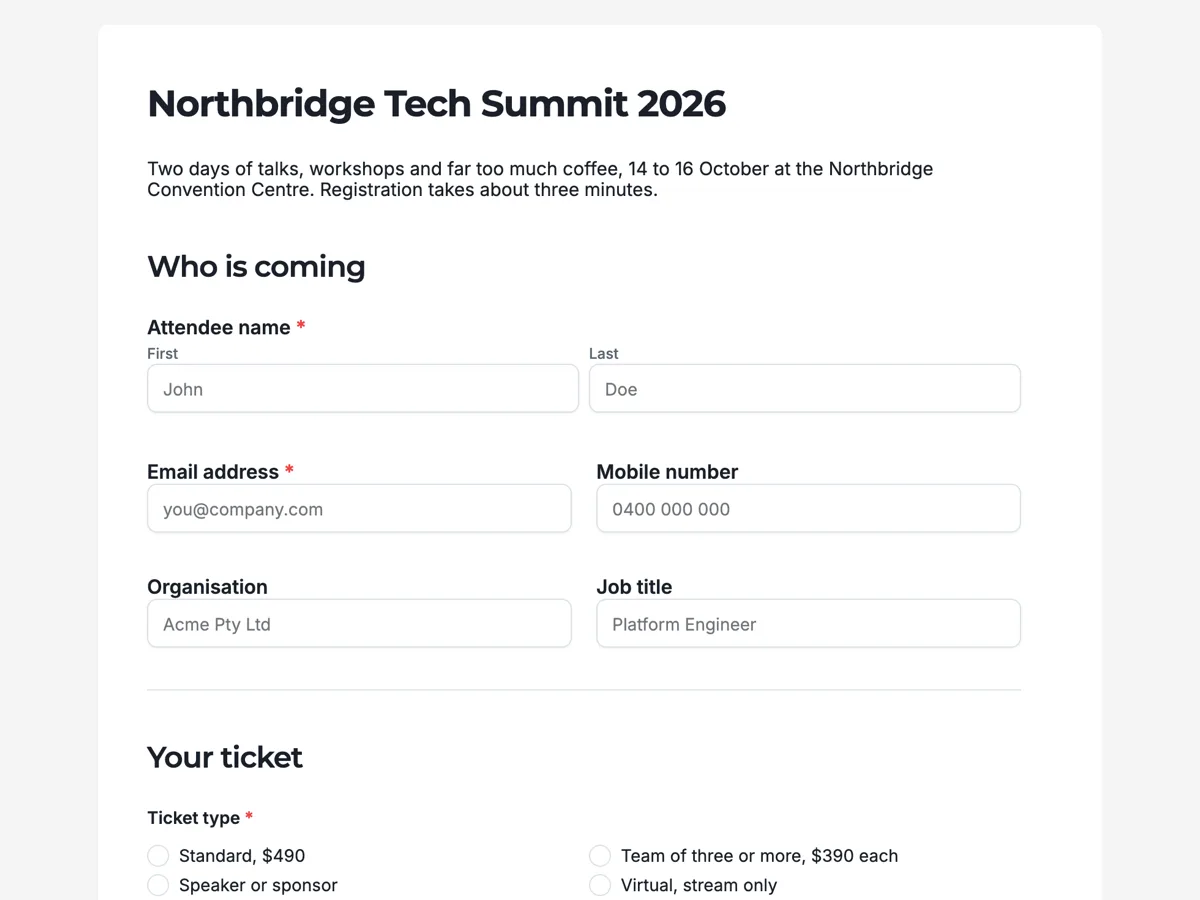
The form itself
A static copy of the finished form, exactly as it renders. Nothing here can be filled in or submitted, so read it as a reference and build your own from the button above.
Every field, and what it collects
The complete field list, in the order respondents meet it.
- Attendee nameNameRequired
- Email addressShort textRequired
- Your ticket and joining details go here.
- Mobile numberShort text
- Only used for day-of updates.
- OrganisationShort text
- Job titleShort text
- Ticket typeSingle choiceRequired
- Options: Standard, $490 · Team of three or more, $390 each · Speaker or sponsor · Virtual, stream only
- Which days will you attend?Multiple choice
- Options: Wednesday 14 October · Thursday 15 October · Workshop day, Friday 16 October
- Preferred breakout trackDropdown
- Options: Platform and infrastructure · Data and machine learning · Product and design · Security · Undecided
- Dietary requirementsLong text
- Written in your own words rather than a tick list, because allergies rarely fit a tick list.
- Accessibility requirementsLong text
- Tell us what you need and we will arrange it before you arrive.
- Before you finishMultiple choiceRequired
- Options: I have read and agree to the Summit code of conduct · I am happy to appear in photography and video from the event
Who is coming
Your ticket
Access and catering
How the three sections are ordered
The form runs from identity to money to care. Who is coming holds the attendee name and email, which are required, and three optional fields for mobile, organisation and job title. Those last two exist for the badge printer, so an attendee who does not want an employer on a lanyard can leave them empty. Your ticket holds the only other required choice before the end, the ticket type, followed by the days and the preferred track. Access and catering comes last because those answers take the longest to write and matter to the fewest people, and a slow answer at the end of a form costs nothing.
What the organiser does with the answers
Each response lands as one row in the export, with one column per field. Ticket type gives the revenue and the headcount, the day selection gives the room numbers for each day, and the breakout track gives a rough split for booking rooms of the right size. Dietary and accessibility answers are read by a person, not counted, and passed to the caterer and the venue a week before the event. The consent question splits into two ticks in the same column, so filtering for people who declined photography is a single search rather than a second form.
How to adapt it for a different event
For a one day event, delete the day selection and keep everything else. For a free community meetup, replace the four priced tickets with In person and Online and drop the organisation and job title fields, since nobody prints badges for forty people. For a paid workshop series, add a short text field for an invoice reference and point the thank-you button at the checkout page. Keep the dietary and accessibility boxes open in every version, because those are the two answers that go wrong when they are squeezed into a list.
What makes this form work
Ticket type comes before anything optional
The Ticket type choice, with four priced options from Standard at $490 to the stream only Virtual ticket, is the first required question after name and email. Revenue and capacity are settled while attention is highest. Day selection and the Preferred breakout track dropdown follow, and the longer catering and access answers sit last, where a slower reply does no harm.
Dietary needs are a text box, not a tick list
The Dietary requirements field is a long text box rather than a list of diets, because allergies rarely fit a tick list. An open box catches the guest who is coeliac and also cannot eat sesame, and the caterer gets the wording they need rather than a code to decode.
Accessibility is asked plainly
Accessibility requirements has its own open box beside the dietary one, which invites a specific answer such as captioning, an interpreter or a seat near the front. A vague "special requirements" line is the one most people skip. Asking on the registration form itself is what the W3C recommends for events.
Questions people ask
What fields does a conference registration form need?
Name, email and ticket type are the minimum. Add organisation and job title if you print badges, day selection if it is a multi-day event, and separate dietary and accessibility questions if you are feeding people or hosting them in person.
Should I ask for dietary requirements as a dropdown?
An open text box works better. Allergies and medical diets rarely fit a fixed list, and a caterer needs the exact wording rather than a category. A guest who is coeliac and also cannot eat sesame has no honest tick to choose from a list of five diets, so the box lets them write both, and the caterer reads the real need.
Can I take payment on the form?
Not on this example. It collects the registration and the ticket type, and payment happens elsewhere. The thank-you screen button can link straight to your checkout page, or the organiser can email a payment link after checking each registration. Keeping payment off the form also means a Speaker or sponsor ticket, which is not paid, never meets a card screen.
Why is the code of conduct a required checkbox?
The last question, Before you finish, is a required multiple choice. The first line is agreement to the Summit code of conduct and the second is consent to appear in event photography and video. They are separate ticks, so someone can agree to the code and still decline to be photographed, and the block cannot be skipped, so nobody registers without seeing the code.
Should attendees pick a breakout track at registration?
Ask for a preference, not a commitment. This form asks for a preferred track, which gives the organiser room sizes weeks ahead without locking anybody in. People change their minds when the programme lands, and a form that treats the answer as binding produces either a queue at the door or a half empty room.
How do you ask for accessibility requirements without making people justify them?
Leave it open and ask once. This form has a single accessibility requirements field beside the dietary one, with no list of conditions to tick and no reason box. An attendee writes what they need, an organiser acts on it, and nobody has to disclose a diagnosis to get a seat near the front.
Build your own in about a minute
The button below opens the generator with this use case already described. Change the wording to match your own, generate, then edit anything you like.
Make one like thisOther form examples
Open day registration form
An open day registration is not a headcount. It is the only chance an institution gets to find out what a visitor came for before they arrive, which is what turns a corridor full of strangers into a printed plan with room numbers on it. This one asks who the visitor is, what they want to look at and how many are in the car, in ten screens. It is conversational, because it is answered on a phone at a kitchen table with a course guide open.
Tournament registration form
One form, one team, and the tournament office needs all of it before it can draw a pool. This entry takes the division nomination and the evidence behind it, fourteen players in a table, two adults reachable on the weekend, and the child safety checks that decide who is allowed on the bench. It is a classic form, because a squad table and a fee ladder do not survive being broken into single questions.
Workshop registration form
A workshop registration form takes the person's contact details, the date and the rate they are booking, anything the tutor should set up differently, and their agreement to the cancellation policy and safety terms. This one books a paid one day ceramics workshop with ten places, and it is built around the two things that go wrong with paid classes: somebody cancelling late and somebody arriving with a need the studio has not prepared for. It is a classic form on one page, because a booking that ends in a signature is something people want to see whole before they sign it.
Want the steps in the builder? Read Turn a long classic form into steps, then View, export and manage your responses. For everything this generator can do, see the form maker.
Written and checked by the OneCraft team. Last checked .