Classic form
Course enrolment form
A course enrolment form template collects the student's details, the course and intake, prior study, how the fees will be paid and a signed declaration. This one is built for a training provider running four intakes across five diploma and certificate courses, in five sections, and it ends with a declaration paragraph, two ticks and a drawn signature. The two things most enrolment forms forget, recognition of prior learning and who is actually paying the fees, each get their own questions.
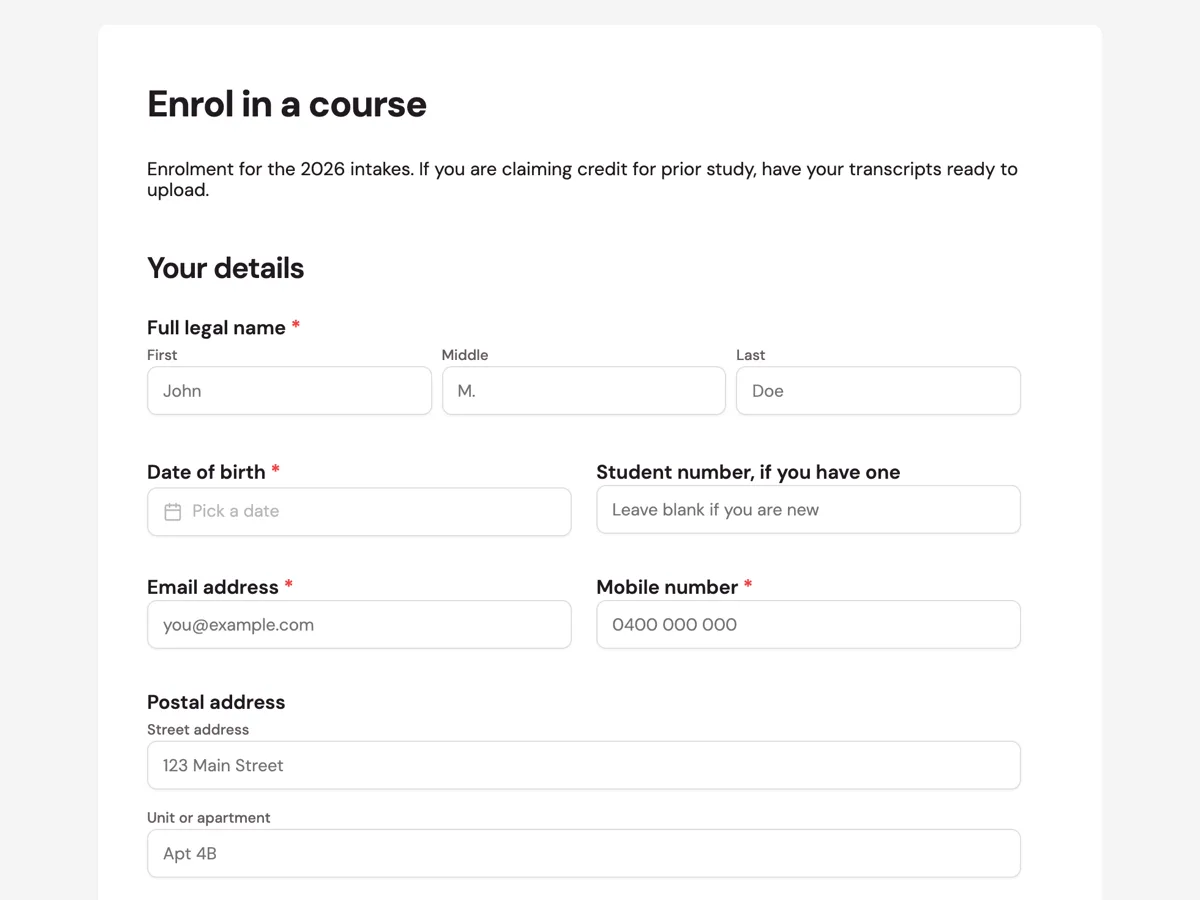
The form itself
A static copy of the finished form, exactly as it renders. Nothing here can be filled in or submitted, so read it as a reference and build your own from the button above.
Every field, and what it collects
The complete field list, in the order respondents meet it.
- Full legal nameNameRequired
- As it appears on your identification, because it goes on your certificate.
- Date of birthDateRequired
- Student number, if you have oneShort text
- Email addressShort textRequired
- Mobile numberShort textRequired
- Postal addressAddress
- CourseDropdownRequired
- Options: Diploma of Information Technology · Diploma of Business · Certificate IV in Cyber Security · Certificate IV in Project Management · Graduate Certificate in Data Analytics
- IntakeDropdownRequired
- Options: February 2026 · May 2026 · August 2026 · November 2026
- How would you like to study?Single choiceRequired
- Options: On campus · Online · Blended, some of each
- Study loadSingle choice
- Options: Full time · Part time
- Highest qualification completedDropdownRequired
- Options: Year 10 or below · Year 12 · Certificate III or IV · Diploma or Advanced Diploma · Bachelor degree · Postgraduate
- Where did you complete it?Short text
- Year completedShort text
- Are you claiming credit or recognition of prior learning?Single choiceRequired
- Options: Yes · No
- If yes, which units and on what basis?Long text
- Transcripts and certificatesFile upload
- Required if you are claiming credit. PDF or clear photos.
- How would you like to pay?Single choiceRequired
- Options: Upfront, with the early payment discount · Payment plan, fortnightly instalments · My employer is paying · Government funded place
- Employer name, if they are payingShort text
- Employer contact for invoicingShort text
- Do you need any learning support or adjustments?Long text
- Emergency contact nameShort text
- Emergency contact phoneShort text
- DeclarationMultiple choiceRequired
- Options: The information above is true and complete · I have read the fee schedule and refund policy
- SignedSignatureRequired
Your details
Your course
Prior study
Fees
Support
What each section of this enrolment form collects
Your details takes the legal name, date of birth, an optional student number for returning students, an email, a mobile and a postal address. Your course is two dropdowns and two choices: which of the five courses, which of the four 2026 intakes, on campus, online or blended, and full or part time. Prior study asks for the highest qualification completed, where and when, then the credit question, its follow up and the transcript upload. Fees is one required choice of four payment routes and two optional employer fields. Support holds the learning adjustments question and the emergency contact, and the form closes on the declaration paragraph, two ticks and a signature.
Why half of the fields are optional
Twelve of the twenty four fields are required: the name, date of birth, email, mobile, course, intake, study mode, highest qualification, the credit question, the payment choice, the declaration and the signature. Those are the answers a provider cannot enrol anybody without. The rest only apply to some students, such as the employer fields, the credit detail and the transcripts, and making them required would force a student who is paying for themselves to type something into an employer box. An enrolment officer reads the gaps in context instead.
How to adapt this form
A school enrolling children replaces the course and intake block with a year level and start date, adds a parent or guardian block and a medical conditions question, and moves the signature to the guardian. A short course provider with no credit transfer cuts the whole Prior study section and keeps one question about relevant experience. A provider with a single intake removes the intake dropdown rather than leaving one option in it, since a question with one answer only slows the student down.
What makes this form work
Legal name is asked for a reason
The first field is Full legal name, because the name on the enrolment is the name printed on the certificate. A classic form does not show help text under a name field, so the intro or the label has to carry the instruction to match identification. Date of birth and an optional existing student number follow, so returning students are matched to their record.
Credit transfer sits next to the uploads
The Prior study section asks whether you are claiming credit or recognition of prior learning, then which units and on what basis, then offers a file upload for transcripts and certificates as PDFs or photos. Keeping the claim and the evidence together means the assessor has both from day one, instead of chasing documents by email, which is what ASQA expects providers to make simple.
Learning support is asked without a penalty
Under Support, the form asks in plain words whether you need any learning support or adjustments. It is optional and it sits after the fees, away from anything that looks like an assessment of the student. The emergency contact fields follow, and the declaration confirms you have read the fee schedule and refund policy before you sign.
Questions people ask
What goes on a course enrolment form?
Student details, the course and intake, prior qualifications, fee arrangements and a declaration. Add a credit transfer question and a document upload if you recognise prior learning, a support question if you make adjustments, and an emergency contact. This example has twenty four fields in five sections, and only twelve of them are required, so a student with nothing unusual to declare moves through it quickly.
How do I collect transcripts?
With a file upload directly under the credit transfer question. This example accepts PDFs or clear photos up to 10 MB, which covers a transcript, a certificate and a statement of attainment. The upload is optional because most students are not claiming credit, and its description, which a classic form does show on uploads, says it is needed when a claim is made.
Can students pay on the form?
No. This form captures how they intend to pay, including employer funded and government funded places, and nothing is charged on submission. The provider sends the invoice or a payment link after reading the enrolment, so the enrolment is not blocked on a card, and a fee query can be settled before any money moves in either direction.
How does the form handle employer funded enrolments?
The Fees section offers four ways to pay: upfront with the early payment discount, a fortnightly payment plan, employer paid, or a government funded place. Two optional fields underneath collect the employer name and an invoicing contact, so when an employer is paying, the invoice goes to the right desk without a follow-up call.
Should an enrolment form ask about prior study?
Yes, and this one asks in two steps. The first question is a required yes or no on whether the student is claiming credit or recognition of prior learning. The second, labelled If yes, asks which units and on what basis, and it is optional. Both always show, so a student who answers no simply leaves the second one empty and moves on.
Why ask for an emergency contact at enrolment?
Because the alternative is asking on the first day, when the student is already on campus and the office is busy. This form collects an emergency contact name and phone in the support section, beside the question about learning adjustments. Both are things a provider needs before teaching starts, not after something happens.
Should an enrolment form ask for a unique student identifier?
For nationally recognised training in Australia, yes, because a provider cannot issue a qualification without the student's USI. This template asks for an existing student number instead, which is the provider's own record. A registered training organisation adds a short text field for the USI in the Your details section and links the government page where a student can find or create one.
Build your own in about a minute
The button below opens the generator with this use case already described. Change the wording to match your own, generate, then edit anything you like.
Make one like thisOther form examples
Tutoring intake form that reaches the tutor before the student does
A first tutoring session spent working out what the student already knows is a session the family paid for and did not get. This intake form collects the year level, the subjects, the most recent school report and a plain answer to what tutoring should change, so the tutor arrives having read the teacher comments rather than discovering them.
Dance class registration form that places a dancer correctly
A dance studio does not have one class to sell, it has a grid of them, and every registration is really a question about which square a dancer belongs in. This form asks the six things that decide the square, one screen at a time, and settles the costume levy before anyone is invoiced for it.
Art class registration form with the materials pack on it
The thing people ask an art studio before they book is what the price actually covers, and the second thing is whether the room will work for them. This ten field registration answers both on the form itself, with the price inside every class option and a materials pack question that has a middle answer for people who want the list first.
Want the steps in the builder? Read Turn a long classic form into steps, then View, export and manage your responses. For everything this generator can do, see the form maker.
Written and checked by the OneCraft team. Last checked .