Classic form
Tutoring intake form that reaches the tutor before the student does
A first tutoring session spent working out what the student already knows is a session the family paid for and did not get. This intake form collects the year level, the subjects, the most recent school report and a plain answer to what tutoring should change, so the tutor arrives having read the teacher comments rather than discovering them.
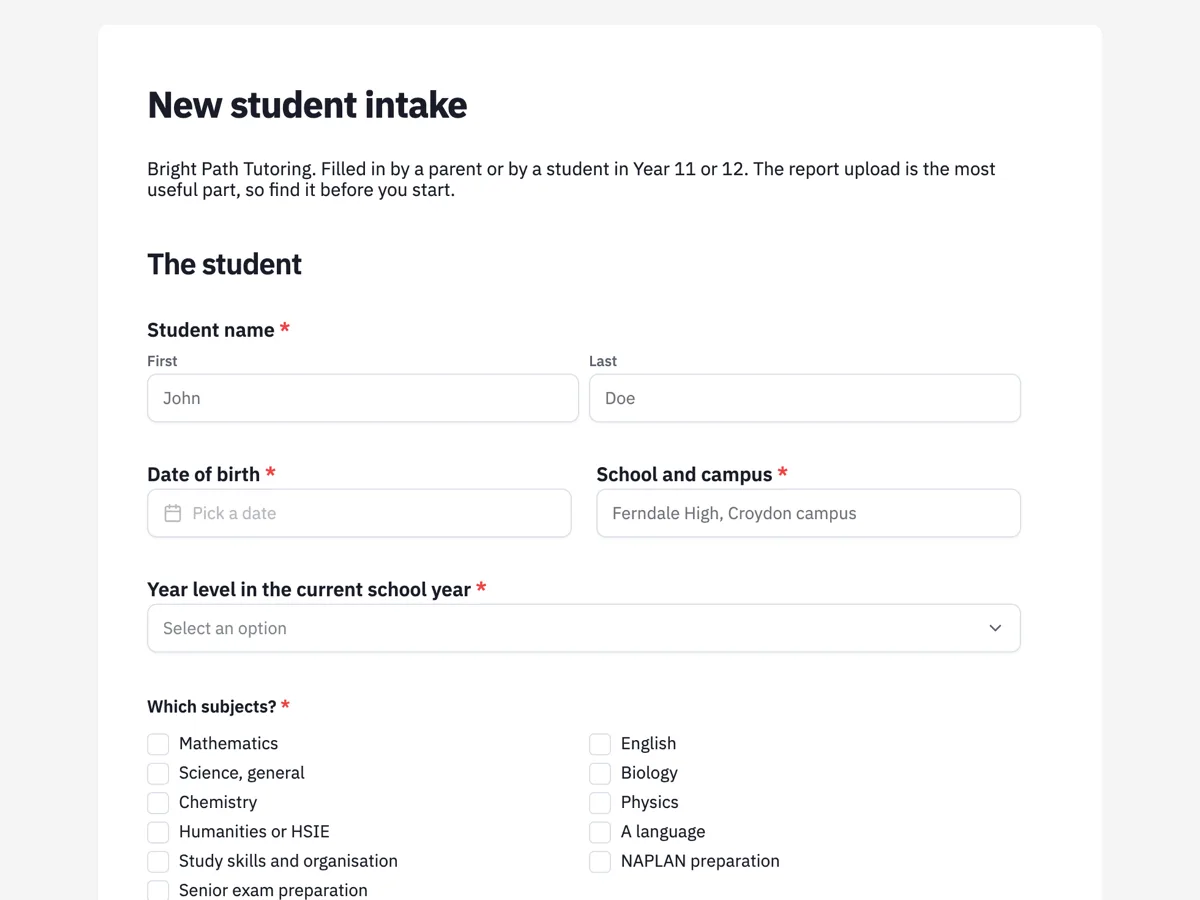
The form itself
A static copy of the finished form, exactly as it renders. Nothing here can be filled in or submitted, so read it as a reference and build your own from the button above.
Every field, and what it collects
The complete field list, in the order respondents meet it.
- Student nameNameRequired
- Date of birthDateRequired
- School and campusShort textRequired
- Year level in the current school yearDropdownRequired
- Options: Year 3 · Year 4 · Year 5 · Year 6 · Year 7 · Year 8 · Year 9 · Year 10 · Year 11 · Year 12
- Which subjects?Multiple choiceRequired
- Options: Mathematics · English · Science, general · Biology · Chemistry · Physics · Humanities or HSIE · A language · Study skills and organisation · NAPLAN preparation · Senior exam preparation
- The most recent school reportFile upload
- A photo of each page is fine. Reports say more in ten seconds than a parent can in ten minutes, particularly the teacher comments. Images or PDF, up to 4 files, 10 MB each.
- What would you like tutoring to change?Long textRequired
- Which of these describes the student at the moment?Multiple choice
- Options: Takes a long time to start a task · Reads slowly or avoids reading aloud · Handwriting is slow or hard to read · Loses track during long instructions · Gets extra time in school assessments · Works better with the room quiet · English is a second language at home · Works well in a group, drifts one to one · None of these apply
- When could the student attend?Rating gridRequired
- Statements:
- Monday
- Tuesday
- Wednesday
- Thursday
- Friday
- Saturday
- Sunday
- How would you like sessions run?Single choiceRequired
- Options: At the centre in Croydon · In our home · Online with a shared whiteboard · At the centre in term, online in the holidays · Whichever gets the right tutor
- How often?Single choiceRequired
- Options: Once a week · Twice a week · Three times a week · Fortnightly · A block before exams only
- Parent or guardian name, relationship and mobileShort textRequired
The student
Where things are now
Sessions
What each field on this form collects
The student block takes the name, the date of birth beside the school and campus, the year level as a dropdown covering Year 3 to Year 12, and the subjects as an eleven item tick list that includes study skills and exam preparation alongside the usual subjects. The second block is where the useful detail sits: an upload for the most recent school report, a required written answer about what tutoring should change, and, under a paragraph that explains the question, a nine item tick list describing how the student works at the moment. The sessions block is a seven day by four period availability grid in which a family can tick several periods on the same day, a radio for how sessions should run across the centre, the home and online, and a radio for frequency. The final field takes the parent or guardian name, their relationship to the student and a mobile, in one line.
The Australian pieces on this form
The year level dropdown runs Year 3 to Year 12 because that is how Australian schooling is named and how the national curriculum is organised, and it is the field that tells a tutor which curriculum level to plan against. The subject list names NAPLAN preparation as its own item, since the national assessment sits in Years 3, 5, 7 and 9 and families ask for it by name in the months beforehand, and senior exam preparation as another, because the final year certificate is where demand concentrates.
How to adapt this form
A centre that only teaches primary students can drop the senior exam item and the online option, and add a reading level question and a field for the classroom teacher name, since primary tutoring works best when the tutor and the teacher are aiming at the same thing. A university or adult version replaces year level with the course and unit code, the school report upload with an assignment brief and a marking rubric, and the guardian field with the student own contact, which also removes the need for the adjustments paragraph. A centre running holiday intensives keeps the first two blocks, replaces the weekly availability grid with a tick list of dated program days, and adds a numbered sibling discount question, because holiday programs are booked by families rather than by students.
What makes this form work
The report upload replaces ten minutes of questions
One file field, images or PDF, up to four pages at ten megabytes each, described as a photo of each page. A tutor reads the teacher comments in seconds and starts session one teaching, which is the whole argument for an intake form over a phone call.
Availability is a grid, so several answers fit in one field
Seven days against four periods, with several cells tickable per row. Families say Tuesday after school and Saturday morning in a single question, and the centre matches it against tutor availability without an email thread about who is free when.
Adjustments are described, not diagnosed
Slow starts, slow reading, losing track during long instructions, extra time in school assessments. Eight plain descriptions with none of these at the end, under a paragraph that says no letter is needed, which is why parents actually tick them.
Questions people ask
Why ask for the school report rather than for grades?
Because the teacher comments are worth more than the marks. A report says the student contributes confidently but rushes written work, which tells a tutor exactly where to start, while a B in English tells them nothing. The upload accepts photos of the pages, which is what most parents actually have on their phone.
Does the form ask about diagnoses like dyslexia or ADHD?
No, and that is deliberate. The question asks what the student does at the moment, such as taking a long time to start or losing track during long instructions, and the paragraph above says plainly that nothing here needs a letter and that anything medical is better discussed on the phone. Tutors plan from behaviour, not from labels.
How does the availability grid work?
It is a seven row by four column grid where several cells can be ticked in the same row, so a family can say Tuesday after school and Tuesday evening both suit. Matching that against tutor availability is what produces two real session times in the reply rather than an email asking when everyone is free.
Should a Year 11 student fill this in themselves?
The introduction says a student in Year 11 or 12 can, and it usually produces a better goals answer. The guardian field is still required, because the account, the invoices and the cancellations belong to an adult. Asking for the relationship in the same field keeps that clear without adding a second question.
Why is the goals question required when most others are not?
Because it is the field the first session is planned from. A tutor with a report and no goal knows the marks but not the family expectation, and those two things can be far apart. Three example answers in the placeholder show the register that is useful, which is plain and specific rather than aspirational.
What happens to the report once the tutor has read it?
It stays attached to the submission in the centre own account, alongside the rest of the answers, and is read by the tutor assigned to the student. A school report is personal information about a child, so it is worth a centre setting out who can see submissions and for how long they are kept before the first one arrives.
Build your own in about a minute
The button below opens the generator with this use case already described. Change the wording to match your own, generate, then edit anything you like.
Make one like thisOther form examples
Child psychology intake form with two guardian signatures
A child psychologist needs three histories before the first session: the development, the school and the household, and the consent of everyone with parental responsibility. This twenty two field intake form collects all four, and ends with two signature boxes rather than one.
Speech pathology intake form as a child case history
A paediatric speech pathologist starts from a case history that reaches back to birth, because prematurity, early feeding and the age of first words each change what a delay is likely to be. This twenty one field intake form collects that history, the hearing testing, the languages spoken at home and the funding, before the first forty five minute session begins.
Accountant new client form that never asks for a TFN
Half of what an accounting firm needs from a new client is structural, the entity, the ABN, the GST cycle and the software, and the one thing it must not collect in a web form is the tax file number. This sixteen field new client form gets the first list and refuses the second, asking instead how the number will be handed over.
Want the steps in the builder? Read Create a form with AI, then Every form field and when to use it. For everything this generator can do, see the form maker.
Written and checked by the OneCraft team. Last checked .