Classic form
Data access request form for an app
A data access request form lets a person ask an organisation for the personal data it holds about them, and gives the organisation enough to confirm who is asking. This one handles access, correction and deletion in one form for a hiking app, with an optional date range, an identity upload and a choice of delivery.
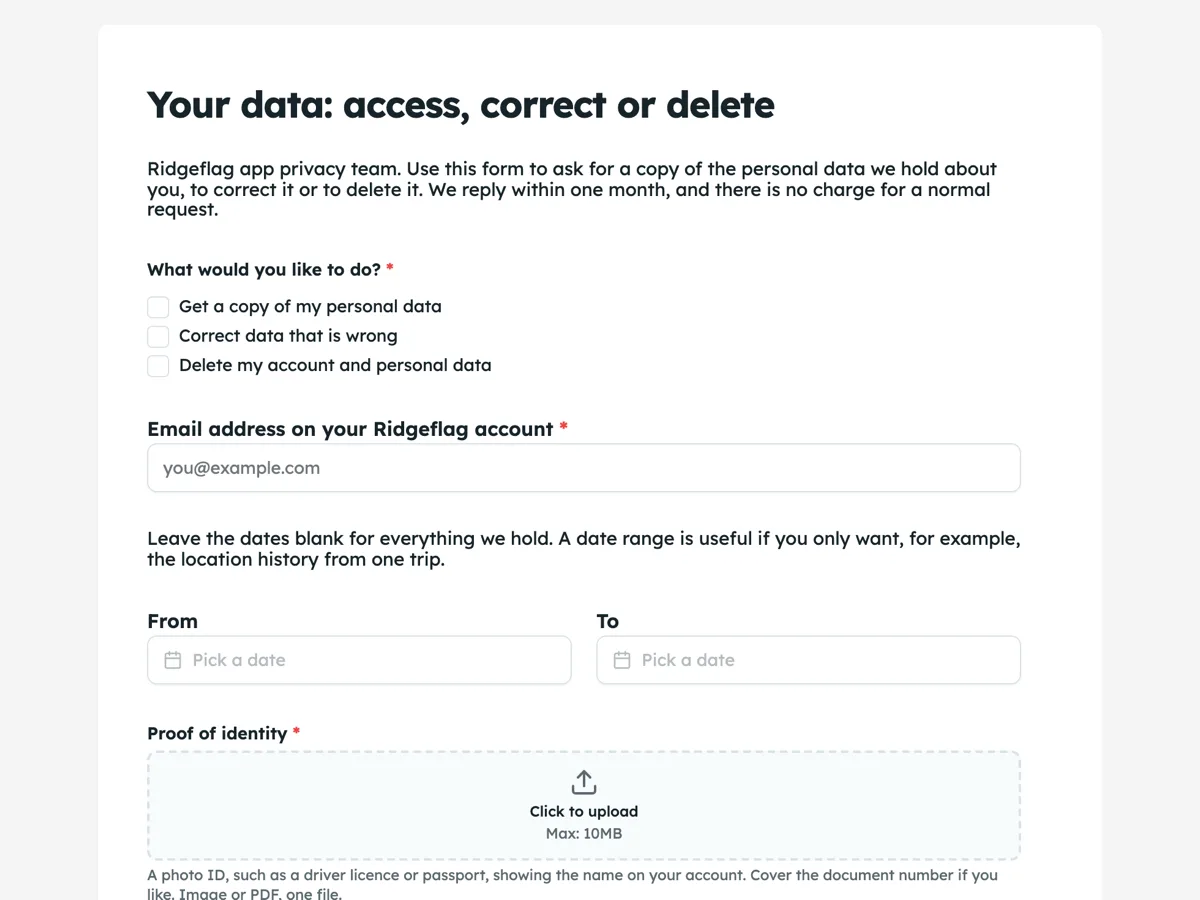
The form itself
A static copy of the finished form, exactly as it renders. Nothing here can be filled in or submitted, so read it as a reference and build your own from the button above.
Every field, and what it collects
The complete field list, in the order respondents meet it.
- What would you like to do?Multiple choiceRequired
- Options: Get a copy of my personal data · Correct data that is wrong · Delete my account and personal data
- Email address on your Ridgeflag accountShort textRequired
- FromDate
- ToDate
- Proof of identityFile uploadRequired
- A photo ID, such as a driver licence or passport, showing the name on your account. Cover the document number if you like. Image or PDF, one file.
- How should we send your data?Single choiceRequired
- Options: A download link to my account email · A file in a machine readable format (JSON) · Not needed, I asked only to correct or delete
- DeclarationMultiple choiceRequired
- Options: I am the account holder, and the information on this form is true
- SignatureSignatureRequired
What each field on this form collects
The request type is a checkbox of access, correction and deletion, so one request can ask for more than one. The account email identifies the account. A paragraph explains the optional date range, then from and to dates share a row. Proof of identity is a required single upload. Delivery is a radio of three, including not needed for correction or deletion only. A declaration tick and a signature close the form. Six of the eight fields are required.
Why identity is checked, and how lightly
A data access request is a common way to steal personal data: someone who knows an email address asks for everything held about it. The ID upload lets the privacy team match the name on the ID to the name on the account. Regulators warn against asking for more than is needed, so the upload note allows the document number to be covered. The account email alone is not enough, because email addresses are easy to guess, but it tells the team which account to check.
What the law asks for
Article 15 of the GDPR gives people the right to a copy of their personal data and information about how it is used. The UK Information Commissioner's Office says organisations should respond within one month, can extend by two more for complex requests, and usually cannot charge. California's CCPA gives residents similar rights to know and delete. A request can be made in any form, including by email; a form only makes it easier to answer. The intro and thank-you screen state the one month timeline.
How to adapt this form
An online shop adds the order number field and a payment data option. A health app adds a paragraph on health data and a question on whether to include connected device data. An Australian business renames it an access request under the Australian Privacy Principles and adjusts the response time.
What makes this form work
Three rights in one checkbox
Access, correction and deletion are ticked together. A person who wants a copy and then deletion asks once, not twice.
A blank range means everything
The paragraph says empty dates return all data. People asking for one trip narrow it; everyone else leaves it blank.
Not needed is a delivery option
Someone asking only to correct or delete picks not needed. The required delivery question never forces a false answer.
Questions people ask
What is a data subject access request?
A request by a person to an organisation for a copy of the personal data it holds about them, along with how it is used and who it is shared with. Under the GDPR it is free in most cases and must be answered within one month. This form handles that request, plus correction and deletion.
Does the person have to use this form?
No. A valid request can arrive by email, letter, chat or phone, and the organisation must still answer it. The form helps both sides by asking for the account email and identity up front, which avoids weeks of back and forth. The intro presents it as the easy route, not the only one.
Why is the date range optional?
Most people want everything, so a blank range means all data held. Some want only one part, such as the location history from one trip, and a date range narrows it. Making it optional keeps a full request simple while letting a targeted one be precise.
What does the JSON delivery option give the person?
A file in a structured, machine readable format they can open or move to another service. That supports the separate right to data portability under the GDPR. Most people choose the download link, which suits reading; JSON suits someone moving to another app.
How does the privacy team know a request has arrived?
The owner can turn on an email alert so the privacy inbox gets each request with all the answers. That matters because the one month clock starts on receipt. The form does not email the person; the team replies to the account email given, which the thank-you screen says.
Can deletion be refused?
Sometimes. An organisation may need to keep some data, for example billing records for tax law, even after deleting an account. The reply should say what was deleted, what was kept and why. The checkbox records that deletion was asked for, so the team answers that request specifically.
Build your own in about a minute
The button below opens the generator with this use case already described. Change the wording to match your own, generate, then edit anything you like.
Make one like thisOther form examples
Change request form with an impact table
A change request form records a proposed change to a project and what it does to scope, time and cost, so someone can decide before the work starts. This one puts the impact in a four row table with days and cost per area and leaves the decision and notes at the end for the project board.
Document request form for a school office
A document request form tells an office which record someone needs, who it is about, why and how to send it, with proof that the person asking is allowed to have it. This one does that for an Australian secondary school, with five documents to choose from, an identity upload and a standard or urgent turnaround.
Freedom of information request form for a council
A freedom of information request form has to describe the documents clearly enough for an agency to find them, say who is asking and how they want access, and deal with the application fee. This one does that for a Victorian council, with a date range to narrow the search, a hardship waiver option and the four forms of access.
Want the steps in the builder? Read Form builder components, then Control who can fill in your form. For everything this generator can do, see the form maker.
Written and checked by the OneCraft team. Last checked .