Classic form
Escape room waiver with a player table and a claustrophobia check
An escape room waiver records that the team has read the room rules and told the host about anything that could make a dark, enclosed room unsafe. This one is signed once by the lead player, with a six player table, a conditions checklist and the promise that doors are never locked.
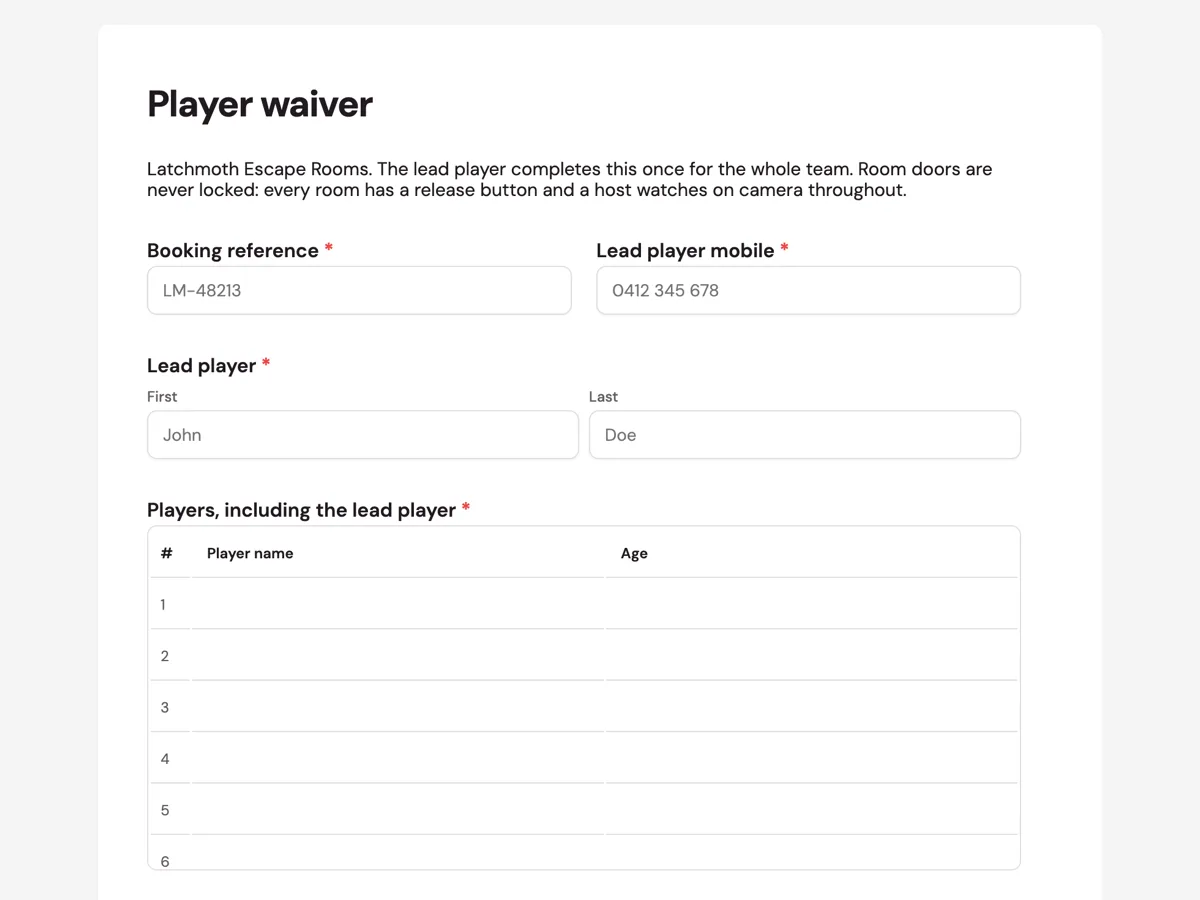
The form itself
A static copy of the finished form, exactly as it renders. Nothing here can be filled in or submitted, so read it as a reference and build your own from the button above.
Every field, and what it collects
The complete field list, in the order respondents meet it.
- Booking referenceShort textRequired
- Lead player mobileShort textRequired
- Lead playerNameRequired
- Players, including the lead playerTableRequired
- Columns: Player name · Age
- Does any player have:Multiple choiceRequired
- Options: Claustrophobia · Epilepsy or light sensitivity · Pregnancy · Limited mobility · Anxiety in the dark · None of these
- Rules acknowledgementMultiple choiceRequired
- Options: I have read the rules and will brief every player in my team
- Lead player signatureSignatureRequired
What each field on this form collects
The booking reference sits beside the lead player's mobile, then the lead player's name. The player table has six numbered rows for name and age. A paragraph explains why conditions are asked and who sees them, then a checkbox lists claustrophobia, epilepsy or light sensitivity, pregnancy, limited mobility, anxiety in the dark and "none of these". The rules paragraph names four rules and how to leave the room. A single tick acknowledges the rules, and the lead player signs. All seven fields are required.
Why the form says the door is never locked
The first worry of a claustrophobic player is being trapped, and many people assume an escape room is literally locked. Saying in the intro that every room has a release button and a host on camera answers that before the conditions question, so a player who ticks claustrophobia does so knowing they can leave. That makes the answer more honest. The host can then use it: lights up a notch, a side passage left open, or a different room with more space. Epilepsy and light sensitivity sit together because strobe and flicker effects are common in themed rooms and can be switched off.
What the host does with the answers
Before the briefing, the host reads the conditions box and the player ages. A claustrophobia tick means the host mentions the release button to the whole team, so the player is not singled out. Light sensitivity means strobe effects are switched off for that session. A player under 14 without an adult listed means a quick check at the door. Each answer maps to an action the host can take in the minutes before the game starts.
How to adapt this form
A venue running corporate team building raises the table to twelve rows and adds a company name. A horror themed room adds a row for heart conditions and a minimum age of 16. A mobile escape game run in a park drops the claustrophobia option and adds one for heat and sun.
What makes this form work
The unlocked door comes first
The intro promises a release button and a watching host before anyone is asked about claustrophobia, so players answer honestly instead of quietly worrying.
Six players, ages included
A numbered table of name and age lets staff check the under 14 rule at the door without asking each player in front of the group.
Conditions a host can act on
Claustrophobia, light sensitivity, pregnancy, limited mobility and anxiety in the dark each map to something the host can change, such as lighting, effects or room choice.
Questions people ask
Do escape rooms really lock you in?
Well run rooms do not. Players are inside a story about escaping, but the exit is never locked or can be opened instantly with a release button, and a host watches throughout. This form says so in its intro, because fire safety and player comfort both depend on a door that opens when someone needs it.
Can someone with claustrophobia play an escape room?
Often, yes, especially once they know the door is not locked. Telling the host lets them choose a larger room, keep a passage open or raise the lighting. Some players prefer to stand near the exit. The checkbox gives the host that information before the briefing, so nobody has to raise it in front of the group.
Why does the lead player sign for everyone?
Teams book as a group and arrive together, and one signature keeps the start on time. The lead player confirms they will brief every player on the rules, which the acknowledgement says. Venues that want individual consent can send each player their own short version of the form instead.
What age can children play escape rooms?
It depends on the venue and the room. This one requires an adult in the room for players under 14, stated in the rules paragraph, and the ages in the player table let staff check it at the door. Rooms with scarier themes usually set a higher minimum age.
Why ask about pregnancy in an escape room?
Some rooms involve crawling through low passages, kneeling or sudden scares, and a pregnant player may want to avoid them. The host can suggest a room or route that avoids those parts. Like every option in the list, it is shared only with the host and asked to help, not to exclude.
Are phones allowed in an escape room?
Not in this one: phones stay in lockers, which the rules paragraph states and the thank-you screen repeats. It keeps the puzzles from being searched online and photographs of the room off social media. The host can always be reached through the camera, so players are not cut off.
Build your own in about a minute
The button below opens the generator with this use case already described. Change the wording to match your own, generate, then edit anything you like.
Make one like thisOther form examples
Horse riding waiver with rider weight, height and experience
A horse riding waiver records that a rider understands the inherent risks of riding and has given the details needed to match them with a suitable horse. This one asks a trail ride customer for weight, height and experience first, then a helmet choice, medical details, the risk acknowledgement and a signature.
Go kart waiver with licence class, height and safety briefing
A go kart waiver records that a driver understands the risks of racing, meets the height rules for their kart and has been briefed on track safety. This one adds licence class, a medical checklist, footwear and a photo for the timing screens, with a guardian for drivers under 16.
Massage consent form with draping, areas and the right to stop
A massage consent form records which treatment a client agrees to, which parts of the body may be massaged and that they can stop at any time. This one also explains draping in plain words, asks about pregnancy and health conditions, and takes the client's signature before the first appointment.
Want the steps in the builder? Read Form builder components, then Design your welcome and thank-you screens. For everything this generator can do, see the form maker.
Sources
Written and checked by the OneCraft team. Last checked .