Classic form
Expense claim form
Expense claims come back for boring reasons: a missing receipt, a date outside the window, or fuel claimed on top of a kilometre rate. This claim states each of those rules in the block where it applies, and gives the line items a table with six rows so a normal trip fits without an attachment. It is a classic form, because a claim is checked as a whole and a receipt upload has to sit beside the lines it belongs to.
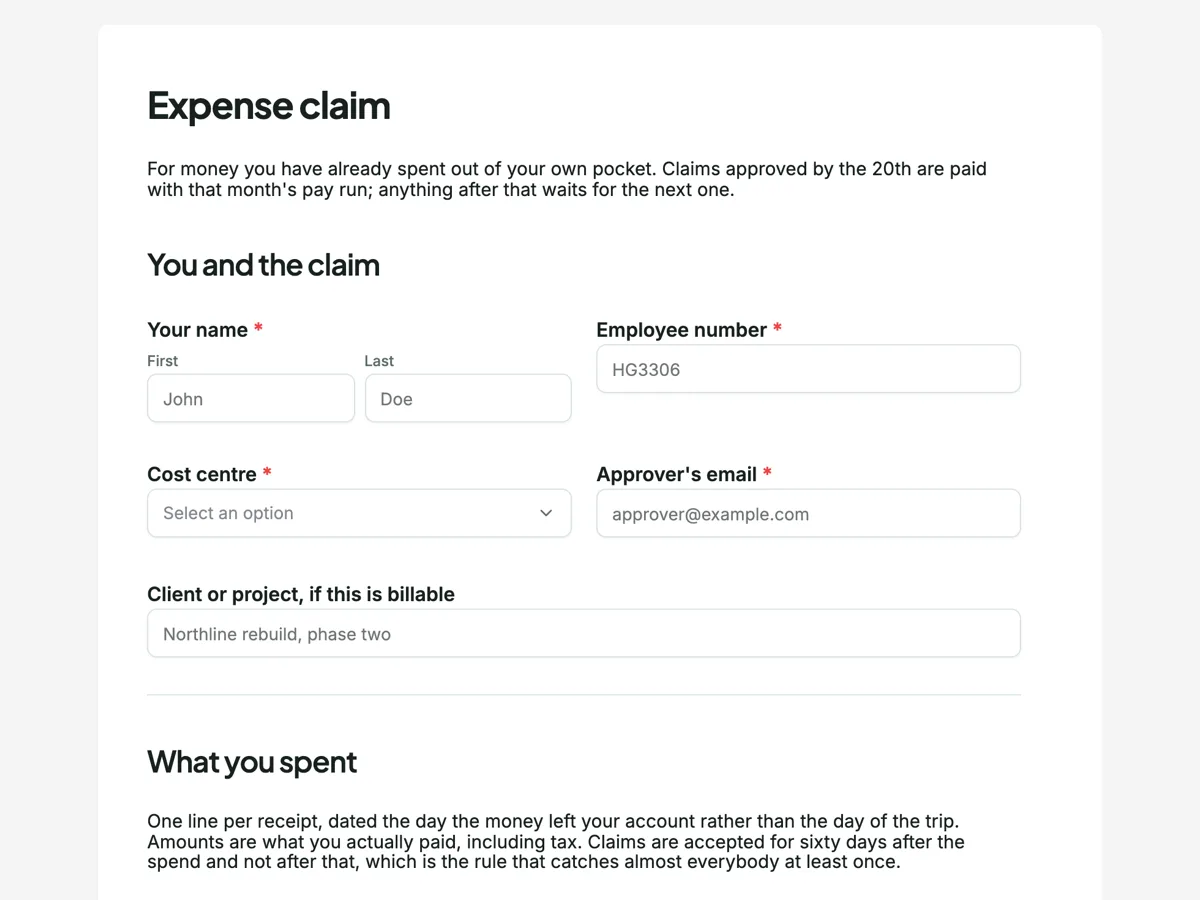
The form itself
A static copy of the finished form, exactly as it renders. Nothing here can be filled in or submitted, so read it as a reference and build your own from the button above.
Every field, and what it collects
The complete field list, in the order respondents meet it.
- Your nameNameRequired
- Employee numberShort textRequired
- Cost centreDropdownRequired
- Options: Delivery · Sales · Marketing · Operations · Finance and legal · People and culture · A client project, named below
- Approver's emailShort textRequired
- Client or project, if this is billableShort text
- Line itemsTable
- Columns: Date · What it was · Category · Amount paid
- Total claimedNumberRequired
- Was any of it paid in another currency?Single choiceRequired
- Options: No · Yes, and I have claimed the amount my bank charged me
- Your receiptsFile uploadRequired
- Up to ten files, PDF or photo, 10 MB each. Photograph receipts flat on a dark surface with the whole docket in frame. A folded receipt with the total cropped off is the single most common reason a claim comes back.
- Does this claim include travel in your own vehicle?Single choiceRequired
- Options: No · Yes, and the trips are below
- Trips in your own vehicleTable
- Columns: Date · From and to · Reason · Kilometres
- I declareMultiple choiceRequired
- Options: Every line was spent on company business and none of it is personal · I have not claimed any of this before and will not claim it anywhere else · A receipt is attached for every line, and each one shows the supplier, the date and the amount · Nothing here has been or will be reimbursed by a client directly · None of these lines was paid on a company card
You and the claim
What you spent
Receipts
Your own car, if you used it
Declaration
What makes this form work
Each rule sits in the block it governs
The sixty day window is above the line items, the receipt definition is above the upload, and the fuel rule is above the mileage table. A claimant meets each rule at the moment it applies to them, which is the only version of a policy anybody reads.
The receipt upload teaches people how to photograph a docket
Flat, dark surface, whole docket in frame. A file upload is one of only two fields whose description a classic form actually shows a respondent, so this is the one place that advice can live and be seen. It removes the most common reason a claim is returned.
The mileage table asks for a reason, not just kilometres
Date, route, reason, kilometres. The reason column is what makes the claim reviewable months later, and it is the difference between a mileage claim that survives a check and a number nobody can account for.
Questions people ask
How many line items should an expense form allow?
As many rows as a normal claim needs, decided when the form is built. A table renders exactly the number of rows it was given and there is no add row button, so six is a design decision: it covers a two night trip, and anything bigger goes in as a second claim. Guessing high leaves a page of empty rows on every claim.
Does the form add up the line items?
No. There is no calculation between fields, which is why the total is its own number field and the claimant types it. That is worth knowing rather than working around: the total and the lines are checked against each other by whoever approves, and a mismatch is a useful signal rather than a bug.
How do the table rows come out in the export?
As one column holding the filled rows as JSON, not as four spreadsheet columns. The same is true of the mileage table. For reading a single claim in the responses table that is fine; for building a finance report from a whole month it means a parsing step, and the page says so rather than promising a tidy spreadsheet.
How many receipts can be attached?
This field takes ten files, up to 10 MB each, as PDFs or photos. A file upload can be set anywhere from one to ten files and up to 100 MB each, and the only two file types available are images and PDF. A phone photo of a paper docket is the normal case and it is what the field description is written for.
How should a claim handle spending in another currency?
Flag it, then let finance convert. This form asks whether any of the claim was paid in another currency rather than asking for a rate. Employees guess rates from whatever site they opened, and the guesses never match the card statement. One yes or no routes the claim to the person who has the real figure.
Why is mileage a separate section?
Because it has no receipt and is reimbursed at a rate rather than a cost. This form asks whether the claim includes travel in your own vehicle, and the trips table below it is labelled for own vehicle travel, so everybody else leaves it empty. Keeping it out of the main line items stops somebody entering fuel twice, once as a receipt and once per kilometre.
Build your own in about a minute
The button below opens the generator with this use case already described. Change the wording to match your own, generate, then edit anything you like.
Make one like thisOther form examples
Employee engagement survey template: 20 statements in five themes
An employee engagement survey measures how committed and supported people feel at work, across enough themes to show where to act and anonymously enough that people answer honestly. This template groups twenty agreement statements into five grids, direction, manager, growth, recognition and team, then asks the employer recommendation question.
Equipment request form
An equipment request that only says "I need a new laptop" costs two more emails before anybody can act on it. This one asks for a rough price per line so the approver knows whether it is theirs to sign, takes a photo of the fault when something is being replaced, and puts the asset return terms on the page before the request is sent rather than in a policy nobody opened. It is a classic form, because the photo field and the item table have to sit beside each other.
360 feedback form
A 360 round fails when raters score a personality instead of a behaviour, and when there is nowhere honest to say they have not seen something. This form asks fifteen behaviours on a frequency scale with a "not seen" column, then three written questions that between them produce the only part of the report anybody rereads. It is conversational, because a rater who meets one grid at a time writes longer answers than one facing three at once.
Want the steps in the builder? Read Every form field and when to use it, then View, export and manage your responses. For everything this generator can do, see the form maker.
Written and checked by the OneCraft team. Last checked .