Classic form
Law firm client intake form with the conflict check on it
A firm cannot give a word of advice until it knows who else is involved, because acting against an existing client is the one mistake that ends a matter before it starts. This fifteen field intake form puts the conflict check on the form as a four row table of other parties, and says plainly that the enquiry engages nobody.
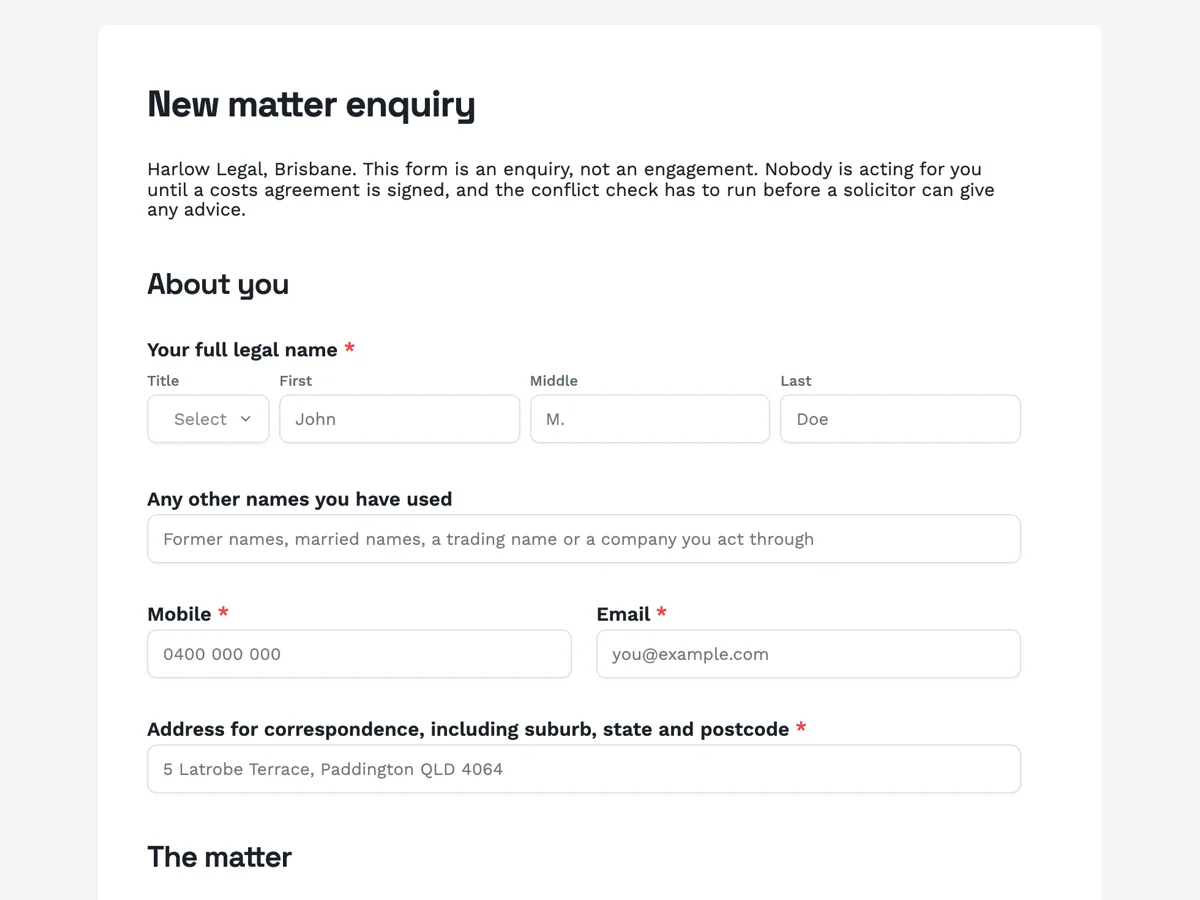
The form itself
A static copy of the finished form, exactly as it renders. Nothing here can be filled in or submitted, so read it as a reference and build your own from the button above.
Every field, and what it collects
The complete field list, in the order respondents meet it.
- Your full legal nameNameRequired
- Any other names you have usedShort text
- MobileShort textRequired
- EmailShort textRequired
- Address for correspondence, including suburb, state and postcodeShort textRequired
- What kind of matter is this?DropdownRequired
- Options: Buying or selling property · A dispute with a builder or tradesperson · Employment, including unfair dismissal · A commercial contract · Setting up or restructuring a business · A debt owed to you, or claimed from you · Wills and estate planning · A contested estate · Family law, separation and parenting · A personal injury claim · A neighbour or body corporate dispute · Something else, described below
- What has happened, in your own words?Long textRequired
- Other partiesTable
- Columns: Full name or business name · Their role in the matter · Company or law firm · Connection to you
- How urgent is this?Single choiceRequired
- Options: No deadline that I know of · A deadline in the next month · A deadline in the next week · A court date or filing deadline already set · A contract with a cooling off period running now · I have been served with something
- How did you come to this firm?Single choiceRequired
- Options: A friend, family member or colleague · Another lawyer referred me · My accountant or financial adviser · A real estate agent or broker · Searched online · A previous matter with this firm · A community legal service
- Has another lawyer acted for you on this matter?Single choiceRequired
- Options: No · Yes, and the file has been closed · Yes, and they are still acting · Yes, and I would rather explain why I left · I have only had a free first appointment elsewhere
- Documents about the matterFile upload
- Contracts, letters of demand, court documents, emails, quotes, invoices or anything you have been served with. Photos of printed pages are fine. Images or PDF, up to 10 MB each.
- Photo identificationFile upload
- A driver licence or passport page, for identity verification before the firm acts. Cover the card number if you would rather, the name, photo and expiry are what is checked. Images or PDF, up to 10 MB each.
- Costs acknowledgementMultiple choiceRequired
- Options: I understand this enquiry does not engage the firm and is not legal advice · I understand a costs agreement and costs disclosure will be provided before any work begins
- SignatureSignatureRequired
About you
The matter
Everybody involved
Timing
Documents and identity
Costs and consent
What each block of this form collects
The identity block asks for the full legal name and then, separately, for any other name the client has used, because a conflict check run against one spelling of a name is a conflict check that missed something. The matter block is a twelve option dropdown and one open question. The conflict block is the reason the form exists, and its paragraph explains in plain words what a conflict check is and why finding a problem today is better than finding it later. Timing is one radio, and it includes having been served with something. The documents block takes the paperwork and an identity document. The last block says twice, in different words, that nothing here engages the firm.
The Australian pieces on this form
The costs paragraph is written around the disclosure obligations that apply to Australian law practices. A client here is entitled to a costs agreement and a written costs disclosure that sets out the basis of charging, an estimate of the total, the disbursements charged on top such as filing fees and searches, and the avenues for disputing a bill. The form does not attempt to make that disclosure, which has to be specific to the matter, but it tells the client what is coming and when, and it puts the acknowledgement of that directly above the signature. The identity upload reflects the verification a practice does before acting, particularly on property, estate and trust work, and the field says only the name, photo and expiry are checked.
How to adapt this form
A conveyancing practice replaces the matter dropdown with a purchase or sale radio and adds the property address, the contract date, the finance and building inspection dates and the agent, since those four dates run the whole file. A family law practice adds the names and dates of birth of any children, the date of separation and whether there are existing orders, and moves the safety question that a general intake does not carry into its own block. A firm doing a lot of employment work adds the employer, the length of service, the termination date and whether a general protections or unfair dismissal time limit is already running, because in that jurisdiction the clock is very short.
What makes this form work
The conflict check is a table, not a question
Name, role, company or law firm, and connection to you, across four rows. A single field asking who else is involved gets one name; four columns get the other side, their lawyers and the company both parties deal with.
Urgency includes having been served
Six options ending in I have been served with something, which is the answer that jumps an enquiry to the top of the pile. A yes or no urgency question would have buried it among the deadlines that are merely soon.
Costs are described before the signature, not after
Hourly rates, an estimate of the total, disbursements such as filing fees and searches, and how to dispute a bill, all named in the paragraph the acknowledgement tick sits under. The disclosure itself follows, but nobody signs here unaware that it is coming.
Questions people ask
What is a conflict check, and why is it on the intake form?
It is the search a firm runs to see whether it already acts for, or has acted against, anybody involved in a new matter. A firm that already acts for the other side cannot act for you. Putting the names on the form means the check runs before a solicitor hears the story rather than after.
Does sending this form make the firm my lawyer?
No, and the form says so three times: in the introduction, in the costs paragraph and in the first acknowledgement tick. An enquiry becomes an engagement when a costs agreement is signed. Until then nothing written back is legal advice, and no deadline is being managed on your behalf.
Is what I write confidential if the firm declines the matter?
Yes. The costs paragraph states that everything written is confidential whether or not the firm ends up acting. That duty attaches to the approach rather than to the engagement, which is also why a conflict check is run before a solicitor reads the detail of what happened.
Why does the form ask for identification?
Because a practice verifies who a client is before it acts, particularly on property, estate and trust matters where money and title change hands. The field asks for a licence or passport page and says the name, photograph and expiry date are what is checked, so a client can cover a card number if they prefer.
What happens if a deadline is close?
The thank you screen says to phone the office as well as sending the form, because a filing date does not wait for an inbox. The urgency radio separates a deadline in the next week from a court date already set and from having been served, and each of those is triaged differently when the enquiry is read.
Why ask whether another lawyer has acted?
Because it changes what can happen next. A file that is closed can be requested, a lawyer still acting has to be dealt with before a second firm can take over, and a free first appointment elsewhere may have created a conflict at that firm rather than this one. One radio, five answers, no awkward phone call.
Build your own in about a minute
The button below opens the generator with this use case already described. Change the wording to match your own, generate, then edit anything you like.
Make one like thisOther form examples
Accountant new client form that never asks for a TFN
Half of what an accounting firm needs from a new client is structural, the entity, the ABN, the GST cycle and the software, and the one thing it must not collect in a web form is the tax file number. This sixteen field new client form gets the first list and refuses the second, asking instead how the number will be handed over.
Financial planning fact find with five tables and a risk profile
An adviser cannot recommend anything until the whole balance sheet is on one page, which is why a fact find is long and why most of it is tables rather than questions. This twenty four field fact find carries goals with dollar figures, assets and liabilities, every super fund and every existing policy, then a seven statement risk profile.
NDIS intake form that starts from the plan itself
An NDIS provider cannot start a support without five things off the plan: the participant number, the two dates, the management type and the goals. This nineteen field intake form asks for all five, plus the participant name as the plan shows it, and tells them to have the plan open while they answer.
Want the steps in the builder? Read Every form field and when to use it, then Control who can fill in your form. For everything this generator can do, see the form maker.
Written and checked by the OneCraft team. Last checked .