Classic form
Meeting room booking form with catering and AV in one request
A meeting room request that arrives without a layout, a headcount and a cost centre becomes three emails and a coordinator moving chairs while eight people wait in a corridor. This booking form asks for all three in ten fields, puts the seated capacity beside every room name, and states the notice period on each catering option.
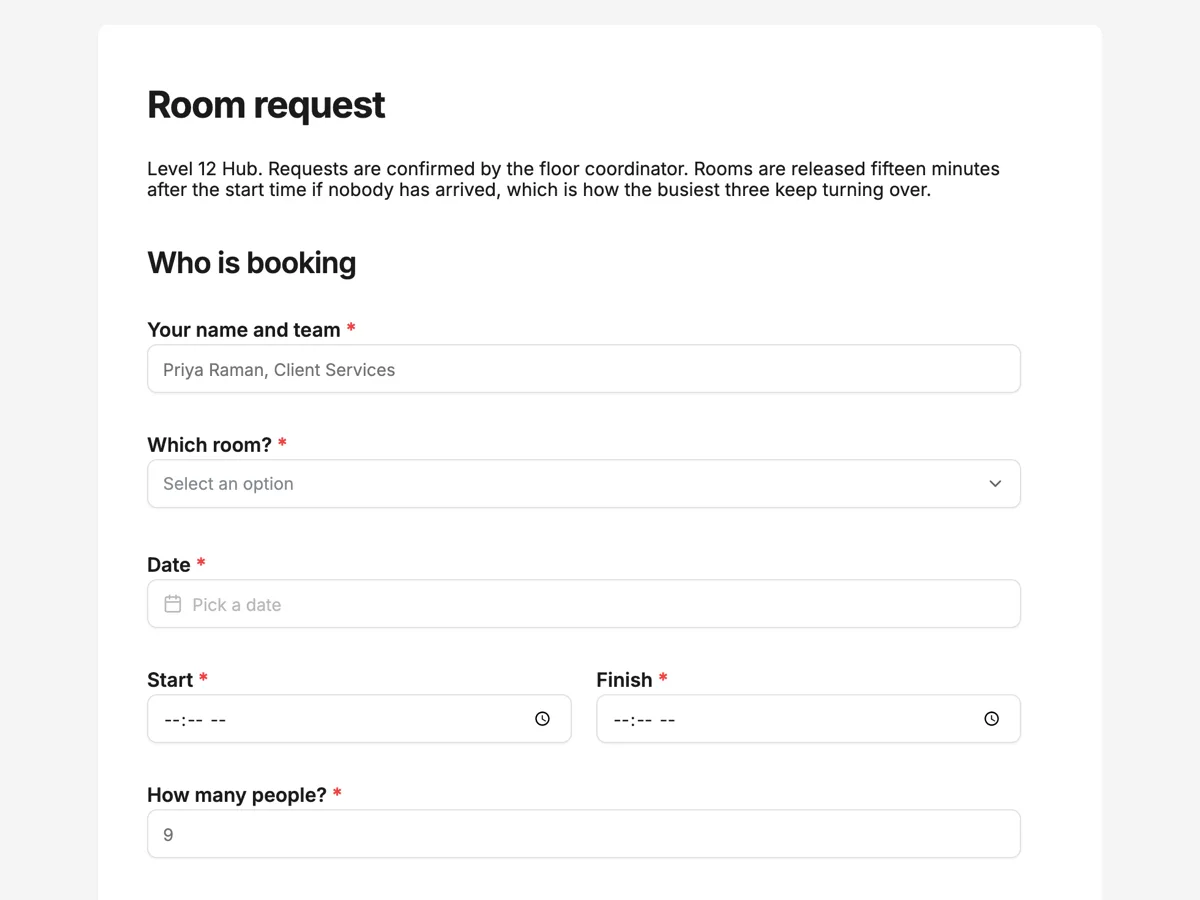
The form itself
A static copy of the finished form, exactly as it renders. Nothing here can be filled in or submitted, so read it as a reference and build your own from the button above.
Every field, and what it collects
The complete field list, in the order respondents meet it.
- Your name and teamShort textRequired
- Which room?DropdownRequired
- Options: Wattle, boardroom, seats 14 · Ironbark, meeting room, seats 10 · Banksia, meeting room, seats 8 · Kurrajong, huddle room, seats 4 · Melaleuca, huddle room, seats 4 · Training room, seats 40 theatre style · The whole floor lounge, standing event up to 80 · No preference, whatever fits
- DateDateRequired
- StartTimeRequired
- FinishTimeRequired
- How many people?NumberRequired
- LayoutSingle choiceRequired
- Options: Boardroom, one table, everyone facing in · U shape, open end at the screen · Theatre, rows facing forward · Cabaret, small round tables · Workshop, four clusters of six · Standing, no seating plan · As it is, do not move anything
- What do you need running?Multiple choice
- Options: Wall screen with a cable to the table · Wireless screen sharing · Video conference camera and room microphone · Hybrid setup, remote attendees joining as equals · Lapel or handheld microphone · Recording of the session · Whiteboard and markers · Printed handouts delivered to the room · Nothing, just the room
- CateringSingle choiceRequired
- Options: Nothing · Tea, coffee and water on arrival · Morning tea, one working day of notice · Working lunch, two working days of notice · Afternoon tea · Full day, arrival, lunch and afternoon tea
- Cost centre the room and catering are charged toShort textRequired
Who is booking
How the room should be set up
Catering and billing
What each field on this form collects
The first field takes the requester name and their team in one line, which is what the coordinator needs to route the confirmation. The room dropdown names seven rooms, plus a no preference option, and puts the seated capacity in every option, from a four person huddle room to the floor lounge at eighty standing. The date sits alone and the start and finish times share a row on a twenty four hour clock, which removes the morning and afternoon ambiguity that costs a room its first fifteen minutes. The headcount is a single number. The setup block opens with a paragraph explaining that rooms are set the evening before, then a seven option layout radio that ends with do not move anything, and a nine item audio visual tick list ending in nothing, just the room. The billing block is the catering radio with notice periods written into each option, a paragraph about dietary requirements, and a required cost centre field.
Why the capacity sits inside the room name
The most common failure in room booking is not a double booking, it is a mismatch: eleven people in a room that seats eight, or a two person catch up occupying the boardroom because it was the name somebody recognised. Putting the seated capacity in the option label solves both without a validation rule, because a requester choosing Banksia can see it seats eight while they are typing nine into the headcount field. The layout question does similar work further down. Rooms are set the evening before, so a layout chosen at request time is free and a layout chosen on the morning is somebody moving furniture while the meeting waits.
How to adapt this form
An office that charges for rooms replaces the cost centre field with a purchase order number and adds an hourly rate to each room option, which turns the dropdown into a price list and shortens the approval conversation. A building that hosts external visitors adds a visitor list table with name, organisation and arrival time, since reception needs it for passes and for the evacuation list. A team running hybrid meetings heavily can promote the hybrid setup tick to its own question asking how many people will join remotely, because a hybrid meeting with two remote attendees and one with twenty need different rooms, and that number is what the audio visual team actually plans against.
What makes this form work
Every room option names its capacity
Wattle seats fourteen, Kurrajong seats four, the lounge takes eighty standing. A requester typing nine into the headcount field can see whether the room they picked holds it, which prevents the mismatch that no validation rule would have caught.
Catering options carry their own notice period
Morning tea needs one working day, a working lunch needs two, and both say so in the option label. Nobody has to read a policy page, and the coordinator stops receiving lunch requests at nine in the morning for a midday meeting.
The layout list ends with do not move anything
Seven options, six of them real configurations and one that says leave the room as it is. It gives the majority of bookings an honest answer, so the layouts that are requested are the ones that genuinely need the floor team the evening before.
Questions people ask
Why use a twenty four hour clock for the start and finish times?
Because a room booked for two without an indication of morning or afternoon is the single most common cause of a clash, and a time field set to a twenty four hour format removes the ambiguity in one property. It also matches how most building and calendar systems store the value, so nothing has to be interpreted downstream.
Can the request go straight into the building system?
A webhook add-on posts each submission once as JSON, keyed by field label and by field id, with a ten second timeout and no retry, which is enough for a system that accepts an inbound hook. Because there is no retry, the stored responses remain the record and the coordinator still confirms by hand.
Why is the cost centre required?
Because a room and a catering order are charged somewhere, and chasing the code afterwards is the least popular job on the floor. Making it required costs the requester five seconds when they have the code in front of them and saves the coordinator a message a week later when they do not.
How should dietary requirements be collected?
Not on this form. The paragraph asks the requester to send them with the catering order to the coordinator, because a room request is filled in days ahead by one person while attendee lists change. Food businesses have to be able to say whether a dish contains a declared allergen, so the information has to reach the caterer, not sit in a booking record.
What does a hybrid setup mean as an audio visual option?
A room configured so remote attendees can see and hear everyone and be seen and heard in return, rather than a laptop propped at one end of a table. Industry guidance on audio visual design treats that as a room specification rather than an accessory, which is why it is listed separately from a video conference camera.
What happens if the requested room is taken?
The thank you screen says the reply offers the two closest alternatives rather than leaving the requester to look. That promise is only keepable because the form collected the headcount and the layout, which is what lets the coordinator judge which other room actually works.
Build your own in about a minute
The button below opens the generator with this use case already described. Change the wording to match your own, generate, then edit anything you like.
Make one like thisOther form examples
Car rental booking form with every driver named
A car rental booking is really two bookings, one for the car and one for the people allowed to drive it, and the second is where rentals go wrong. This booking form takes the vehicle class, the locations and the times in seven fields, then asks for every driver by name, licence number and expiry in a table.
Equipment hire booking form with the items as a table
A hire yard prices a booking from three columns, which are the item, how many and for how many days, and everything else on a hire form is about getting the gear to a site and back. This booking form takes those three as a table, asks what the truck will find when it arrives, and closes with the waiver and the terms signed.
Free consultation booking form that qualifies before the call
A free consultation booking form has to qualify the lead and get a call in the diary, without making the free call feel like an exam. This one asks the services, the goal, a budget band and the timeline in seven screens, then hands the visitor to a booking calendar through the redirect add-on.
Want the steps in the builder? Read Automate your form with add-ons, then Every form field and when to use it. For everything this generator can do, see the form maker.
Sources
Written and checked by the OneCraft team. Last checked .