Conversational form
Free consultation booking form that qualifies before the call
A free consultation booking form has to qualify the lead and get a call in the diary, without making the free call feel like an exam. This one asks the services, the goal, a budget band and the timeline in seven screens, then hands the visitor to a booking calendar through the redirect add-on.
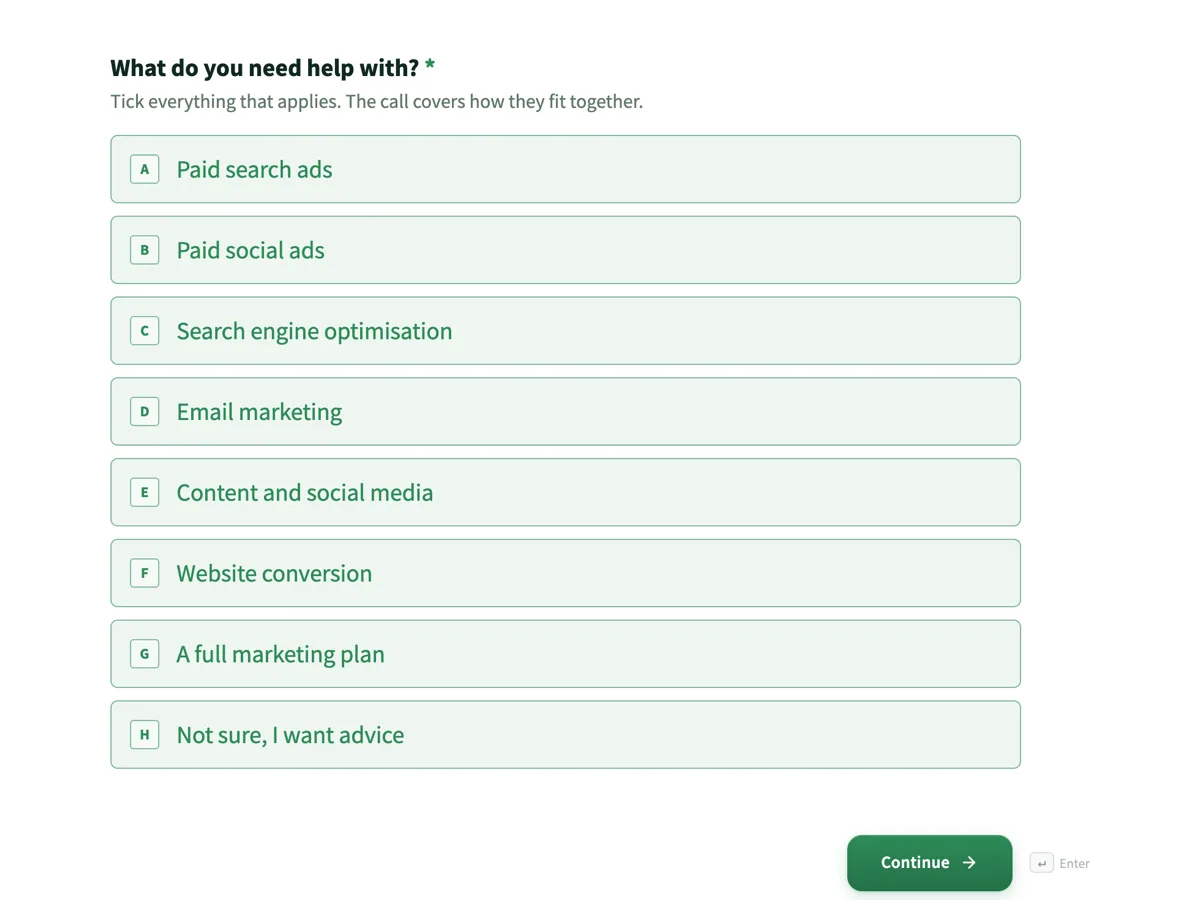
The form itself
The first screen of the form. A conversational form shows one question per screen, so the remaining screens are listed in the field table below. Nothing here can be filled in or submitted, so read it as a reference and build your own from the button above.
Every field, and what it collects
The complete field list, in the order respondents meet it.
- What do you need help with?Multiple choiceRequired
- Tick everything that applies. The call covers how they fit together.
- Options: Paid search ads · Paid social ads · Search engine optimisation · Email marketing · Content and social media · Website conversion · A full marketing plan · Not sure, I want advice
- What would make the next six months a success?Long textRequired
- A number is ideal, but a plain sentence works.
- What is your monthly marketing budget, including ad spend?Single choiceRequired
- This sets which options the strategist brings to the call. It is not a commitment.
- Options: Under $2,000 · $2,000 to $5,000 · $5,000 to $15,000 · Over $15,000 · Not set yet
- When do you want to start?Single choiceRequired
- Options: As soon as possible · Within a month · In one to three months · Just researching for now
- Which times suit you for a call?Multiple choiceRequired
- The calendar after this form shows the exact slots. These help the team open more of the times you prefer.
- Options: Weekday morning · Weekday lunchtime · Weekday afternoon · Weekday evening, before 7 pm
- Your website addressShort textRequired
- The strategist looks at it before the call. Write none yet if you do not have one.
- Who is the call with?ProfileRequired
What each screen of this booking asks, in order
Screen one is a required checkbox of eight services, ending in not sure, I want advice. Screen two asks what would make the next six months a success, with a placeholder showing two measurable answers. Screen three is the monthly budget including ad spend, in five bands, with help text saying it is not a commitment. Screen four is the start date, from as soon as possible to just researching. Screen five is a checkbox of four call time windows. Screen six is the website address, with none yet allowed. Screen seven is a profile block for the name and role, a work email and a phone number. The owner turns on the redirect add-on and points it at the booking calendar, so submitting opens the calendar.
How the redirect add-on changes the ending
With a redirect URL set, the form follows it about 300 milliseconds after the response is saved and never shows the thank-you screen. That is the point here: the visitor goes from the last answer to a calendar with real slots, while the strategist already has the goal, budget and website. The thank-you screen is still written, with an open the calendar button, because it is what a visitor sees if the add-on is switched off. The preferred times screen does not book anything; it tells the team which times to open more of.
How to adapt this form
A law firm offering a free first meeting replaces services with the area of law, removes the budget band, and adds a conflict check question asking the names of other parties. An accountant swaps the website for the business structure and turnover band. A design studio keeps the budget band, adds a question on whether there is a brand guide, and points the redirect at a calendar that only offers afternoon slots.
What makes this form work
The form ends in a calendar
The redirect add-on sends the visitor to a booking calendar as soon as the answers are saved. The qualifying questions and the time slot happen in one sitting, and nobody waits for an email with a link.
Every screen has an honest way out
Not sure on services, not set yet on budget, just researching on timing, none yet on the website. Each lets a real prospect answer truthfully, which is what makes the answers worth reading before the call.
The goal comes with an example of a number
The placeholder shows twice the enquiries and a cost per lead under $40. It nudges visitors toward a measurable answer, and the strategist opens the call with the number instead of asking for it.
Questions people ask
Should a free consultation form ask for a budget?
Yes, if it is framed as setting the options rather than as a gate. The help text here says it is not a commitment, and a not set yet answer is offered. The strategist then brings ideas that fit the money, which makes the free call more useful to the visitor, not less.
How does the visitor pick the exact time?
Through a booking calendar the agency already uses. The owner sets the form's redirect add-on to the calendar page, and the browser goes there about 300 milliseconds after the answers are saved. The form records the request; the calendar holds the slot. Both are needed, and neither replaces the other.
Why does the form ask for the website before the call?
So the strategist can look at it first. A site that loads slowly on a phone or has no clear contact page changes the advice, and finding that during the call wastes half of it. The help text allows none yet, because new businesses book these calls too and should not be stopped by the field.
Why is the goal a written answer instead of a list?
Because goals sound similar in a list and differ in the detail. Twice the enquiries and a cost per lead under $40 are both more leads, but they lead to different plans. The placeholder shows both, and the help text accepts a plain sentence from anyone without a number in mind.
What does the just researching answer do?
It lets the visitor be honest about timing, and it lets the agency prepare a different call: an overview and a plan to come back to, not a proposal for next week. Without it, people pick as soon as possible to seem serious, and the follow up lands badly when they were never ready.
Why ask for the role as well as the name?
Because a call with the owner of a business and a call with a marketing coordinator go differently. The owner can decide on budget during the call; a coordinator usually gathers options for someone else. Knowing the role lets the strategist bring the right level of detail and plan a follow up for the person who decides.
Build your own in about a minute
The button below opens the generator with this use case already described. Change the wording to match your own, generate, then edit anything you like.
Make one like thisOther form examples
Tutoring session booking form with subject, format and free times
A tutoring session booking form has to match a student to a tutor who teaches the subject at that year level, in the right format, at a time both are free. This one asks each of those on its own screen, uses a weekly grid for availability, and asks what the first session should cover so it starts on real work.
Meeting room booking form with catering and AV in one request
A meeting room request that arrives without a layout, a headcount and a cost centre becomes three emails and a coordinator moving chairs while eight people wait in a corridor. This booking form asks for all three in ten fields, puts the seated capacity beside every room name, and states the notice period on each catering option.
Car rental booking form with every driver named
A car rental booking is really two bookings, one for the car and one for the people allowed to drive it, and the second is where rentals go wrong. This booking form takes the vehicle class, the locations and the times in seven fields, then asks for every driver by name, licence number and expiry in a table.
Want the steps in the builder? Read Automate your form with add-ons, then Create a conversational form with AI. For everything this generator can do, see the form maker.
Sources
Written and checked by the OneCraft team. Last checked .