Conversational form
Tutoring session booking form with subject, format and free times
A tutoring session booking form has to match a student to a tutor who teaches the subject at that year level, in the right format, at a time both are free. This one asks each of those on its own screen, uses a weekly grid for availability, and asks what the first session should cover so it starts on real work.
The form itself
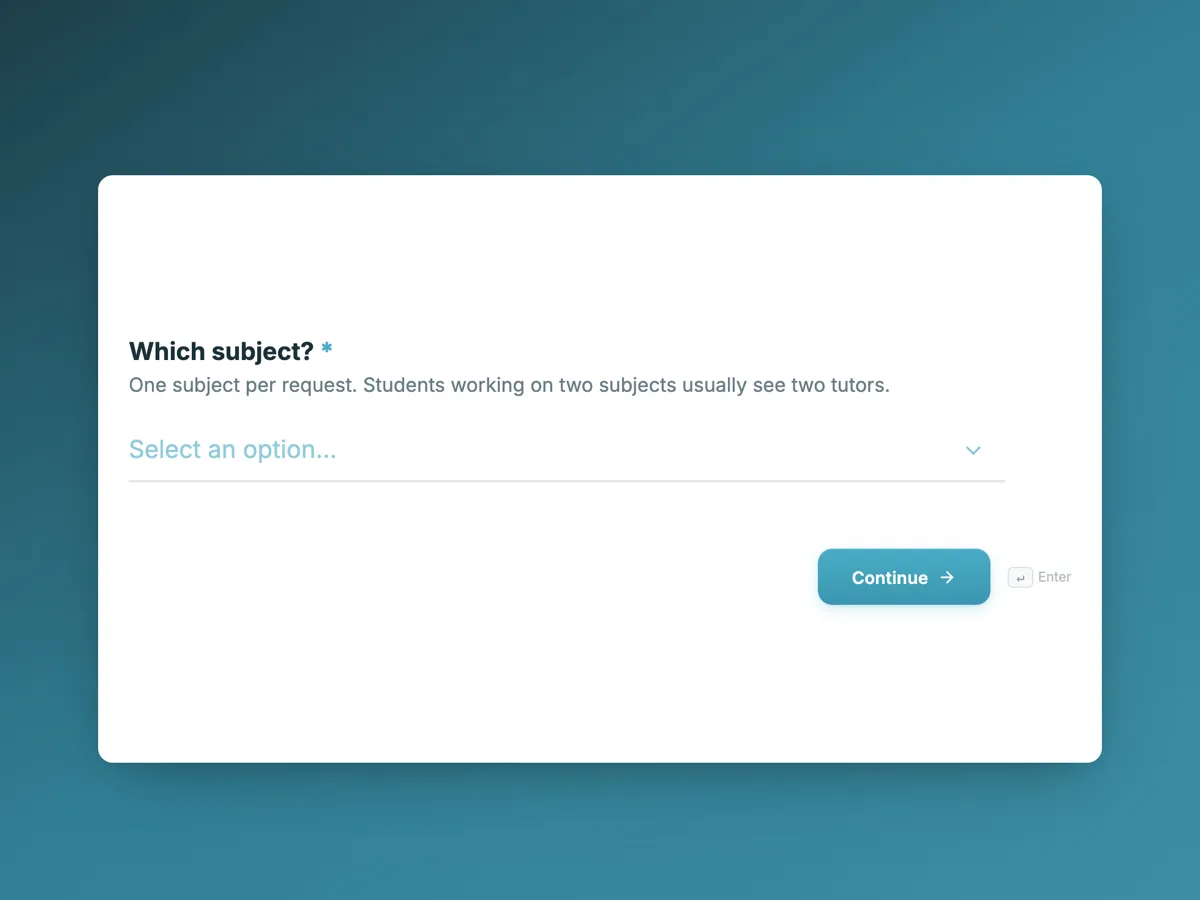
The first screen of the form. A conversational form shows one question per screen, so the remaining screens are listed in the field table below. Nothing here can be filled in or submitted, so read it as a reference and build your own from the button above.
Every field, and what it collects
The complete field list, in the order respondents meet it.
- Which subject?DropdownRequired
- One subject per request. Students working on two subjects usually see two tutors.
- Options: Maths · Advanced maths · English · Essay writing · Science · Chemistry · Physics · Biology · A second language · Exam preparation
- What year or grade is the student in?DropdownRequired
- Options: Year 3 or 4 · Year 5 or 6 · Year 7 or 8 · Year 9 or 10 · Year 11 · Year 12 · University or adult
- Online or in your home?Single choiceRequired
- Online sessions use a shared whiteboard and need a laptop or tablet with a camera. In home tutors travel up to 10 kilometres, and a parent or guardian must be home for the whole session.
- Options: Online · In home · Either is fine
- How many sessions are you after?Single choiceRequired
- Options: One session to see how it goes · Weekly for a school term · Twice a week for a school term · A block of five before an exam
- How does the student feel about this subject right now?Single choiceRequired
- Ask the student. Their answer, not the report card, tells the tutor how to pace the first session.
- Options: Lost, and avoiding it · Behind, but trying · Doing fine, wants to do better · Ahead, wants to be stretched
- When is the student free?Rating gridRequired
- Tick every time that could work. More ticks means a faster match.
- Statements:
- Monday
- Tuesday
- Wednesday
- Thursday
- Friday
- Weekend morning
- What should the first session cover?Long textRequired
- Something specific from the last few weeks of class works best, such as fractions, a novel being studied or an assignment due date.
- Parent or guardian contactProfileRequired
What each screen of this booking asks, in order
Screen one is the subject as a dropdown of ten, one per request. Screen two is the year or grade, from Year 3 to university. Screen three is the format: online with a shared whiteboard, in home within 10 kilometres with a parent present, or either. Screen four is the number of sessions, from a single trial to a block of five before an exam. Screen five asks how the student feels about the subject, from lost to ahead. Screen six is the availability grid: six rows, Monday to Friday and a weekend morning, against three time bands, with any number of ticks per row. Screen seven asks what the first session should cover. Screen eight is a profile block for the parent or guardian.
Why availability is a grid
Asking a parent for a preferred time gets one answer, usually Tuesday at four, and the tutor who is free on Wednesday evening never gets matched. The grid asks for every time that could work, eighteen cells in all, and the help text says more ticks means a faster match. It is a checkbox grid, so a row can carry several ticks. One thing to know: a required grid is satisfied once any single row is answered, so the form guarantees at least one free slot, not a full week.
How to adapt this form
A music teacher swaps the subject for the instrument, the year for the grade level reached, and asks whether the student has an instrument at home. An adult language school drops the parent profile for the learner's own contact and replaces the confidence screen with a self rated level. A university study support service removes the in home option entirely, adds the course code, and limits sessions to the number the department funds.
What makes this form work
Eighteen time slots instead of one
The availability grid crosses six days with three time bands and lets every workable cell be ticked. A parent who would have typed Tuesday at four gives the tutor coordinator every option, and the match comes faster.
The student's own read on the subject
Lost and avoiding it, behind but trying, doing fine, or ahead. Four honest answers that the help text tells the parent to take from the student, which tells the tutor more about session one than a grade does.
Session one starts on real work
A required question asks what the first session should cover, with examples of a good answer. The tutor arrives with a test, a topic or an assignment to work on, not a blank hour.
Questions people ask
Who should fill in a tutoring booking form, the parent or the student?
For a school student, the parent, because the booking, the payment and any in home visit are their responsibility, and the profile block takes the parent's details. The welcome screen suggests the student sits nearby, since the confidence question and the first session topic are theirs to answer. An adult learner fills it in alone.
Why does an in home session need a parent at home?
It is a standard safeguarding rule for anyone working one to one with a child in a private house, alongside the background checks tutors hold. The help text states it on the format screen so a family choosing in home knows before the tutor is matched, rather than finding out at the door.
What does the confidence question change?
The pace and the start of session one. A student who is lost and avoiding the subject needs a first session that finds solid ground and builds from it. One who wants to be stretched needs harder problems quickly. The same report card grade can hide either, which is why the help text asks for the student's own answer.
Why is the first session topic required?
Because a first session with no topic turns into an hour of general revision. Something specific from the last few weeks of class, fractions, a set novel or an assignment due date, gives the tutor something to prepare and the student a reason to come back. The placeholder gives three examples of a good answer.
Can one request cover two subjects?
No, the subject screen asks for one and its help text says students working on two usually see two tutors. A maths tutor and an English tutor are rarely the same person. A family that wants both sends the form twice, and each request is matched separately with its own availability grid.
How is a tutor matched from this form?
The coordinator filters tutors by subject and year first, then by format, then looks for overlap between the student's ticks in the availability grid and the tutor's free times. The confidence answer helps choose between two tutors who both fit. The thank-you screen promises a call within two days, which is when the match is confirmed.
Build your own in about a minute
The button below opens the generator with this use case already described. Change the wording to match your own, generate, then edit anything you like.
Make one like thisOther form examples
Tour booking form that asks about fitness before the date
A day tour is ruined for everybody when one person is on a walk that is two grades harder than they expected, and no booking system catches that. This tour booking form names the distance, the climb and the grading in every option, then asks the group to describe the least fit person coming, in words that make the honest answer easy to give.
Free consultation booking form that qualifies before the call
A free consultation booking form has to qualify the lead and get a call in the diary, without making the free call feel like an exam. This one asks the services, the goal, a budget band and the timeline in seven screens, then hands the visitor to a booking calendar through the redirect add-on.
Kids party booking form for a play centre
A kids party booking form has to fix the package, the session and the number of children, because those three decide the room, the party host and the food order. This one adds the cake, a plain allergy question with a privacy note above it, and the parent's signature that makes the waivers their job.
Want the steps in the builder? Read Create a conversational form with AI, then Form builder components. For everything this generator can do, see the form maker.
Written and checked by the OneCraft team. Last checked .