Classic form
Performance review form
Most review forms fail in the same place: the objectives from last period are nowhere on the page, so the rating gets argued from memory. This one puts them in a table with the measure beside them, keeps the behaviour grid to six statements with a "not seen" column, allows exactly one rating, and gives the employee a box to disagree in writing. It is a classic form, because a manager writing it up needs the whole record visible at once.
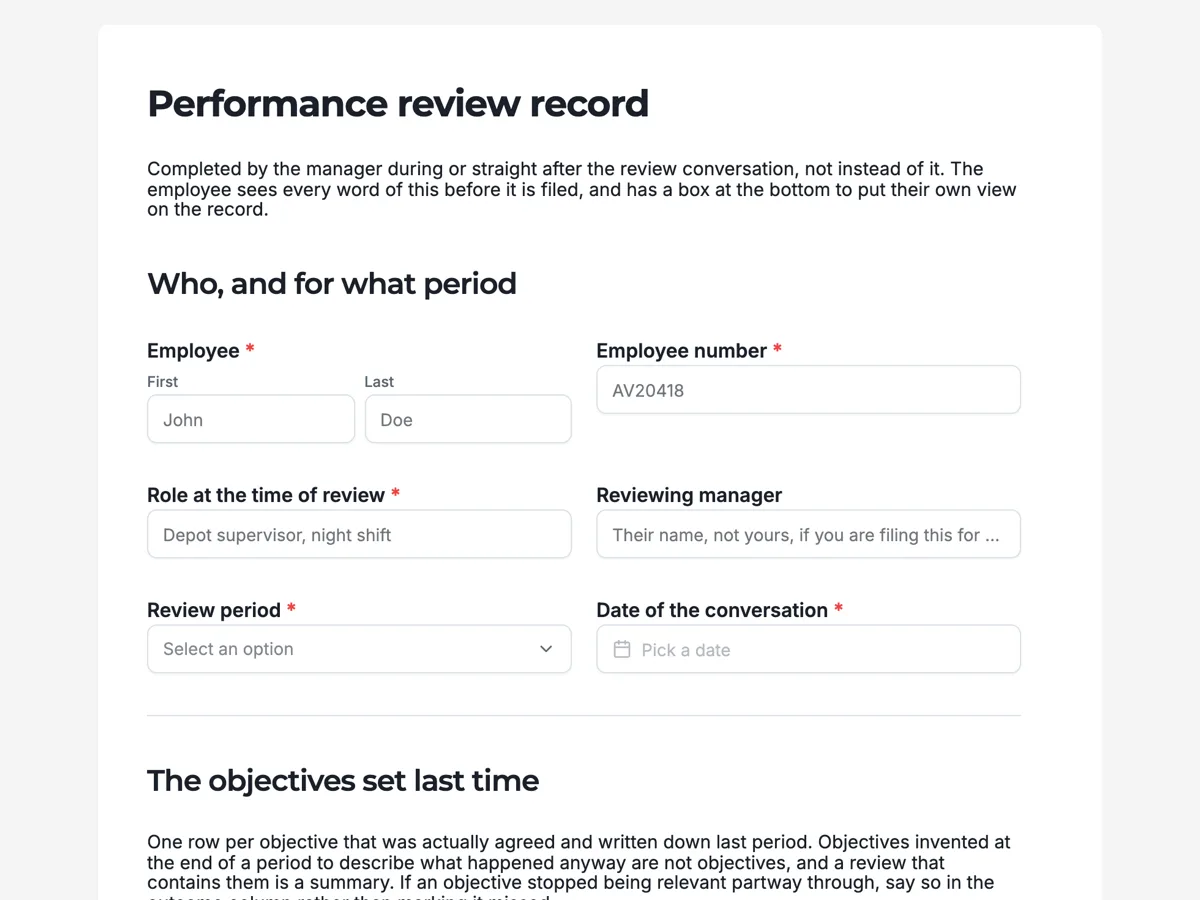
The form itself
A static copy of the finished form, exactly as it renders. Nothing here can be filled in or submitted, so read it as a reference and build your own from the button above.
Every field, and what it collects
The complete field list, in the order respondents meet it.
- EmployeeNameRequired
- Employee numberShort textRequired
- Role at the time of reviewShort textRequired
- Reviewing managerShort text
- Review periodDropdownRequired
- Options: Annual · Mid year · End of probation · End of a fixed term · Out of cycle, after a role change
- Date of the conversationDateRequired
- Objectives and what happenedTable
- Columns: Objective as it was written · How it was to be measured · What actually happened · Met, partly, or overtaken
- Anything that changed the ground under these objectivesLong text
- Against what the role asks forRating gridRequired
- Statements:
- Quality of the finished work
- Reliability of dates and commitments
- Handles the parts of the job nobody enjoys
- Communicates a problem while it is still small
- Makes the people around them better at their jobs
- Judgement when the rules do not cover it
- Overall rating for the periodDropdownRequired
- Options: Did not meet the role · Met most of the role · Met the role · Exceeded the role · Outstanding, and repeatably so
- Is this a change from last period?Single choiceRequired
- Options: Same as last time · Up one band · Down one band · First review in this role
- What they did best, described so somebody else could recognise itLong textRequired
- The one thing that would make the biggest difference next periodLong textRequired
- Objectives agreed for the coming periodTable
- Columns: Objective · How we will know it is done · By when
- Next check in, not next reviewDate
- Development spend agreed, if anyShort text
- Employee commentLong text
- Does the employee agree with the overall rating?Single choiceRequired
- Options: Yes · Partly, and it is noted above · No, and it is noted above · They want time to respond in writing
- Signed at the end of the meetingSignature
Who, and for what period
The objectives set last time
How the work was done
The overall picture
What the next period is for
The employee's own words
What makes this form work
Last period's objectives are on the page, with their measure
Four columns: the objective as it was written, how it was to be measured, what actually happened, and whether it was met, partly met or overtaken by events. The last option matters, because an objective the business cancelled is not a failure and a form with no way to say so records it as one.
One rating, and a question about whether it moved
A single five band dropdown, paired with whether it went up, down or stayed. Two fields carry the whole judgement, so there is no scoring system to game and no weighted average to argue with. The reasoning lives in the two written questions underneath.
Disagreement has somewhere to go
A comment box the paragraph above hands to the employee, and a question asking outright whether they agree with the rating, including an option to respond in writing later. A review somebody disputes is still valid; the dispute being recorded at the time is what makes the file defensible a year on.
Questions people ask
Should the review form carry the rating and the pay decision together?
No, and this one deliberately does not. The record is written first and read against every other manager's in the department before anything attached to it is decided. Putting a number on the same page invites the rating to be reverse engineered from the budget, and it makes the form impossible to share with the employee in full.
Why does the behaviour grid have a "not seen" column?
Because a manager who has genuinely not observed something will otherwise mark the middle, and a middle mark is read as a judgement rather than an absence. Four columns is also the practical ceiling for a grid on a phone: past that, the last column sits off the edge and the respondent has to scroll the grid sideways to reach it.
How do the two objective tables come out in the export?
Each table arrives as a single column holding its filled rows as JSON, not as separate spreadsheet columns, and the same is true of the rating grid, which comes back as one column of statement and answer pairs. For reading one review that is fine. For pulling a department's objectives into a spreadsheet, plan on a parsing step.
Can the employee fill in their part on the same form?
The comment box and the agreement question are on this form and are meant to be completed with the employee present, which is how a paper review has always worked. If you want them to write independently beforehand, that is a separate self assessment form sent to them, and the two records are read together.
Should a review form book the next check in?
Yes, and this form asks for it explicitly as the next check in, not the next review. A twelve month gap is what turns a review into a surprise. Setting a date in the meeting, while both people are in the room, is the only reliable way the interim conversation actually happens.
Why ask whether the rating changed from last period?
Because the direction carries more information than the level. This form asks it directly under the overall rating. A steady three and a three that was a four last period are different conversations, and recording the change means the next reviewer can see a trajectory rather than a single snapshot.
Build your own in about a minute
The button below opens the generator with this use case already described. Change the wording to match your own, generate, then edit anything you like.
Make one like thisOther form examples
360 feedback form
A 360 round fails when raters score a personality instead of a behaviour, and when there is nowhere honest to say they have not seen something. This form asks fifteen behaviours on a frequency scale with a "not seen" column, then three written questions that between them produce the only part of the report anybody rereads. It is conversational, because a rater who meets one grid at a time writes longer answers than one facing three at once.
Self assessment form
A self assessment collapses when it is written the night before the meeting and asks for a rating first. This one asks for the record before the reflection, gives the misses their own question, and ends on the one thing a manager can act on immediately. It is a conversational form, asked one question per screen, because written answers get longer when nothing else is on the page competing for the box.
Reference check form
A reference done by phone produces notes nobody can find and a memory of a tone of voice. Sent as a form, it produces the same four facts every time, a rating grid the referee can honestly leave blank, and the rehire answer in the referee's own words. This one is written for UK employers, and it is a classic form, because a referee wants to see the whole thing before starting and answer the parts they can.
Want the steps in the builder? Read Every form field and when to use it, then Shape the PDF version of your form. For everything this generator can do, see the form maker.
Written and checked by the OneCraft team. Last checked .