Classic form
Photo consent form for a childcare centre, one use at a time
A photo consent form records where a child's photo may be used, for how long, and how a parent can withdraw that permission. This one asks Australian childcare families yes or no for four separate uses, whether a first name may appear, and whether there is a safety reason the child must not be identifiable.
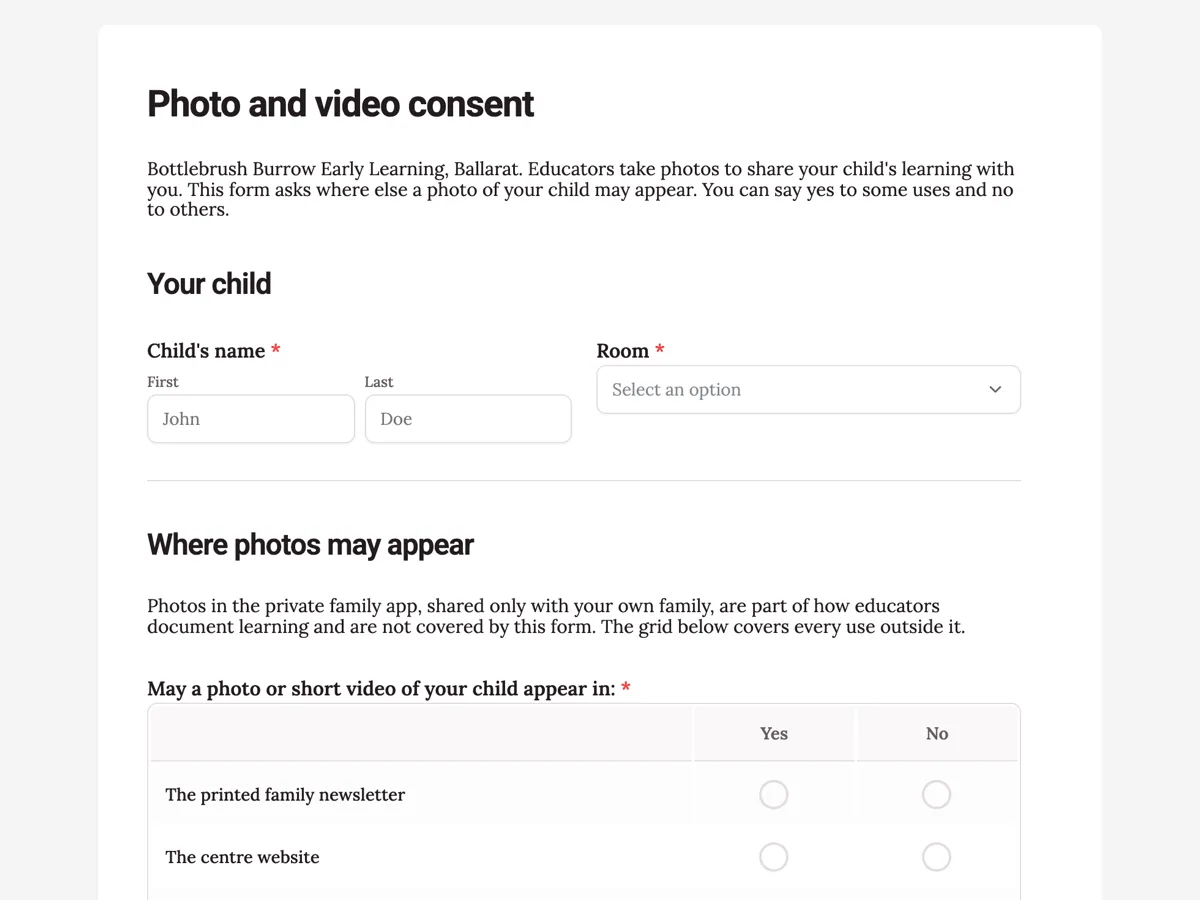
The form itself
A static copy of the finished form, exactly as it renders. Nothing here can be filled in or submitted, so read it as a reference and build your own from the button above.
Every field, and what it collects
The complete field list, in the order respondents meet it.
- Child's nameNameRequired
- RoomDropdownRequired
- Options: Joeys (0 to 2) · Possums (2 to 3) · Wombats (3 to 4) · Kookaburras (kindergarten)
- May a photo or short video of your child appear in:Rating gridRequired
- Statements:
- The printed family newsletter
- The centre website
- The centre's public social media pages
- Wall displays inside the centre
- If a photo is used, may your child's first name appear with it?Single choiceRequired
- Options: Yes, first name only · No, no name at all
- How long should this consent last?Single choiceRequired
- Options: Until the end of this year · Until my child leaves the centre
- Safety concerns the director should know aboutLong text
- Parent or guardian nameNameRequired
- Relationship to the childSingle choiceRequired
- Options: Parent · Guardian · Kinship carer
- SignatureSignatureRequired
Your child
Where photos may appear
Changing your mind
What each field on this form collects
The child's name sits beside a room dropdown of four age groups. A paragraph explains that the private family app is outside the form. The grid asks yes or no for four uses: the printed newsletter, the website, public social media and wall displays. A radio asks whether the first name may appear, and another sets the duration, to the end of the year or until the child leaves. A paragraph introduces the safety concerns box, which is optional and read only by the director. The withdrawal paragraph comes before the guardian's name, relationship and signature. Eight of the nine fields are required.
Why one yes or no per use
A single "I consent to photos" tick hides the choice most parents want to make. Many are happy for a painting day photo on the room wall and uncomfortable with the same photo on a public page. A grid of four rows lets them say exactly that, and it gives educators a lookup they can check in seconds. The name question is separate because a photo with a first name is easier to link to a child than a photo alone. The safety box exists for the families who most need a no: a child under a protection order should never be identifiable online.
The Australian rules behind it
The Education and Care Services National Regulations require approved services to have policies on child safe environments, and many state child safe standards ask services to manage online images of children. A photo of an identifiable child is personal information under the Privacy Act 1988, and the OAIC advises getting consent before publishing one. The eSafety Commissioner's guidance for parents covers the risks of sharing images of children publicly. The form keeps the private family app separate, because documenting learning is part of the service, while public uses are the parent's choice.
How to adapt this form
A primary school adds rows for the yearbook and local newspaper and asks the duration by school year. A sports club swaps the rooms for age groups and adds a row for match day photographers. A family day care educator drops the website row and keeps the newsletter and displays.
What makes this form work
Four uses, four answers
The newsletter, the website, public social media and wall displays each get a yes or no row, so a parent can allow the room wall and refuse every public page.
Names asked separately
A radio decides whether the child's first name may appear with a photo, the detail that makes a child easiest to identify online.
A private box for safety
The optional safety concerns field, read only by the director, catches the families whose child must not be identifiable because of a court or intervention order.
Questions people ask
Is a photo consent form required for childcare in Australia?
The national regulations do not name a photo form, but services must protect children's privacy and safety, and publishing an identifiable photo without consent creates real risk. Most services treat written consent for each public use as essential, and authorised officers expect to see a clear policy and records that educators follow.
Can a parent say yes to wall displays and no to social media?
Yes, that is the point of the grid. Each use has its own yes or no row, so a family can allow photos inside the centre and refuse every public use. Educators check the child's row before posting anything, which is easier than reading a paragraph of conditions on each file.
What if two parents disagree?
Most services follow the more restrictive answer until both parents agree, because a photo published cannot be fully recalled. The form takes one guardian's signature, so the director should ask whether the other parent has been consulted when a family situation is known to be complex, and record the outcome.
Why ask about court orders on a photo form?
Because a published photo can reveal where a child spends each day. A parent with an intervention order may need the child kept off every public page, whatever the other answers say. The question is optional, read only by the director, and introduced by a paragraph so parents understand why it is asked.
How long should photo consent last?
This form offers two choices: to the end of the year, or until the child leaves. A yearly renewal suits services that change rooms and staff each year and gives families a regular chance to reconsider. Either way, a parent can withdraw at any time in writing, which the form states before the signature.
Does withdrawing consent remove old photos?
It stops new uses straight away, and the form promises website and social media photos come down within five business days. Printed newsletters already sent home cannot be recalled, and the form says so honestly. Being clear about what can and cannot be undone is part of informed consent.
Build your own in about a minute
The button below opens the generator with this use case already described. Change the wording to match your own, generate, then edit anything you like.
Make one like thisOther form examples
Medication consent form for childcare, dose by dose
A medication consent form for childcare has to authorise educators to give a named medicine at a set dose, time and route, and show when the child last had it. This one puts those four details in a table copied from the pharmacy label, then asks the reason, prescriber, expiry, storage and last dose before a guardian signs.
Parental consent form for a whole club season
A parental consent form for a sports club has to say which activities the child may join, who may drive them, what happens if they are hurt and whether they can be photographed. This one covers a whole junior football season at once, with a medications table for the coach and a guardian signature.
Research participant consent form with a withdrawal clause
A research participant consent form has to show that the participant read the information sheet, agreed to each use of their data separately and knew how to withdraw. This one does that for a university sleep study, with three data statements ticked one by one, a recording choice, a dated withdrawal cut off and both participant and researcher signatures.
Want the steps in the builder? Read Form builder components, then Design your welcome and thank-you screens. For everything this generator can do, see the form maker.
Written and checked by the OneCraft team. Last checked .