Classic form
Product order form
A wholesale order form template should capture the account, the order lines, where the goods go and where the invoice goes, and nothing else. This one is built the way a trade desk receives orders from existing trade accounts. It captures the business name and trade account number, who is ordering, a purchase order number, a five row order table with item code, product, variant and quantity, a delivery address with dock or level, a delivery method and requested date, and a billing address that is asked for rather than assumed. About four minutes.
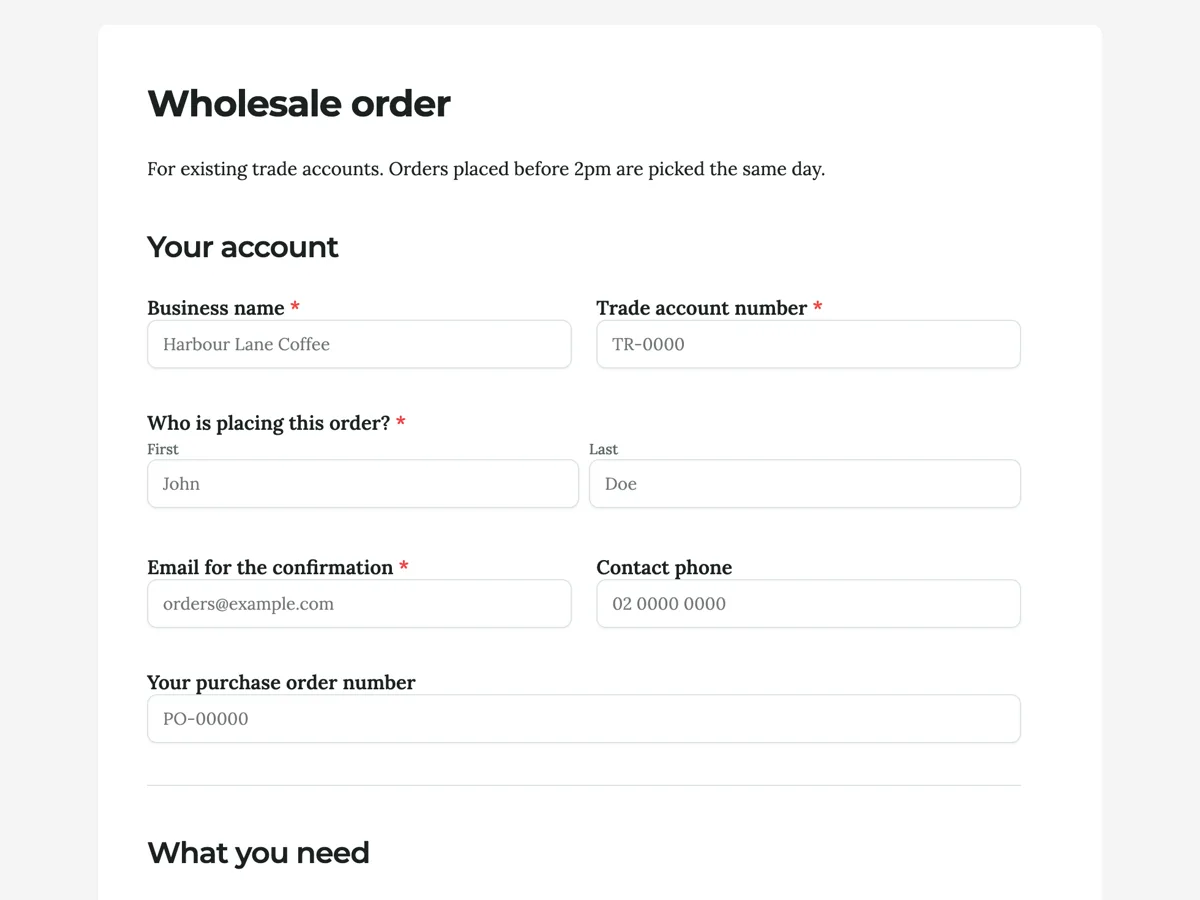
The form itself
A static copy of the finished form, exactly as it renders. Nothing here can be filled in or submitted, so read it as a reference and build your own from the button above.
Every field, and what it collects
The complete field list, in the order respondents meet it.
- Business nameShort textRequired
- Trade account numberShort textRequired
- Who is placing this order?NameRequired
- Email for the confirmationShort textRequired
- Contact phoneShort text
- Your purchase order numberShort text
- If your accounts team needs one on the invoice, put it here.
- Order linesTable
- One product per row. Leave rows blank if you do not need them.
- Columns: Item code · Product · Size or variant · Quantity
- Deliver toAddress
- Delivery methodSingle choiceRequired
- Options: Standard, 2 to 4 business days · Express, next business day · Pick up from the warehouse
- Requested delivery dateDate
- We will get as close as we can.
- Delivery instructionsLong text
- Is the billing address the same as the delivery address?Single choiceRequired
- Options: Yes, same as above · No, it is different
- Billing address, if differentAddress
- Accounts payable emailShort text
- Anything else?Long text
- ConfirmMultiple choiceRequired
- Options: I am authorised to order on this trade account · I accept the current trade price list and payment terms
Your account
What you need
Delivery
Billing
What each section is for
Your account identifies the business and the person. Business name, trade account number, the orderer's name and a confirmation email are required, because the trade desk cannot price or confirm an order without them. Contact phone and purchase order number are optional. What you need holds the order table. Delivery asks where, how and when, with only the delivery method required, since a pick up order has no address. Billing asks the one required question about the billing address, then offers the fields a buyer with a separate head office fills in. The form closes on a required Confirm block covering authority to order and acceptance of the price list.
How the trade desk works from the responses
Every order arrives as one row in the responses table and in the CSV export. The order table comes through as a single column holding the filled rows, so a desk that picks from a spreadsheet splits that column once and keeps the rest. An email alert add-on can send each new order to the trade desk inbox, and a webhook can push it into a stock system that accepts JSON. The confirmation with pricing and a despatch date is then written by a person on the desk, which is also the moment to check stock and the requested delivery date against what is really on the shelf.
Adapting it for retail or a single product
For a retail shop taking orders from the public, remove the trade account number and the purchase order field, add a short text field for a promo code if you run them, and send buyers to your checkout from the thank-you button. For a single product such as firewood or a bulk coffee subscription, swap the table for a quantity number field and a variant dropdown. Keep the billing question in every version where the payer and the receiver can differ.
What makes this form work
Order lines are a table
The Order lines table gives five rows with Item code, Product, Size or variant and Quantity in their own columns, and the section heading What you need sits above it. A short order simply leaves the lower rows empty. Each part of an order lands in a known column, so the picker reads codes and quantities rather than untangling a paragraph, and the export drops straight into a spreadsheet.
Billing is asked, not assumed
A required question asks whether the billing address is the same as the delivery address. Below it sit a Billing address, if different block and an accounts payable email, which a buyer who answered yes leaves empty. In trade, goods go to a site and invoices go to head office more often than not, and a wrong address on a tax invoice means reissuing it before it can be paid.
The purchase order number is on the form
The optional "Your purchase order number" field sits in the account section, before any order line, so a buyer whose accounts team needs one on the invoice meets it early. Capturing it at order time is what lets the invoice be paid within terms. Chasing a PO after invoicing is how a 30 day term quietly becomes 60.
Questions people ask
What should a product order form include?
Customer and contact details, the products with quantities, a delivery address and method, and billing details. For trade, add an account number and a purchase order field. Everything past that should earn its place by changing what the warehouse or accounts team does with the order, which is why this example has no marketing questions and no rating of the last delivery.
Can this form take payment?
This example captures the order for an existing trade account, which is invoiced afterwards on the account's terms. For card payment, point the thank-you screen button at your checkout page instead. Most trade buyers expect an invoice they can match to a purchase order, so taking a card on the order form usually suits a retail shop better than a wholesaler.
Why a table instead of one product per field?
A table handles an order of one line or five without changing the form, and it exports to a spreadsheet in a shape a warehouse can pick from. Separate fields for product one, product two and product three would need a new form every time an account ordered more lines, and every empty field would still sit in the export as a blank column.
What does the confirmation checkbox at the end do?
The required Confirm block has two lines: that the person is authorised to order on the trade account, and that they accept the current trade price list and payment terms. A delivery instructions box and an "Anything else?" field sit just above it, so the special notes a driver needs arrive with the order rather than in a separate email.
Why does the form ask for a purchase order number?
Because most trade buyers cannot pay an invoice without one. This form asks for it in the account section, before the order lines. Collecting it at order time avoids the invoice sitting unpaid for a month while accounts payable and the buyer work out which reference it should have carried.
Should the delivery date be a request or a promise?
A request, and this form labels it as one. It asks for a requested delivery date beside the delivery method and the instructions. Wholesale stock moves when it moves, and a field that reads like a commitment creates a dispute the first time a container is late through no fault of yours.
Build your own in about a minute
The button below opens the generator with this use case already described. Change the wording to match your own, generate, then edit anything you like.
Make one like thisOther form examples
Cake order form with the lead time and deposit rule on it
Most cake orders go wrong at the first message, when the date, the serves and the picture arrive across three chats. This form takes all of it in one go and says, before the customer types anything, how many days notice a custom cake needs and what the deposit is.
New vet client form with the pet record and the consent together
A vet's first consult is shorter when the microchip number, the last vaccination and the previous clinic's name are already on file. This form collects the owner, one pet and the consent a clinic needs, and asks for the previous vet so the records arrive before the appointment does.
Class booking form
A single class is a small booking with a surprising number of ways to go wrong: the wrong session, a second person who was never counted, and a student who cannot grip clay for three hours. This booking form asks the four things that decide whether the class runs well and states the two rules that cause every argument. It is conversational, because it is answered on a phone from a studio Instagram post.
Want the steps in the builder? Read Create a form from scratch with AI, then View, export and manage your responses. For everything this generator can do, see the form maker.
Written and checked by the OneCraft team. Last checked .