Classic form
New vet client form with the pet record and the consent together
A vet's first consult is shorter when the microchip number, the last vaccination and the previous clinic's name are already on file. This form collects the owner, one pet and the consent a clinic needs, and asks for the previous vet so the records arrive before the appointment does.
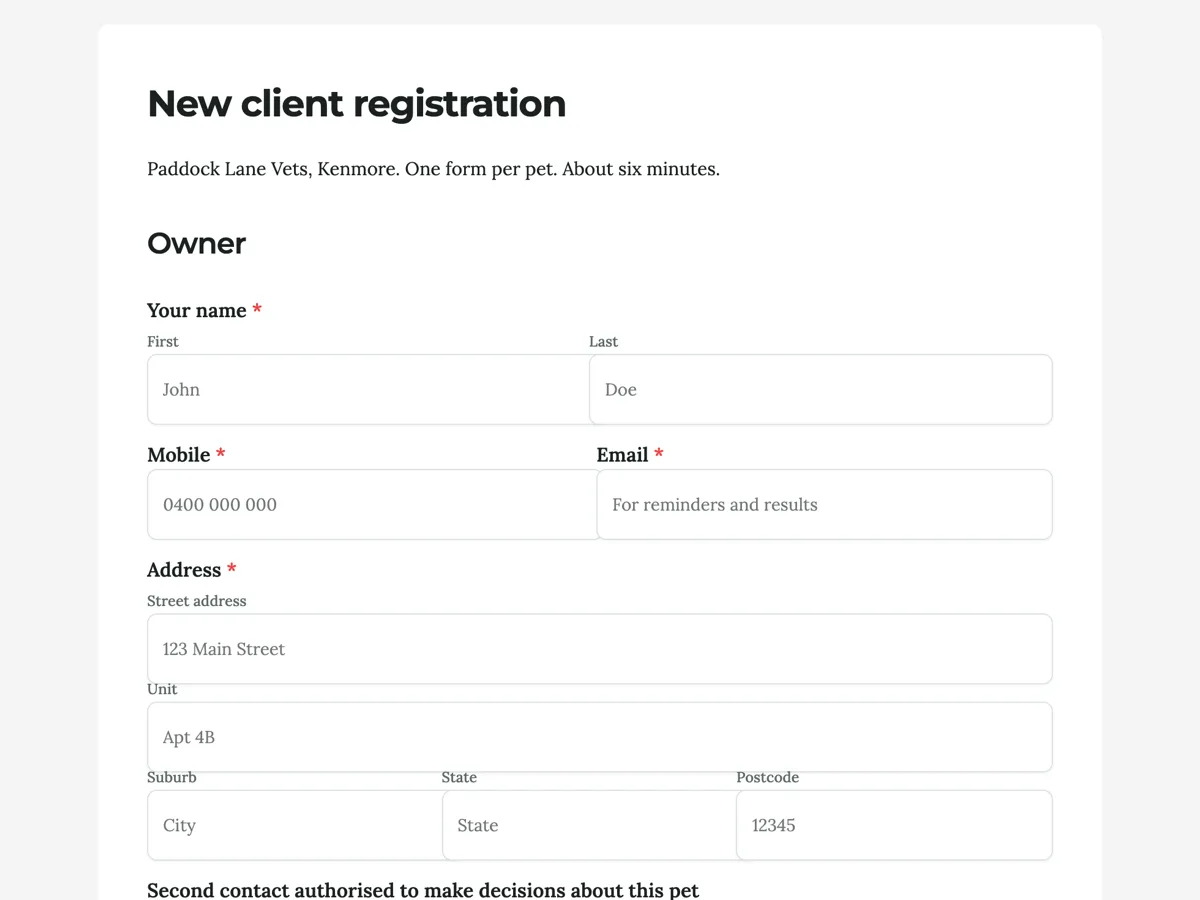
The form itself
A static copy of the finished form, exactly as it renders. Nothing here can be filled in or submitted, so read it as a reference and build your own from the button above.
Every field, and what it collects
The complete field list, in the order respondents meet it.
- Your nameNameRequired
- MobileShort textRequired
- EmailShort textRequired
- AddressAddressRequired
- Second contact authorised to make decisions about this petShort text
- How did you hear about us?Dropdown
- Options: Google · Neighbour or friend · Breeder or shelter · Walked past · Other
- Pet's nameShort textRequired
- Breed, colour and sexShort textRequired
- SpeciesSingle choiceRequired
- Options: Dog · Cat · Rabbit · Bird · Other
- Date of birth or approximate ageShort textRequired
- Microchip numberShort text
- Desexed?Single choiceRequired
- Options: Yes · No · Not sure
- Vaccination statusSingle choiceRequired
- Options: Up to date (certificate available) · Overdue · Never vaccinated · Not sure
- Previous vet clinic and suburbShort text
- Diet and any medicationsLong text
- Anything we should know about handling or behaviour?Long text
- Pet insuranceSingle choiceRequired
- Options: Yes · No
- A photo of your pet for the filePhoto upload
- Optional, and it makes the file easier to match at the desk.
- I agreeMultiple choiceRequired
- Options: I agree to the statement above
- SignatureSignatureRequired
Owner
The pet
Consent
Question banks built on this form
What a vet clinic needs before the first consult
Three things make the first fifteen minutes clinical instead of clerical: the history, the microchip and the money conversation. The history arrives through the previous vet field and the records request the thank-you screen promises, which is a fax-era courtesy that still runs between clinics daily. The microchip number links the animal to the registries every Australian state runs, and the form is relaxed about it because the scanner at the desk settles it in seconds. The money conversation happens once, in the consent paragraph, where payment on the day and the $300 estimate threshold are agreed before the first invoice can surprise anyone.
How to adapt this form
A multi pet household version replaces the pet section with a fixed four row table, name, species, age, desexed, trading detail for coverage, and the behaviour questions become one shared field, which is the real cost of the table. An equine practice swaps the address for a property address with paddock directions and adds an agistment contact. A shelter adoption version pre-fills the pet details from the shelter record and keeps only the owner and consent sections, since the medical history arrives with the animal. Whatever the variant, keep the second decision maker field: surgery consent at 2 pm cannot wait for an owner in a meeting.
What makes this form work
Vaccination status includes the true answer
Up to date, overdue, never, and not sure. Most rescue dogs and every inherited cat arrive with an unknown history, and a form that only offers yes or no teaches owners to guess. Not sure routes the animal to a catch-up conversation instead of a fiction on the file.
The previous vet field pre-loads the first consult
One optional line, clinic and suburb, and the thank-you screen immediately commits to requesting the records. The vaccination dates and old bloods arrive before the animal does, and the first fifteen minutes get spent on the animal in the room rather than on reconstruction.
The $300 estimate rule is agreed before the first invoice
The consent paragraph puts the payment terms and the estimate threshold in plain sight above the tick and the signature. The clinic's most common billing dispute is settled at registration, in writing, before there is anything to dispute.
Questions people ask
Why one form per pet?
Because a form has no repeatable sections, and a three pet version done properly would triple its length for every single pet household. The welcome screen owns the trade-off with an apology. The multi pet adaptation in the adapt section uses a table instead, at the cost of the per animal detail.
Should the microchip number be required?
No. Most owners do not know it, some paperwork is in a drawer three houses ago, and the clinic scans the chip at the first visit anyway. The field exists so the number lands on file when it is known, and the placeholder says the scanner covers everyone else.
Why ask for a second decision maker?
Because the hardest phone call in veterinary practice is the one that goes unanswered while an animal is under anaesthetic. A named second contact who may authorise treatment turns that stall into a second call. It is one optional field that occasionally matters more than every other field on the form.
Does the signature here cover surgery?
No. This is the general consent: examine and treat, request records, pay on the day, estimates before anything over $300. Procedure specific consent is taken separately when a procedure is actually proposed, with its own risks explained. The form says what it covers and nothing more.
How does the records request to the previous vet work?
The form collects the clinic name and suburb, and the practice emails them for the file, vaccination dates, bloods, the lot. Clinics do this for each other as a matter of course. It is the cheapest question on the form and it routinely saves the most consult time.
Why does the form ask about insurance at all?
A yes changes the paperwork the desk prepares, since insured owners need itemised invoices in a claimable format, and it changes the treatment conversation, because an insured animal's owner weighs options differently. One tap here saves that discovery happening mid-consult.
Build your own in about a minute
The button below opens the generator with this use case already described. Change the wording to match your own, generate, then edit anything you like.
Make one like thisOther form examples
Vet surgery consent form with bloods, fluids and estimate
A vet surgery consent form has to record what the owner agreed to: the procedure, the optional anaesthetic extras, the estimated cost and what to do if something goes wrong. This one asks each of those as its own question, including resuscitation, and keeps a contact number for the day above the owner signature.
Dog grooming intake form with the matting consent already signed
A grooming appointment goes wrong in two ways: the coat is worse than the booking allowed for, or the dog will not tolerate the dryer and nobody warned the groomer. This intake form asks about both before the appointment, and it takes the matting consent in writing so the conversation at the table is about the coat rather than about permission.
Product registration form that captures the serial and the proof
A product registration is only worth collecting if it produces something a service desk can act on, which means a serial number in the right format and a receipt that is actually readable. This ten field form states the serial format, tells people where the compliance plate is, and separates a recall notice from a marketing email.
Want the steps in the builder? Read Create a form with AI, then Form builder components. For everything this generator can do, see the form maker.
Written and checked by the OneCraft team. Last checked .