Classic form
Social media consent form for staff, platform by platform
A social media consent form for staff has to record where an employer may post photos of them, how they are named and how they can take that back. This one asks platform by platform in a five row grid, so a barista can say yes to the website and no to TikTok, and prints the withdrawal steps above the signature.
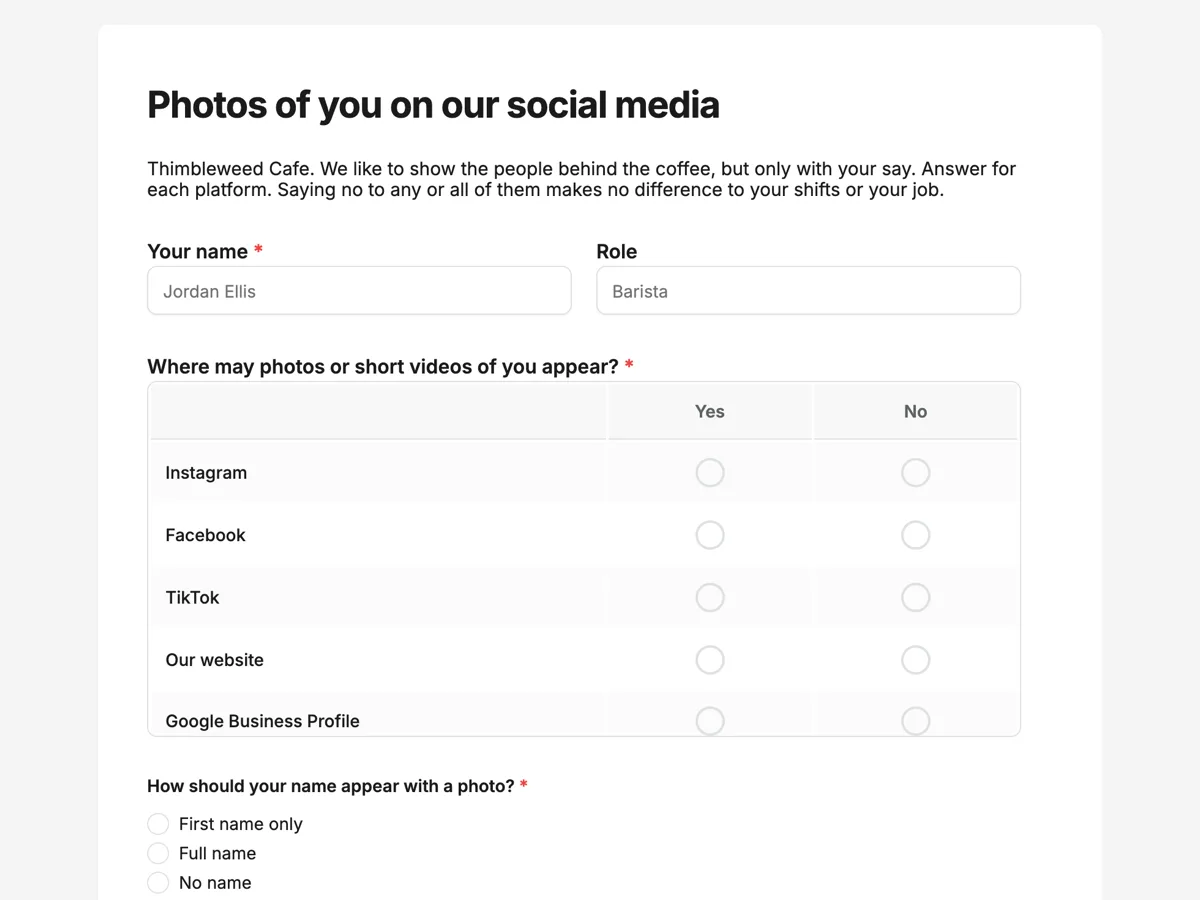
The form itself
A static copy of the finished form, exactly as it renders. Nothing here can be filled in or submitted, so read it as a reference and build your own from the button above.
Every field, and what it collects
The complete field list, in the order respondents meet it.
- Your nameShort textRequired
- RoleShort text
- Where may photos or short videos of you appear?Rating gridRequired
- Statements:
- TikTok
- Our website
- Google Business Profile
- How should your name appear with a photo?Single choiceRequired
- Options: First name only · Full name · No name
- May we tag your personal account?Single choiceRequired
- Options: Yes, ask me for the handle · No
- SignatureSignatureRequired
- DateDateRequired
What each field on this form collects
Name and an optional role sit side by side. The platform grid has five rows, Instagram, Facebook, TikTok, the cafe website and Google Business Profile, each answered yes or no. Name shown is a radio of first name, full name or no name. Tagging is a two way radio, with yes meaning the manager asks for the handle. A paragraph explains how to withdraw and what happens to old posts. Signature and date share the last row. Six of the seven fields are required.
Why a grid beats one yes or no
People feel differently about each platform. A photo on the cafe website, seen by customers, is not the same as a short video on TikTok, seen by strangers and friends from school. One yes covering social media forces staff to accept all of it or none. The grid lets them choose per platform, and the manager reads one row before each post. The grid counts as answered once any row is answered, so the manager treats a blank row as a no, and the intro says no is always fine.
Consent at work is harder to give freely
Privacy regulators such as the UK Information Commissioner's Office point out that consent from employees is rarely free, because staff may feel they cannot say no to their boss. That is why the intro says a no makes no difference to shifts or the job, and why withdrawal is easy and fast. Valid consent under the GDPR must be specific, informed, unambiguous and as easy to withdraw as to give, which the platform grid and the withdrawal paragraph are built to meet.
How to adapt this form
A gym adds a row for in gym screens and a question about photos during workouts. A school uses a parent version with the child's name and year. A business with paid ads adds a separate row for advertising, since ads reach far more people than a post. A larger employer with several sites adds a site dropdown, so the marketing team knows which manager holds the paper trail and which venue accounts the answers apply to.
What makes this form work
Five platforms, five answers
Instagram, Facebook, TikTok, the website and Google Business Profile are separate rows. A yes to the website is not a yes to TikTok.
No is said to be safe
The intro says no makes no difference to shifts or the job. Consent at work only means something when refusing is clearly allowed.
Withdrawal has a deadline
Posts come down from cafe accounts within seven days of a withdrawal. Staff know what will happen and when before they sign.
Questions people ask
Does an employer need written consent to post staff photos?
In many countries, a photo that identifies a person is personal information, and posting it on social media needs a lawful reason, usually consent. Written consent is the clearest record. This form gives the employer a signed, dated answer per platform, which is far easier to rely on than a verbal yes at the coffee machine.
What happens to old posts when staff withdraw consent?
The withdrawal paragraph says posts showing the person are removed from cafe accounts within seven days, and new posts stop straight away. It also says copies already shared by other people cannot be recalled. Being honest about that limit is part of informed consent, so it appears before the signature.
Should staff be named in posts?
Only how they choose. First name only is the most common answer because it feels friendly without being searchable. Full name suits staff who want the profile, such as a head barista entering competitions. No name is always available, and the manager checks this answer before writing any caption.
Why ask about tagging personal accounts?
A tag links the cafe's audience straight to someone's private profile, which many people do not want. Some staff like the exposure; others keep their accounts private on purpose. Asking separately from the photo question keeps a yes to photos from becoming a yes to strangers finding them.
How often should staff consent be renewed?
Asking again once a year, or when a new platform is added, keeps it current. Staff change their minds as their lives change, and a form from three years ago is weak evidence of consent today. The owner can export responses with dates and see which ones are old.
Build your own in about a minute
The button below opens the generator with this use case already described. Change the wording to match your own, generate, then edit anything you like.
Make one like thisOther form examples
Informed consent counselling form, confidentiality first
Informed consent for counselling means the client knows, before the first session, what stays private, when it cannot, what it costs and how notes and contact are handled. This form puts the four limits of confidentiality first, each ticked separately, then fees, notes and contact, and ends with a signature and date.
Vet surgery consent form with bloods, fluids and estimate
A vet surgery consent form has to record what the owner agreed to: the procedure, the optional anaesthetic extras, the estimated cost and what to do if something goes wrong. This one asks each of those as its own question, including resuscitation, and keeps a contact number for the day above the owner signature.
Adventure tour waiver for fitness, medical and evacuation
An adventure tour waiver records that a guest understands the risks of a remote trip, has declared their fitness and health honestly and knows who pays if they need to be evacuated. This one does it for a guided multi day walking company in eleven fields, with a four level fitness rating and an evacuation cost acknowledgement.
Want the steps in the builder? Read Form builder components, then View, export and manage your responses. For everything this generator can do, see the form maker.
Sources
Written and checked by the OneCraft team. Last checked .