Classic form
Telehealth consent form for video and phone sessions
A telehealth consent form has to record how the session will run, where the client will physically be, what privacy risks they accept and who can be called in an emergency. This one asks those eight things on one page for a psychology practice, with the crisis numbers printed above the emergency question.
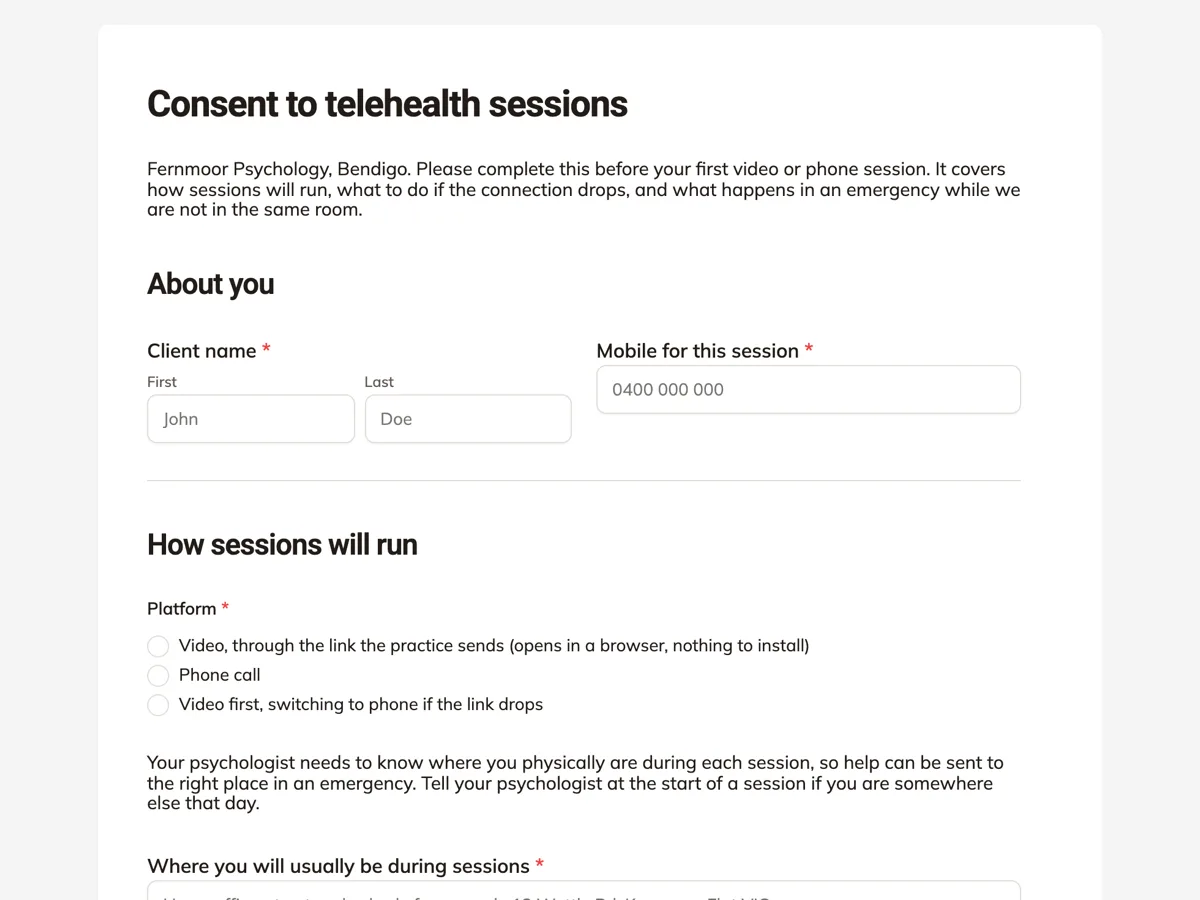
The form itself
A static copy of the finished form, exactly as it renders. Nothing here can be filled in or submitted, so read it as a reference and build your own from the button above.
Every field, and what it collects
The complete field list, in the order respondents meet it.
- Client nameNameRequired
- Mobile for this sessionShort textRequired
- PlatformSingle choiceRequired
- Options: Video, through the link the practice sends (opens in a browser, nothing to install) · Phone call · Video first, switching to phone if the link drops
- Where you will usually be during sessionsShort textRequired
- I understand and agree thatMultiple choiceRequired
- Options: I will be in a private room where I cannot be overheard · I will not use a shared or work computer for sessions · No internet connection is completely secure · A session may end early if the connection or my privacy fails
- Emergency plan: a person nearby who can be called, and their phoneShort textRequired
- RecordingSingle choiceRequired
- Options: I agree that neither of us will record sessions · I would like to talk about recording with my psychologist first
- Client signatureSignatureRequired
About you
How sessions will run
Privacy and safety
What each field on this form collects
Client name and a mobile for the session sit side by side. Platform is a radio of three: video through a browser link, phone, or video with phone as the fallback. A paragraph explains why location matters, then a short text asks where the client will usually be, with a street and suburb placeholder. After a privacy paragraph, a checkbox of four points records what the client agrees to: a private room, no shared computer, no connection being fully secure, and sessions that may end early. A crisis paragraph gives 000 and Lifeline. The emergency plan asks for a nearby person and their phone, recording is a radio of two, and the client signs. All eight fields are required.
Why location and an emergency contact come first
In a clinic room, the psychologist knows where the client is and who is in the building. On video, neither is true. If a client becomes unsafe mid session, the psychologist needs a street address to give 000 and a person close by who can check on them. That is why the location question is required and why the emergency plan asks for a named person, not a helpline. The paragraph above the location question also asks the client to say so when they join from somewhere else, because an address recorded once can be wrong on the day.
The Australian rules behind it
Ahpra and the National Boards publish telehealth guidance that expects practitioners to get informed consent for telehealth, to consider whether it suits the client, and to have a plan for when something goes wrong. The Psychology Board of Australia applies that to psychologists. What clients say in session is health information under the Australian Privacy Principles, which is why the privacy paragraph says it is kept in the clinical record. Lifeline 13 11 14 is the national 24 hour crisis line.
How to adapt this form
A GP clinic drops the recording radio and adds whether a carer will join the call. A practice seeing young people adds a parent contact and a question about who else is at home. A dietitian, where risk is lower, can shorten the privacy checklist to two points and keep the location field.
What makes this form work
A street address, not a city
The location placeholder shows a street and suburb. If 000 must be called, the psychologist has an address an ambulance can find, not just Bendigo.
Four privacy points the client ticks
Private room, no shared computer, no perfect security and sessions that may end early are ticked one by one, so each risk is read rather than skimmed.
Crisis numbers above the emergency question
The paragraph with 000 and Lifeline 13 11 14 sits right above the emergency plan. Telehealth is not a crisis service, and the form says so where it matters.
Questions people ask
Does a client need to sign a new telehealth consent for every session?
No. One signed form covers the course of telehealth sessions, as long as nothing material changes. The location and emergency contact can change, which is why the form asks the client to say at the start of a session if they are somewhere else. A new platform or a new psychologist is a reason to ask again.
Why ask for a nearby person rather than a crisis line?
A crisis line can talk to the client, but it cannot knock on their door. The emergency plan asks for someone physically close, such as a partner or housemate, who can be called if the psychologist cannot reach the client and is worried. The crisis numbers are printed separately so the client has them too.
What if the client says they want to talk about recording first?
Then the psychologist raises it at the start of the first session before going further. Some clients want a recording to replay a relaxation exercise; others worry the practice records them. Neither is settled by a tick box, so the second option turns a yes or no into a conversation.
Can the form stop strangers from filling it in?
The owner can set the form to require a secret key, which the practice sends with the booking. Only someone with the key can open it. A public link works too, since the psychologist checks the name against the booking before reading the answers, but a key keeps casual visitors out.
Are telehealth psychology sessions covered by Medicare?
Sessions under a Mental Health Treatment Plan can attract a Medicare rebate when delivered by video or phone, subject to the current Better Access rules. The form does not ask about Medicare because the booking system already holds the referral. A practice that wants to record it can add a short text for the referral date.
Build your own in about a minute
The button below opens the generator with this use case already described. Change the wording to match your own, generate, then edit anything you like.
Make one like thisOther form examples
Piercing consent form with an ID check and aftercare
A piercing consent form records who is being pierced, where, with what jewellery, and that the client is old enough, has declared relevant health conditions and has received aftercare instructions. This one, for an Australian studio, adds a photo of photo ID and a guardian signature for clients aged 16 or 17.
Gym waiver form with a health declaration, signed online at join
A gym waiver form records that a new member understands the risks of training, has declared any health conditions and accepts the club's terms before using the floor. This one is filled online at join for an Australian strength gym, with a six item health declaration, a clearance question and a signature.
Medication consent form for childcare, dose by dose
A medication consent form for childcare has to authorise educators to give a named medicine at a set dose, time and route, and show when the child last had it. This one puts those four details in a table copied from the pharmacy label, then asks the reason, prescriber, expiry, storage and last dose before a guardian signs.
Want the steps in the builder? Read Form builder components, then Control who can fill in your form. For everything this generator can do, see the form maker.
Written and checked by the OneCraft team. Last checked .