he-IL · Hebrew
Hebrew AI voiceover
Hebrew narration runs on eight he-IL voices with the director writing the entire script in Hebrew. The render mirrors itself for right-to-left text, and one font in the catalogue, Open Sans, actually ships Hebrew glyphs, a detail worth using.
The Hebrew voices, with samples
Each sample reads the same line so you can compare them fairly.
Puck
energetic · maleכך אני נשמע כשאני קורא את התסריט שלך בקצב רגיל, בלי מוזיקה ברקע.
Laomedeia
energetic · femaleכך אני נשמע כשאני קורא את התסריט שלך בקצב רגיל, בלי מוזיקה ברקע.
Charon
instructional · maleכך אני נשמע כשאני קורא את התסריט שלך בקצב רגיל, בלי מוזיקה ברקע.
Erinome
instructional · femaleכך אני נשמע כשאני קורא את התסריט שלך בקצב רגיל, בלי מוזיקה ברקע.
Umbriel
warm · maleכך אני נשמע כשאני קורא את התסריט שלך בקצב רגיל, בלי מוזיקה ברקע.
Sulafat
warm · femaleכך אני נשמע כשאני קורא את התסריט שלך בקצב רגיל, בלי מוזיקה ברקע.
Iapetus
neutral · maleכך אני נשמע כשאני קורא את התסריט שלך בקצב רגיל, בלי מוזיקה ברקע.
Aoede
neutral · femaleכך אני נשמע כשאני קורא את התסריט שלך בקצב רגיל, בלי מוזיקה ברקע.
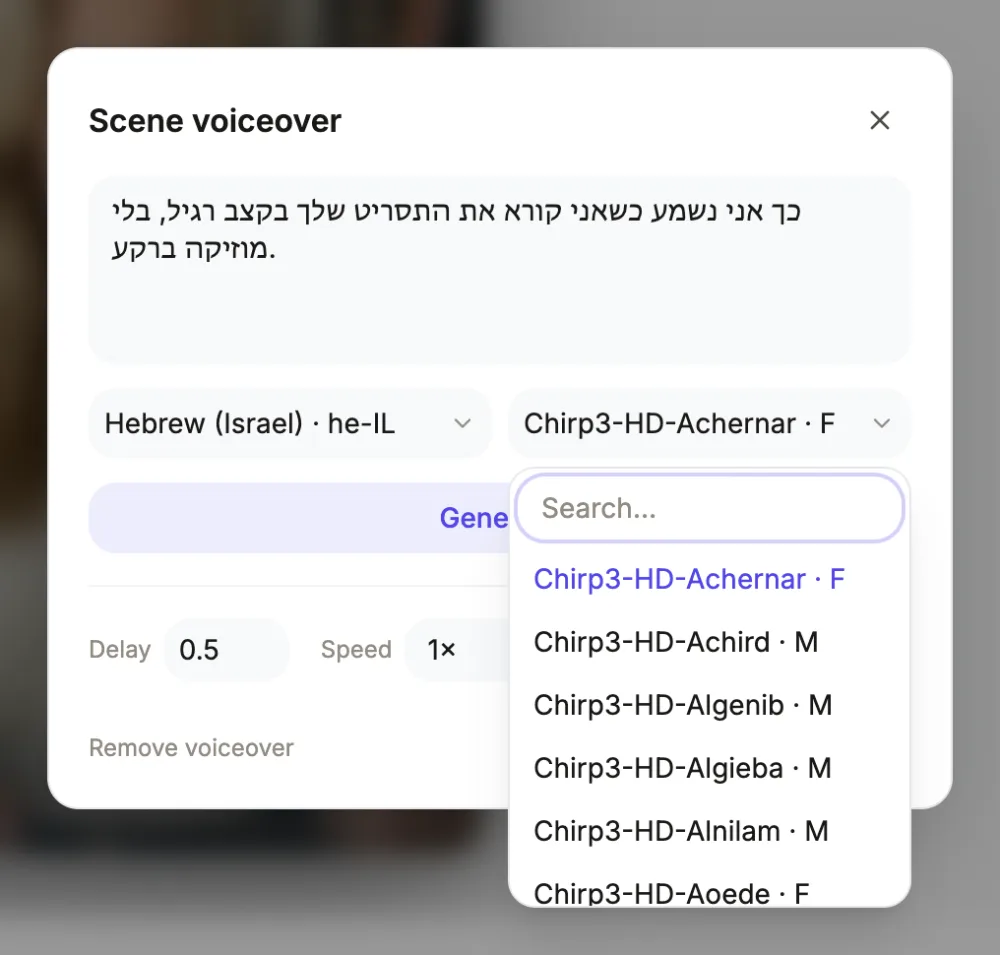
he-IL from a one-word setting
Hebrew in the Language field maps to the he-IL locale, and every automatic voice for the video is minted there, since premium voice identifiers are locale-bound. The director writes modern Israeli Hebrew for narration and on-screen copy alike, working from your brief's facts in any language; nothing is machine-translated, it is authored. Nikud is not used, matching how commercial Hebrew is actually written. Wording you cannot allow to drift, a registered slogan or halachic phrasing, should be quoted in the brief and will be carried through exactly.
Casting from the full eight
Hebrew carries the complete character set: Puck and Laomedeia for energetic retail spots, Charon and Erinome for explainers, with tutorials locked to the instructional pair by a code-level rule, Umbriel and Sulafat for warm testimonial reads, Iapetus and Aoede for corporate updates. Style and gender come from the brief's tone, one default voice per video, overridable scene by scene through the voice dialog, which also searches the entire live Google catalogue when you want something outside the eight.
The Open Sans advantage
Every caption stays legible in Hebrew because the render host substitutes a system font for missing glyphs, but substitution never matches the design. The exception available to you: switch the video's font to Open Sans in the theme panel, the single catalogue family with a genuine Hebrew subset, and both captions and any Hebrew on-screen text render in the design's own typeface with proper weights. That one change turns Hebrew from the weakest-looking script in the catalogue into a clean one, and it costs nothing but the font choice.
Right-to-left habits for a clean result
Keep Latin brand names and figures at a sentence's edge rather than its middle, because a mixed-direction run inside a centred right-to-left pill is where ordering surprises live. Spell numbers as words when the spoken form matters, since Hebrew numerals inflect for gender. Pronunciation control is respelling in the narration box, about half a credit per regenerated clip, and it works well given Hebrew's consonantal regularity. Scene timing behaves as everywhere: scenes stretch to clips, delay and speed (0.85x to 1.25x) sit per scene, music self-ducks to 22 percent, and generated narration never contains an em dash.
Captions in this script
Hebrew script trips the render's right-to-left mode: caption text direction flips so words read correctly from the right, the highlight follows the voice from the first spoken word, and authored slot alignments mirror across the frame. Fonts split into one and the rest: Open Sans, selectable in the theme panel's font tab, ships a real Hebrew subset, while the twenty-six other families do not, leaving their looks to a fallback font for Hebrew glyphs. A sentence mixing Hebrew with Latin letters or numbers can order strangely inside the centred pill, so give mixed lines one test render or drop the caption on that scene.
Questions people ask
Which Hebrew voices exist?
Eight in he-IL: energetic Puck and Laomedeia, instructional Charon and Erinome, warm Umbriel and Sulafat, neutral Iapetus and Aoede. One is cast automatically by style and gender; every scene can re-cast through its voice dialog, which searches the full Google catalogue.
Do captions read right to left properly?
Yes. The pill sets an RTL direction when the script is Hebrew, so word order is correct and highlighting follows the voice from the right. For the glyphs to match your design, set the video's font to Open Sans, the one catalogue family with a Hebrew subset; other fonts trigger a system fallback.
Can I brief in English for a Hebrew video?
Yes. The Language setting drives the output, so an English brief produces a video fully narrated and titled in Hebrew, written natively by the director. Hebrew phrases that must appear verbatim belong in the brief as quotes; everything else is composed fresh.
How do I fix a mispronounced word?
Respell it in the scene's narration, using Hebrew letters that force the sound you want, and regenerate the clip for about half a credit. There is no phonetic notation input. Foreign names usually settle after one respelling; check the caption on that scene afterwards since it displays the respelled text.
What is the cost structure?
Narration is billed by length at the same rate across languages, about half a credit for a typical clip. Editing narration, timing, captions and order between generations is free. An export bills its render time, usually a small amount; a longer one, or an export with narration still owing, needs at least 1 credit left to start.
Narrate a video in Hebrew
The button opens the video generator with the language already set in the brief. Pick a voice after the scenes are planned.
Make a videoRelated pages
Arabic AI voiceover
Arabic resolves to ar-XA, the multi-region locale, so the eight voices speak Modern Standard Arabic rather than an Egyptian or Gulf dialect. Captions run right to left with mirrored layout, and the whole script is written in Arabic by the director.
Urdu AI voiceover
Urdu maps to ur-IN, so the accent is Indian Urdu rather than Pakistani, with all eight premium voices present. The script is right to left, which the captions honour, though the Perso-Arabic glyphs come from a fallback font rather than the look's own.
Portuguese AI voiceover
Choosing Portuguese gives you a Brazilian voice, one of eight pt-BR characters spanning energetic, instructional, warm and neutral reads. A team in Lisbon should know that up front: European Portuguese exists only through the per-scene catalogue search, not as the default.
Every locale is listed onthe voiceover languages page.