ja-JP · Japanese
Japanese AI voiceover
Japanese narration draws on the full eight ja-JP voices, with the director writing the script in Japanese natively. Spaceless text is segmented into dictionary words for the captions, and katakana respelling is your pronunciation control.
The Japanese voices, with samples
Each sample reads the same line so you can compare them fairly.
Puck
energetic · male音楽なしで、普通の速さであなたの台本を読むと、私の声はこのように聞こえます。
Laomedeia
energetic · female音楽なしで、普通の速さであなたの台本を読むと、私の声はこのように聞こえます。
Charon
instructional · male音楽なしで、普通の速さであなたの台本を読むと、私の声はこのように聞こえます。
Erinome
instructional · female音楽なしで、普通の速さであなたの台本を読むと、私の声はこのように聞こえます。
Umbriel
warm · male音楽なしで、普通の速さであなたの台本を読むと、私の声はこのように聞こえます。
Sulafat
warm · female音楽なしで、普通の速さであなたの台本を読むと、私の声はこのように聞こえます。
Iapetus
neutral · male音楽なしで、普通の速さであなたの台本を読むと、私の声はこのように聞こえます。
Aoede
neutral · female音楽なしで、普通の速さであなたの台本を読むと、私の声はこのように聞こえます。
The script the director writes
Japanese in the Language field commits the video to ja-JP voices and to a natively written Japanese script: narration in a natural spoken register and on-screen text in the compact headline style Japanese design uses. Politeness is steerable, desu-masu for most business videos, plain form when your brief describes something casual, and honorific keigo when you ask for it. Briefs in English are standard; the director takes facts, not sentences. Any Japanese you quote in the brief, a product name in katakana especially, is carried through exactly.
Eight voices and the pitch accent question
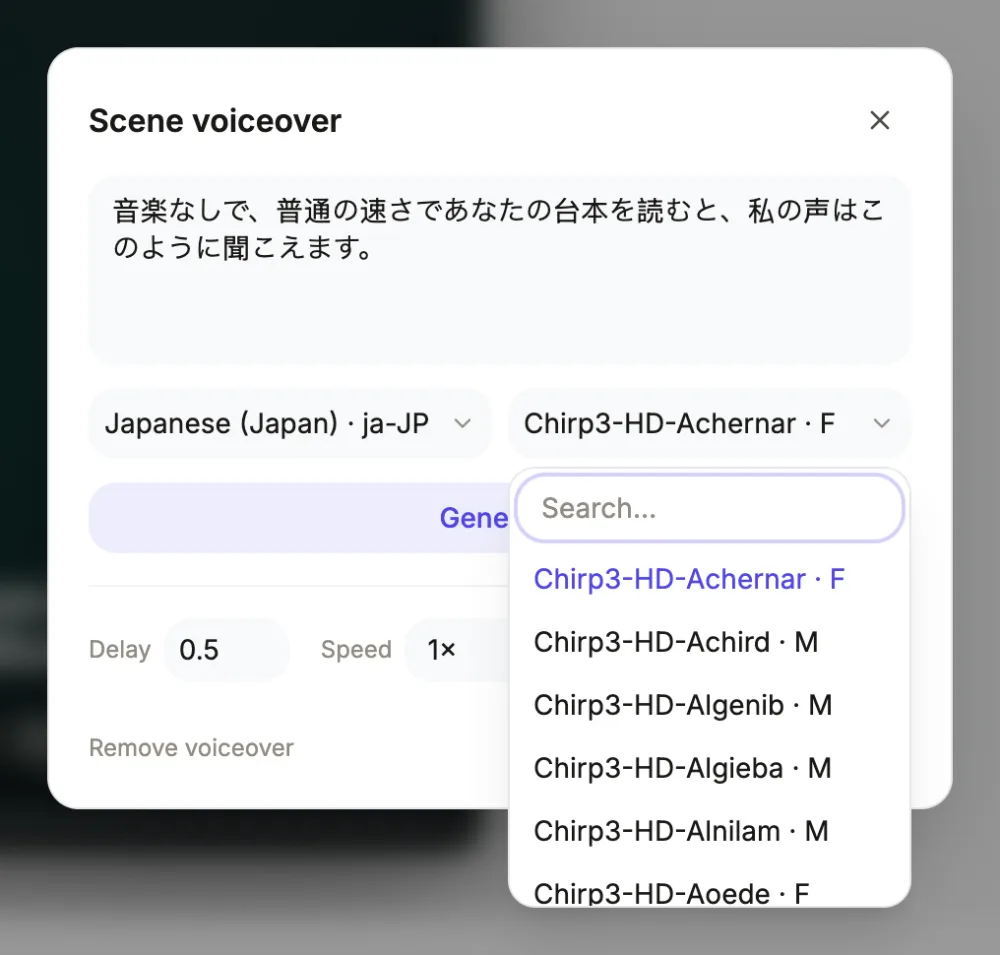
The full premium cast exists in ja-JP: Puck and Laomedeia for energy, Charon and Erinome for instruction, tutorials pinned to that pair by rule, Umbriel and Sulafat for warmth, Iapetus and Aoede for neutral reads. Pitch accent is handled natively by the voices, and where a homograph could read two ways, the fix is writing the intended word in kana so the reading is explicit. Scene-level re-casting works through the voice dialog, with the whole Google catalogue searchable, including ja-JP voices in other tiers.
Katakana is your pronunciation panel
There is no phonetic input anywhere in the product, but Japanese has one built into the writing system: respell any foreign name in katakana inside the narration and the voice reads exactly those syllables. It is the most reliable respelling mechanism of any language here, about half a credit per regenerated clip. The same trick pins readings of ambiguous kanji, swap the kanji for kana and ambiguity disappears. Captions display what you wrote, so a scene whose narration went full kana may want its caption toggled off in the voice dialog.
Density, timing and the sound bed
Japanese packs meaning densely, so spoken lines often run shorter than their English drafts, and a 15 second promo fits comfortably. When a line does run long, the scene stretches to the clip and dynamic pace floats the overrun across the next cut. Per scene: delay in seconds, speed steps 0.85x to 1.25x, and the narration box. Music ducks to 22 percent under the voice automatically. A typical clip uses about half a credit, billed by length, and an export bills its render time, usually a small amount.
Captions in this script
Japanese writes without spaces, and the captions handle it with a dictionary segmenter: each sentence, cut on the 。!? punctuation, is split into real words joined without gaps in the pill, and the highlight walks them in time with the voice. Long unspaced sentences wrap on those word boundaries at roughly 22 characters a line. The glyphs come from the render host's fallback font, since no catalogue family ships kana or kanji, and that fallback can style kana and kanji slightly differently from each other; short sentences and one test render are the practical safeguards.
Questions people ask
Which Japanese voices can I choose?
Eight ja-JP voices across four style pairs: energetic Puck and Laomedeia, instructional Charon and Erinome, warm Umbriel and Sulafat, neutral Iapetus and Aoede. The per-scene voice dialog searches the complete Google catalogue, which includes further Japanese voices in other tiers.
How do captions cope without spaces?
A dictionary segmenter splits each sentence into words, matching how the voice timing is marked, so the highlight tracks the voice word by word and wrapping happens between words. Sentences cut on Japanese punctuation. Keeping sentences short keeps each caption cue comfortably inside the pill.
Will kanji and kana match my design?
They render from a fallback font, since no catalogue family ships Japanese glyphs, so the caption and any on-screen Japanese text sit stylistically apart from the look's Latin type, and the fallback may style kana and kanji subtly differently. One render check per project is the honest safeguard.
How do I control a name's reading?
Write it in katakana, or kana for a native word with two readings, inside the scene's narration and regenerate for about half a credit. The voice reads the syllables you wrote, making this the most deterministic pronunciation fix in the product. The caption will show the kana version on that scene.
What is the credit cost?
Narration is billed by length, about 1 credit per 330 characters with a minimum of half a credit per clip, normally one clip per narrated scene. Editing text, timing and captions between generations is free. An export bills its render time, usually a small amount; longer videos, or exports with clips pending, need at least 1 credit left.
Narrate a video in Japanese
The button opens the video generator with the language already set in the brief. Pick a voice after the scenes are planned.
Make a videoRelated pages
Chinese AI voiceover
Choosing Chinese (Simplified) gives you mainland Mandarin, the cmn-CN locale with all eight premium voices, and a director that scripts the video in simplified characters. Traditional script is a separate entry with its own, smaller voice tier.
Traditional Chinese AI voiceover
The traditional script entry maps to cmn-TW, Taiwan Mandarin, where the catalogue offers no premium characters: two Wavenet voices, cmn-TW-Wavenet-B male and cmn-TW-Wavenet-A female, do the reading. The script comes out in traditional characters throughout.
Korean AI voiceover
Korean carries the full eight ko-KR voices, and because Hangul writes with spaces, captions type on word by word like English rather than dumping whole sentences. The glyphs come from a fallback font, the one honest caveat on this page.
Every locale is listed onthe voiceover languages page.