Proposals · Alternative
A Quotient alternative for online quotes that end in payment
Quotient is quoting software: a fast quote screen, optional and multiple choice items, questions on the quote, follow ups, and invoices pushed to Xero or QuickBooks once a quote is accepted. OneCraft Proposals drafts the quote from a brief and keeps the invoice, the card payment and the reminders inside the same product.
Updated , competitor details checked . Quotient is a trademark of its owner. OneCraft is an unrelated product and claims no affiliation with or endorsement by it.
Nuwan Madhusanka · Co-founder
3 min read · Published
The short verdict
Quotient is the sharper tool for a team that quotes all day from a price library, answers customer questions on the quote and lets Xero or QuickBooks do the invoicing. OneCraft is the better fit for a business without accounting software in the loop, or one that wants the quote written for it and the deposit taken by card the moment the customer accepts.
| Feature | Quotient | OneCraft |
|---|---|---|
| Price | Solo, Team and Team+ plans in USD, listed on Quotient's pricing page and not restated here checked 2026-10-13 | Per account: Free $0, Starter $8, Pro $25 and Pro+ $125 a month; quotes capped at 3 on Free and 25 on Starter, unlimited from Pro |
| Building a quote | Just look up a contact, add a title, enter your items, and you're good to go, with your best quotes turned into templates and items saved in a content library checked 2026-10-13 | The AI writes the quote from a brief and price hints, or it starts from one of 6 quote templates (catering, landscaping, printing, repair, trades call-out, tutoring) |
| Optional items | Mark items as optional, and the total price updates in real-time as customers make selections; set up multiple-choice items and allow customers to adjust quantities for editable items checked 2026-10-13 | Optional items and editable quantities with a minimum and maximum; no multiple choice groups |
| Questions on the quote | When customers have questions, they can post them directly on the quote checked 2026-10-13 | No comments on the quote; the client can accept or decline with a reason |
| Acceptance | A simple click on the Accept Quote button turns the agreement into a legally binding deal, with signing from a touch device checked 2026-10-13 | Name, email, a drawn signature and a consent box, recorded on a certificate page in the PDF |
| Follow up | A built-in follow-up system, notifying you of aging deals right on your Dashboard checked 2026-10-13 | No quote follow up prompts; a quote past its valid until date moves to expired and can no longer be accepted |
| View tracking | Knowing when and how many times a customer has viewed your quote checked 2026-10-13 | Opens and time viewed per recipient link on the activity page |
| Invoices | Once a Quote has been Accepted, a Xero Invoice is created automatically, with the same handover to QuickBooks checked 2026-10-13 | Invoices are created inside OneCraft at acceptance: a deposit invoice due that day plus a draft balance, or one invoice due in 14 days |
| Taking payment | Payment collection is not described on the tour or integrations pages; accepted quotes are sent to accounting software as invoices checked 2026-10-13 | Each invoice has a pay page; Pay now opens Stripe Checkout on the owner's connected account (paid plans) |
| Leads and reviews | With Quotient Leads, potential customers can send new requests directly to you online, and Quotient automates requesting reviews or feedback after a job is complete checked 2026-10-13 | No lead form or review requests in Proposals |
Where Quotient is better
Customers ask questions on the quote
A question posted on a Quotient quote and its answer stay with the quote, visible to the whole team. OneCraft has no comments; a client who wants to ask something emails you, and only a decline reason is recorded on the activity page.
Accounting handles the invoice
For a business already invoicing from Xero or QuickBooks, an accepted quote that becomes an accounting invoice automatically is the cleanest path. OneCraft has no accounting connector, so its invoices live in OneCraft and would be entered in the books separately.
Built for quoting volume
Multiple choice items, a price item library, aging deal prompts, lead capture and review requests are all aimed at a team sending many quotes a week. OneCraft offers 6 quote templates and the AI, which suits a business that writes fewer, larger quotes.
Where OneCraft is different
The quote is written for you
Describe the job and the prices and the AI lays out the scope, the pricing table and numbered terms such as validity and payment, after reading the customer's website or company name. Every price you give becomes a line item at exactly that amount.
Paid without leaving the product
An accepted quote with a deposit becomes an issued invoice due that day, emailed to the customer, with a Pay now button that opens Stripe Checkout. The money goes to your own Stripe account. Bank details can sit on the same pay page for customers who prefer a transfer.
Reminders on every invoice
Pick off, gentle, standard or firm per invoice. Standard reminds three days before the due date, on it, and three, seven and fourteen days after. An invoice turns overdue the day after it falls due, and the Invoices tab shows what is outstanding and overdue.
A finished example
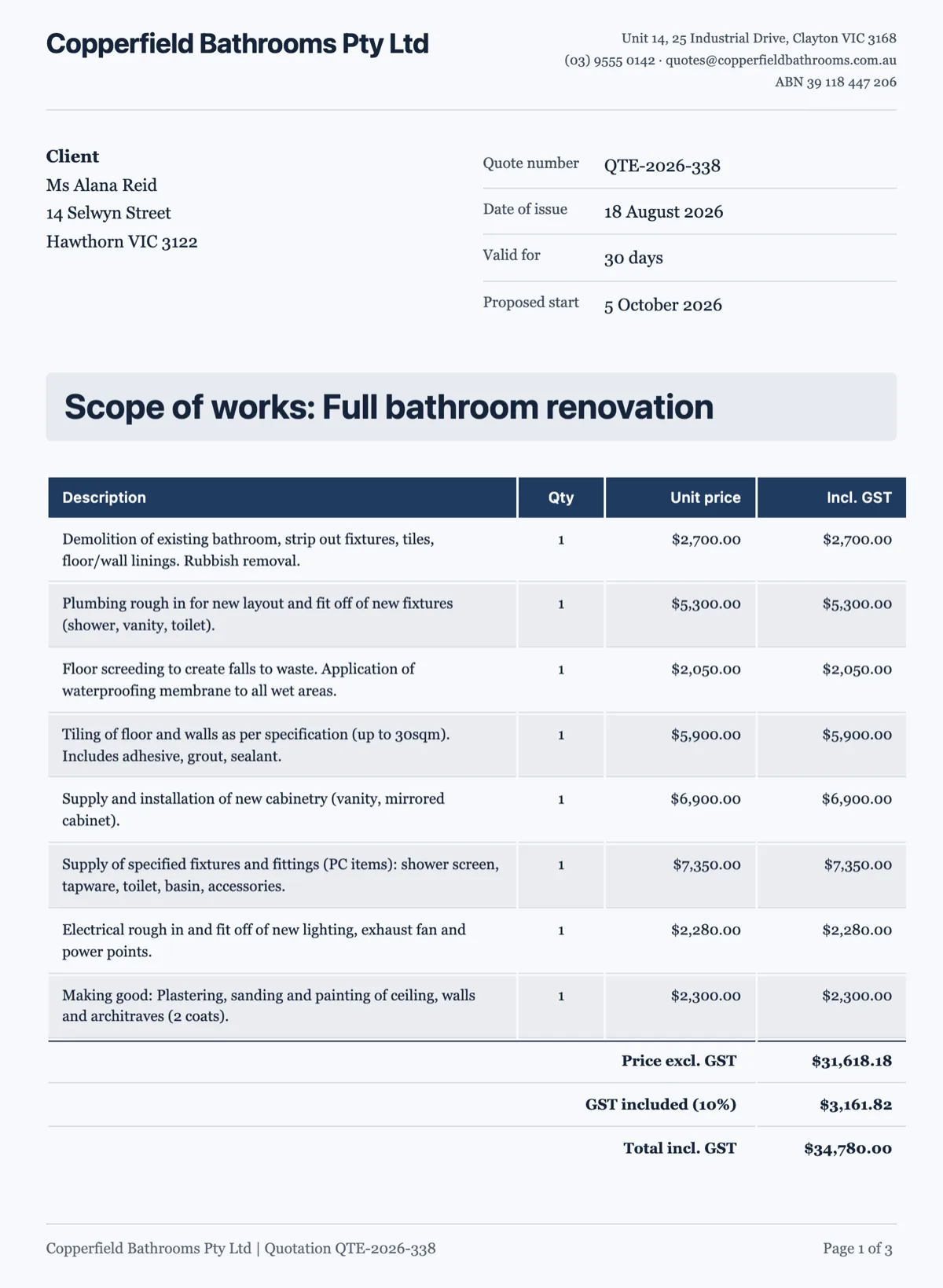 Quotation template priced trade by tradeMade with OneCraft, exactly as the generator and editor left it. Open the page for the full breakdown.
Typed by hand against written from a brief
Quotient's quote screen is fast because it is simple: a contact, a title and items, with templates and a library of saved items to speed it up. OneCraft starts one step earlier. You give the job, the customer and the prices in plain words, choose quote rather than proposal, and the AI produces the document with sections around a single pricing table. The six quote templates give a trade its usual items as a starting point, such as call-out, labour by the hour, parts and an optional safety switch upgrade.
After the customer accepts
Quotient hands the accepted quote to Xero or QuickBooks, where the invoice and the payment are handled. OneCraft keeps that inside: the invoice is created at acceptance, numbered in the INV-0001 style, emailed to the customer and given a pay page with card payment and your bank details. You can still mark an invoice paid by hand when a transfer arrives. What it will not do is post anything to accounting software.
Editable quantities on a trade quote
Both products let the customer adjust a quantity. In OneCraft you set the minimum and maximum, so eight downlights can move between six and twelve and the total follows on the customer's screen. The acceptance stores the chosen number, and that is the number on the invoice. Optional items such as a safety switch upgrade show as a tick box, unticked unless you set it to be included by default.
How the columns were checked
Quotient's column quotes its home page, tour, integrations page and pricing page as read on 13 October 2026. Where a capability such as taking card payments was not described on those pages, the cell says so rather than guessing. Prices are not restated. Each OneCraft cell names a row in a ledger read out of the product's source code.
Who should stay with Quotient
Stay with Quotient if customers ask questions on the quote, if Xero or QuickBooks issues your invoices, or if a team sends quotes all day from a price library with multiple choice items. OneCraft suits the business that wants quotes drafted for it and paid through a pay link without accounting software in the middle.
Questions people ask
Can customers choose between options on a OneCraft quote?
They can tick optional items on or off and change quantities you have left editable, and the totals update as they go. There are no multiple choice groups where picking one option deselects another, which Quotient offers. For good, better and best packages, the usual approach is a base item with the upgrades as optional extras.
Does OneCraft connect to Xero or QuickBooks?
No. There is no accounting integration. Invoices are created and tracked in OneCraft, with numbers, statuses, PDFs and pay pages, and the totals in the Invoices tab show what has been paid this month and what is outstanding. If your bookkeeping must sync automatically, Quotient's handover to Xero or QuickBooks is the better fit.
What happens when a quote expires?
Every quote has a valid until date, set from the validity days in the brief or the Pricing panel. A daily check moves sent or viewed quotes past that date to expired, and an expired quote cannot be accepted. The customer sees that it lapsed and is asked to contact you, and you can duplicate it with new dates.
Can the customer leave a question on the quote?
No. There is no comment thread on a OneCraft quote. The customer reads it, can download the PDF, and either accepts or declines, optionally giving a reason for declining that appears on your activity page. Questions arrive the usual way, by email or phone, so keep your contact details in the quote.
How is GST shown on a quote?
Quotes in Australian dollars label the tax line GST. Each item can carry a tax rate, and the summary shows subtotal, any discount, the tax line and the total, or reads Includes GST when prices are tax inclusive. When there is a deposit, a Deposit due now line and a Balance line follow the total.
Can I send one quote to several people?
Yes, up to five recipients per send. Each gets their own tracked link, so the activity page shows who opened it and for how long. The quote they see is frozen as a version at the moment you send, and any later edits are only seen by the customer after you send again.
Try the proposal side of OneCraft
The button opens the generator with a starting prompt already filled in. Change the wording to match your own work before you run it.
Create a proposal with OneCraftMore comparisons
- A Bidsketch alternative with AI drafting and online depositsA Bidsketch alternative where the proposal is drafted from a brief, the client ticks optional fees and accepts, and a deposit invoice arrives with a pay link.
- A Nusii alternative that carries on to invoicesA Nusii alternative that drafts the proposal from a brief, records acceptance on a certificate page, then issues invoices with a pay link and reminders.
- A Better Proposals alternative with AI drafting and pay linksA Better Proposals alternative that writes the proposal from a brief, tracks each link and takes deposits through Stripe, with their stronger features named.
What the module actually does, feature by feature: the proposals maker page.
Step by step in the builder: Send a proposal and get paid.
Written and checked by the OneCraft team. Last checked .