Classic form
DJ booking form with set times and a must play list
A DJ booking form has to settle the date, the venue and exactly when the music starts and stops, then what the night should sound like. This one adds a five row must play table of songs and artists, a do not play list, and a checklist of the equipment the venue already has, so the DJ packs the right van.
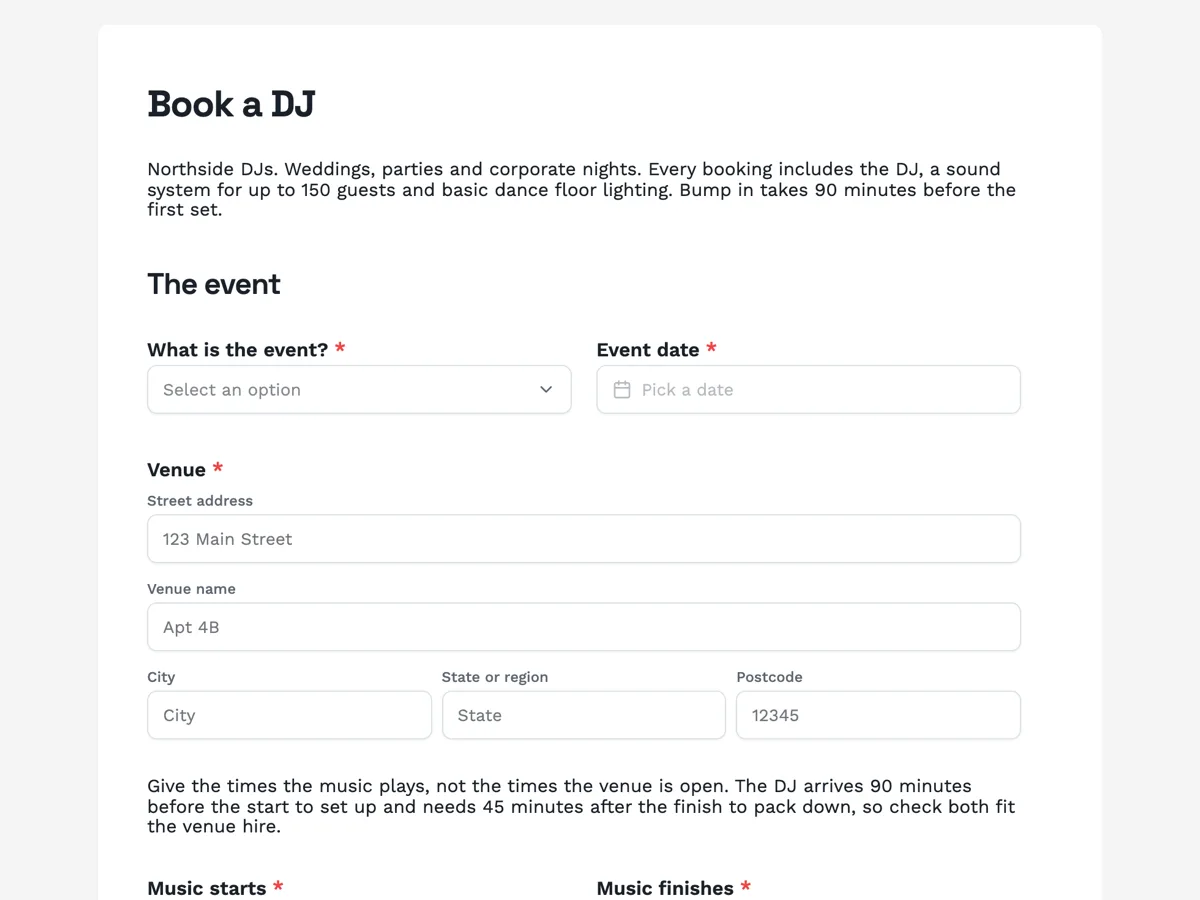
The form itself
A static copy of the finished form, exactly as it renders. Nothing here can be filled in or submitted, so read it as a reference and build your own from the button above.
Every field, and what it collects
The complete field list, in the order respondents meet it.
- What is the event?DropdownRequired
- Options: Wedding reception · Engagement party · Milestone birthday · Corporate party · Club or venue night · School formal · Other
- Event dateDateRequired
- VenueAddressRequired
- Music startsTimeRequired
- Music finishesTimeRequired
- Genres you want on the nightMultiple choiceRequired
- Options: Current hits · 2000s · 90s · 80s · Disco and funk · House · Hip hop and RnB · Rock classics · Latin · Country · Indie · Leave it to the DJ
- Must playTable
- Columns: Song · Artist
- Do not playLong text
- What does the venue already have?Multiple choiceRequired
- Options: In house PA system · Lighting rig · Wireless microphone for speeches · Dance floor · Power at the DJ spot · Nothing, bring everything · Not sure, I will ask the venue
- Your nameNameRequired
- Mobile and emailShort textRequired
The event
The music
You
What each field on this form collects
What is the event is a dropdown of seven, from wedding reception to school formal, beside the event date. Venue is an address block with the venue name in the second line. Music starts and music finishes are two time fields on one row, under a paragraph about the 90 minute bump in and 45 minute pack down. Genres is a required checkbox of twelve in three columns, ending in leave it to the DJ. A paragraph explains the must play list, then the must play table gives five numbered rows with song and artist columns. Do not play is an optional long text. What the venue already has is a required checkbox of seven, including not sure. Your name and a mobile and email line close the form.
Why the must play list is five rows
A list of forty requests is a playlist, and a DJ who plays a playlist cannot read the room. Five rows forces the choice down to the songs the night is actually built around: the first dance, the last song, the one the best man will demand. A table renders exactly the rows it is set to and cannot grow, so the limit is real, and the thank-you screen says more songs can be added on the planning call. The artist column matters because a song title alone often matches a cover, a remix and the original.
How to adapt this form
A wedding DJ adds the timeline: entrance song, first dance, cake cutting and last song as four short text fields, because those moments are cued live. A club or bar booking agent drops the must play table, adds a set length and a tech rider upload, and asks for the booking fee and the door deal. A school formal DJ adds a supervising teacher contact and a clean versions only tick, which schools expect to see in writing.
What makes this form work
Start and finish are two fields
Music starts and music finishes sit side by side, with a paragraph about the 90 minute setup and 45 minute pack down above them. The DJ gets the set length and the venue gets the hire window from the same two answers.
Five songs, with the artist
The must play table has five numbered rows and two columns, song and artist. It is short enough to force real choices and specific enough that the DJ plays the right version of the first dance, not a cover.
The equipment check has a not sure answer
Seven options from an in house PA to nothing at all, plus not sure. Without that last option people tick what they hope is there; with it, the DJ knows which venues to phone before the night.
Questions people ask
Why does a DJ booking form ask what the venue already has?
Because it decides what goes in the van. A venue with an in house PA and a lighting rig needs a controller and a laptop; a marquee in a paddock needs everything including power. The not sure option exists so nobody guesses, and it tells the DJ to call the venue before the night.
What is the difference between the set times and the venue hire times?
The set times are when music plays. The venue hire runs longer, because the DJ arrives 90 minutes before the first song to set up and needs 45 minutes after the last to pack down. The paragraph above the two time fields says this so the hire booking covers the whole window.
Can guests add songs through this form?
No, the form is filled in once by the person booking. The must play table holds five songs and the thank-you screen says more can be added on the planning call. A couple who wants guest requests can share a separate short form with guests and send the DJ its results.
Why is the do not play list optional?
Many people have nothing to ban, and a required box would fill with none. When it matters it matters a lot, a song tied to a bad memory or a line dance the couple cannot stand, so the field is there with a placeholder that names whole genres and line dances as fair answers.
Is the date confirmed when the form is sent?
No. The form is a request, and the thank-you screen says the DJ calls within two working days to go through the timeline. Dates are confirmed on that call, usually with a deposit. A form records answers and does not check a calendar, so two requests for the same Saturday can both arrive.
Does the venue need a music licence for a DJ?
Often, yes. Playing recorded music in public is usually covered by licences from music rights organisations, and many venues already hold them. A private wedding in a hired hall may be covered by the venue or may need the DJ to arrange it, which is a question worth asking on the planning call rather than on the night.
Build your own in about a minute
The button below opens the generator with this use case already described. Change the wording to match your own, generate, then edit anything you like.
Make one like thisOther form examples
Photo booth booking form with the print layout and props
A photo booth booking form has to pin down the date, the hours and the venue, then the three choices that change what guests take home: the booth, the print and the props. This one describes each booth and print in its label, states the floor space and power needed, and takes a logo for branded prints.
Private dining enquiry form with the minimum spend in writing
A private dining enquiry form has to settle the room, the menu and the drinks, because together they decide whether a group clears the minimum spend. This one prices each choice in its label and puts the minimum spend and deposit terms above a required tick, so the quote that comes back holds no surprises.
Salon booking form that asks what has been on your hair
A salon booking goes wrong when the slot booked and the service required are different lengths, and colour is where that gap gets expensive. This booking form puts the real duration beside every service, asks what has been on the hair in the last twelve months, and checks whether a patch test exists before anybody is offered a colour appointment.
Want the steps in the builder? Read Form builder components, then Create a form with AI. For everything this generator can do, see the form maker.
Sources
Written and checked by the OneCraft team. Last checked .