Classic form
Photo booth booking form with the print layout and props
A photo booth booking form has to pin down the date, the hours and the venue, then the three choices that change what guests take home: the booth, the print and the props. This one describes each booth and print in its label, states the floor space and power needed, and takes a logo for branded prints.
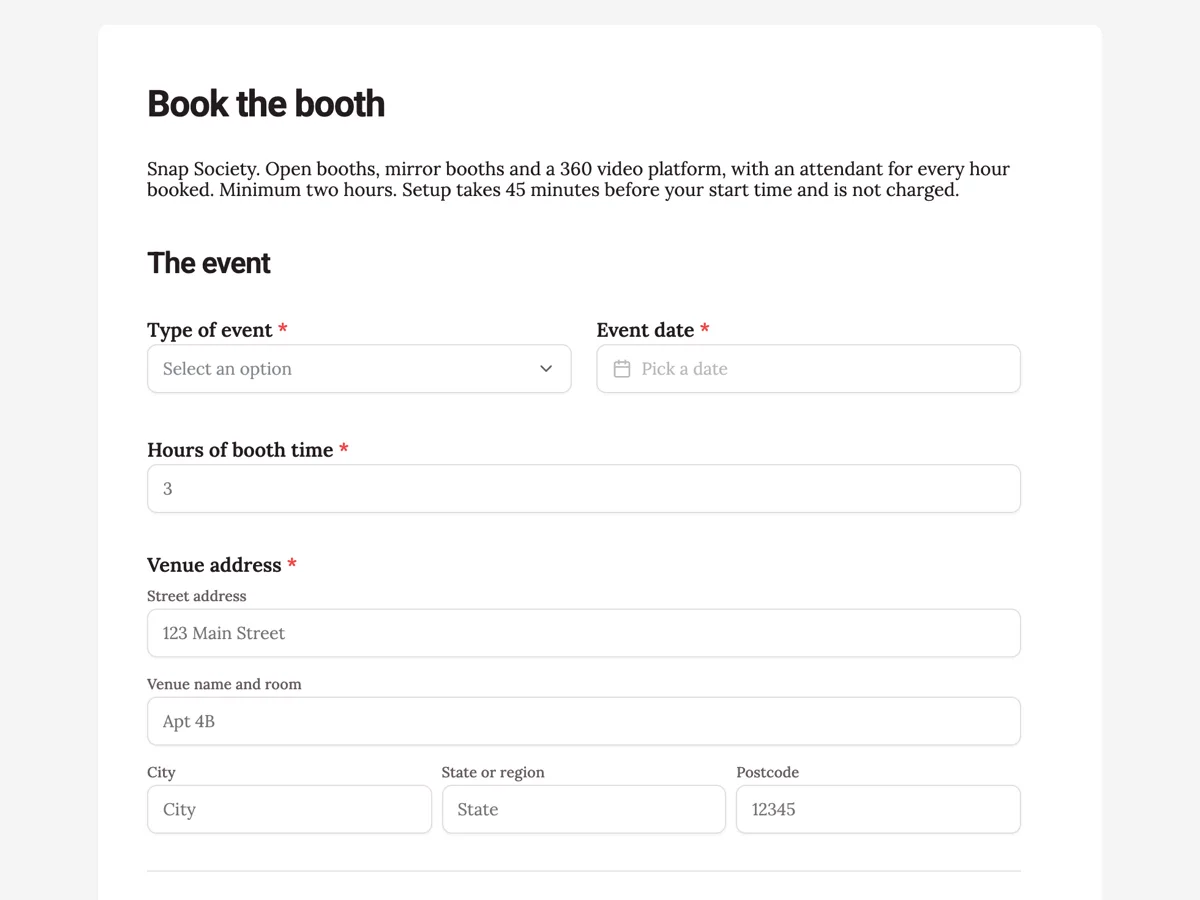
The form itself
A static copy of the finished form, exactly as it renders. Nothing here can be filled in or submitted, so read it as a reference and build your own from the button above.
Every field, and what it collects
The complete field list, in the order respondents meet it.
- Type of eventDropdownRequired
- Options: Wedding · Birthday · Corporate party · Product launch · School formal · Festival or market · Other
- Event dateDateRequired
- Hours of booth timeNumberRequired
- Venue addressAddressRequired
- Booth styleSingle choiceRequired
- Options: Open booth with a backdrop, fits groups of up to 10 · Mirror booth, full length touch screen, best for 2 to 4 people · 360 video platform, slow motion clips instead of prints
- Print layoutSingle choiceRequired
- Options: Classic strip, three photos on a 2 by 6 inch strip · Postcard, one large photo on 4 by 6 inches · Grid, four photos on 4 by 6 inches · Digital only, no prints, a gallery link after the event
- PropsMultiple choice
- Options: Hats and glasses · Signs with phrases · Feather boas and wigs · Themed prop box to match the event · No props
- GuestbookSingle choiceRequired
- Options: Yes, guests stick a copy of their print in a guestbook with a note · No guestbook
- Logo or monogram for the print designFile upload
- Optional. A PNG with a transparent background or a PDF works best. It goes on the bottom of every print and on the start screen.
- Your name, mobile and emailShort textRequired
The event
The booth
Your details
What each field on this form collects
Type of event is a dropdown of seven, from wedding to festival. Event date sits beside it. Hours of booth time is a number with a two hour minimum and a six hour cap. Venue address takes the street, the venue name and room, city, region and postcode. A paragraph states the floor space and power each booth needs. Booth style is a radio of three: open booth for groups of up to ten, a mirror booth for two to four, or a 360 video platform. Print layout is a radio of four, including digital only. Props is an optional checkbox. Guestbook is a yes or no radio. Logo upload accepts images or PDF and its description, which does show on the published form, says where the logo goes. A single line takes the name, mobile and email.
Why the space and power paragraph sits above the booth choice
The booking that goes wrong is the 360 platform ordered for a garden wedding with no power near the lawn. The paragraph gives the footprint for each style, 3 by 3 metres or 4 by 4 for the platform, and the power point distance before anyone chooses. A customer reading it either picks a booth that fits or flags the problem in the venue name field, and the operator finds out before the van is loaded.
How to adapt this form
A wedding only operator adds the ceremony and reception times and a question about when guests are free, since a booth during speeches sits idle. A corporate activation company adds a data capture question, whether guests share an email to receive their photo, and the privacy wording that goes with it. A school formal booth adds a supervision contact from the school and drops the props that a school would not allow.
What makes this form work
Each booth says who it suits
Open booth for groups of up to ten, mirror booth for two to four, 360 platform for slow motion clips. The guest count and the style of event match to a booth in one read, without a sales call to explain the difference.
The floor space is stated before the choice
A paragraph gives 3 by 3 metres and a power point within 5 metres, and 4 by 4 on a solid floor for the 360 platform. The venue problem that ruins a booth booking is visible at the moment of choosing.
Branding is an upload, not an email thread
The logo arrives with the booking as an image or PDF, and the description says it goes on every print and the start screen. The design work can start the day the booking lands instead of waiting for a file chased by email.
Questions people ask
How many hours of photo booth time does an event need?
Two hours suits a party of up to about 80 guests. Weddings usually book three, covering the gap between dinner and dancing, and large corporate events four or more. The form caps the number at six because attendants work in one shift, and the welcome copy notes that setup time before the start is not charged.
What is the difference between the print layouts?
A classic strip is three small photos on a 2 by 6 inch strip, the traditional booth look. A postcard is one large photo on 4 by 6 inches. A grid fits four photos on the same 4 by 6 inch card. Digital only skips the printer and sends a gallery link afterwards, which suits a 360 video booking.
What should the logo file be?
A PNG with a transparent background or a PDF, which the upload field accepts along with other image types. It goes on the bottom of every print and on the booth start screen. The thank-you screen says the print template comes back for approval two weeks before the event, so a poor file is caught early.
Why is the contact detail one field instead of three?
To keep the form at ten fields on a short booking. The placeholder shows the expected order, name, mobile and email, and the operator replies by email with availability. A business that wants the email as its own column in the export can split it into a separate short text field without changing anything else.
Does the form check whether the date is free?
No. It collects the request and the operator checks the calendar, which the thank-you screen says, with a reply within a day. The submit button reads check my date to set that expectation. The date is held once the 30 percent deposit is paid, outside the form.
Can guests be photographed without agreeing to it?
A booth only photographs people who step into it, which is a form of agreement in itself. Guests may still object to prints or a gallery being shared publicly, so a host who plans to post the gallery should say so at the event. A corporate activation collecting emails needs a clear privacy notice, as the adaptation section says.
Build your own in about a minute
The button below opens the generator with this use case already described. Change the wording to match your own, generate, then edit anything you like.
Make one like thisOther form examples
Private dining enquiry form with the minimum spend in writing
A private dining enquiry form has to settle the room, the menu and the drinks, because together they decide whether a group clears the minimum spend. This one prices each choice in its label and puts the minimum spend and deposit terms above a required tick, so the quote that comes back holds no surprises.
DJ booking form with set times and a must play list
A DJ booking form has to settle the date, the venue and exactly when the music starts and stops, then what the night should sound like. This one adds a five row must play table of songs and artists, a do not play list, and a checklist of the equipment the venue already has, so the DJ packs the right van.
Band booking enquiry form with the line up and the stage
A band booking enquiry form has to match three things: the line up the client wants, the space and power the venue has, and the budget. This one gives each line up its stage size in metres, asks what the venue offers, from separate power circuits to a sound limiter, and takes a budget band so the quote is pitched right.
Want the steps in the builder? Read Create a form with AI, then View, export and manage your responses. For everything this generator can do, see the form maker.
Sources
Written and checked by the OneCraft team. Last checked .