Classic form
IT access request form
Access requests go wrong quietly. Somebody asks for the same access as a colleague, gets it, changes team, and keeps it for four years. This form asks for one line per system with the level and an end date beside it, makes anything elevated justify itself in writing, and forces a review date and a named owner for that review. It is a classic form, because an approver needs the whole request in one view before signing it.
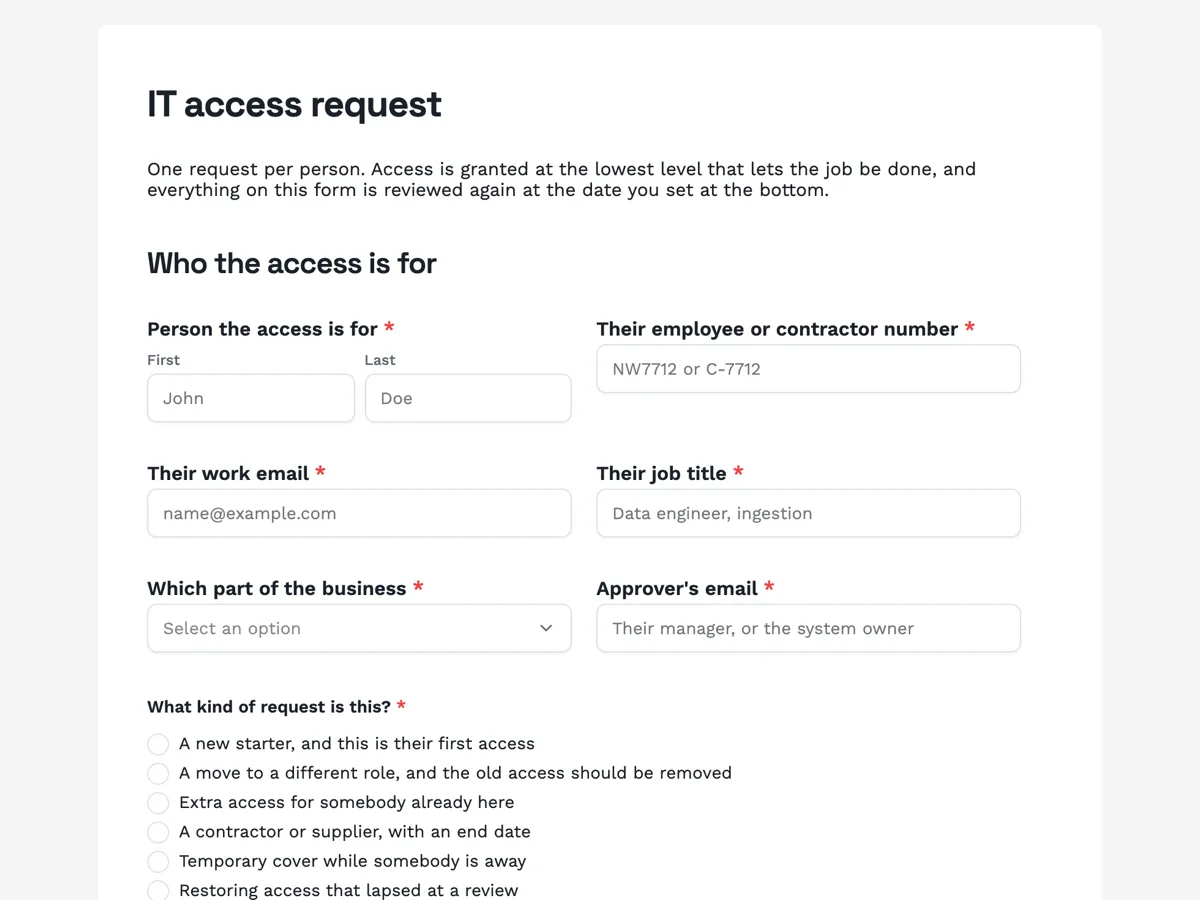
The form itself
A static copy of the finished form, exactly as it renders. Nothing here can be filled in or submitted, so read it as a reference and build your own from the button above.
Every field, and what it collects
The complete field list, in the order respondents meet it.
- Person the access is forNameRequired
- Their employee or contractor numberShort textRequired
- Their work emailShort textRequired
- Their job titleShort textRequired
- Which part of the businessDropdownRequired
- Options: Engineering · Data and analytics · Customer operations · Sales · Finance · People and culture · Facilities · Executive
- Approver's emailShort textRequired
- What kind of request is this?Single choiceRequired
- Options: A new starter, and this is their first access · A move to a different role, and the old access should be removed · Extra access for somebody already here · A contractor or supplier, with an end date · Temporary cover while somebody is away · Restoring access that lapsed at a review
- Date the access is needed byDateRequired
- Is that date immovable?Single choiceRequired
- Options: No, it is a preference · Yes, first day · Yes, a customer commitment
- Systems requestedTable
- Columns: System or application · Level: read, write or admin · What they will do with it · Needed until
- Standard bundle for this role, if it appliesMultiple choice
- Options: Email and calendar · Chat · HR self service · Shared drive, team folders only · Ticketing, as a requester · Wiki, read and write · VPN · Password manager
- Does any of it carry elevated rights?Single choiceRequired
- Options: No · Yes, admin on one system · Yes, admin on several · Yes, production database access
- Is a shared or generic login involved?Single choiceRequired
- Options: No, named account only · Yes, and it is named below
- Justify anything elevated, shared or unusualLong textRequired
- Personal information about customers or staff?Single choiceRequired
- Options: None · Yes, limited to their own team · Yes, across the business · Yes, including health or identity records
- Payment, banking or card data?Single choiceRequired
- Options: None · Yes, read only · Yes, able to change it
- Which of these is already done for this person?Multiple choiceRequired
- Options: Contract or engagement signed and returned · Confidentiality agreement in place · Security awareness induction completed · Multi factor authentication enrolled on their account · Device is company managed, or an exception is recorded · None of these yet, and this request is ahead of them
- Review this access onDateRequired
- Who owns the reviewShort text
- Anything the service desk should knowLong text
Who the access is for
What they need, and at what level
What the access can reach
Review and removal
What makes this form work
Every system carries its own end date
The fourth column of the table is "needed until". Contractor and cover access stops being a thing somebody has to remember, and a blank in that column is a visible decision to grant something indefinitely rather than an accident.
The data reach question routes the request
Two short questions decide whether this is a routine grant or one that goes to security review: what personal information it touches, and whether it reaches payment data. Asking it at request time is far cheaper than reclassifying halfway through, and it is the answer an auditor looks for first.
The prerequisites are a checklist, not an assumption
Contract signed, confidentiality agreement in place, security induction done, multi factor enrolled, managed device. Including an honest last option for "none of these yet" is what makes the list truthful, because access requests routinely run ahead of paperwork and pretending otherwise just moves the problem.
Questions people ask
Why put the systems in a table instead of a checklist?
Because a checklist cannot carry the level or the end date, and those are the two things that make the request reviewable. A table row holds the system, whether it is read, write or admin, what the person will do with it, and when it should stop. A tick box holds none of that, and the follow up email to find out is where a day goes.
Can the form stop somebody asking for admin?
No. There is no branching or conditional logic on a classic form, so every question is shown to everybody and nothing is hidden based on an earlier answer. What the form does instead is make the ask expensive to write: elevated rights are declared in one question and justified in the next, and a blank justification is visible to the approver rather than buried.
How should the approver actually see this?
Turn on the email alert add-on and point it at the approvals inbox, so a submission arrives with every value in the body of the message. A webhook is the other route if you want the request opening a ticket automatically. It fires once per submission with the answers keyed by field label, and there is no retry, so the endpoint receiving it needs to be up.
Does the review date do anything on its own?
No. It is a recorded commitment, not a scheduled job. The form collects the date and the name of the person who owns the review; something on your side has to read the responses and act. Saying that plainly is better than implying an access review runs itself, and the named owner is what makes it happen at all.
Should an access request ask what data the systems can reach?
Yes, because that is what sets the review level. This form asks two direct questions, whether the access touches personal information about customers or staff, and whether it touches payment, banking or card data. Two answers move a request from routine to reviewed without asking the requester to classify anything themselves.
Why ask about a shared or generic login?
Because shared logins break every audit trail you have. This form asks whether one is involved, next to the question about elevated rights, and then asks for a justification. Naming it does not ban it, and some machinery genuinely needs one, but it puts the decision in front of somebody instead of leaving it in a ticket comment.
Build your own in about a minute
The button below opens the generator with this use case already described. Change the wording to match your own, generate, then edit anything you like.
Make one like thisOther form examples
Hazard report form short enough to use
Hazards go unreported because the form is longer than the hazard is worth. This one is nine questions, a photo, a four phrase risk rating and a choice of how soon someone has to come, and it is designed to be filled in standing next to the thing.
Visitor sign in form that replaces the book on the counter
A paper visitor book shows every visitor the names of every other visitor, and it is useless in a fire drill because it is on the counter. This form sits behind a QR code, takes under a minute, and keeps the rules acknowledgement and the sign in time in one private record.
Appointment request form that reception confirms
A form is not a calendar, and pretending otherwise is how double bookings happen. This one asks for three preferred times in the patient’s own words, tells them reception will confirm one by text within two working hours, and collects the reason for the visit so the right length of appointment gets booked.
Want the steps in the builder? Read Control who can fill in your form, then Automate your form with add-ons. For everything this generator can do, see the form maker.
Written and checked by the OneCraft team. Last checked .