Classic form
Visitor sign in form that replaces the book on the counter
A paper visitor book shows every visitor the names of every other visitor, and it is useless in a fire drill because it is on the counter. This form sits behind a QR code, takes under a minute, and keeps the rules acknowledgement and the sign in time in one private record.
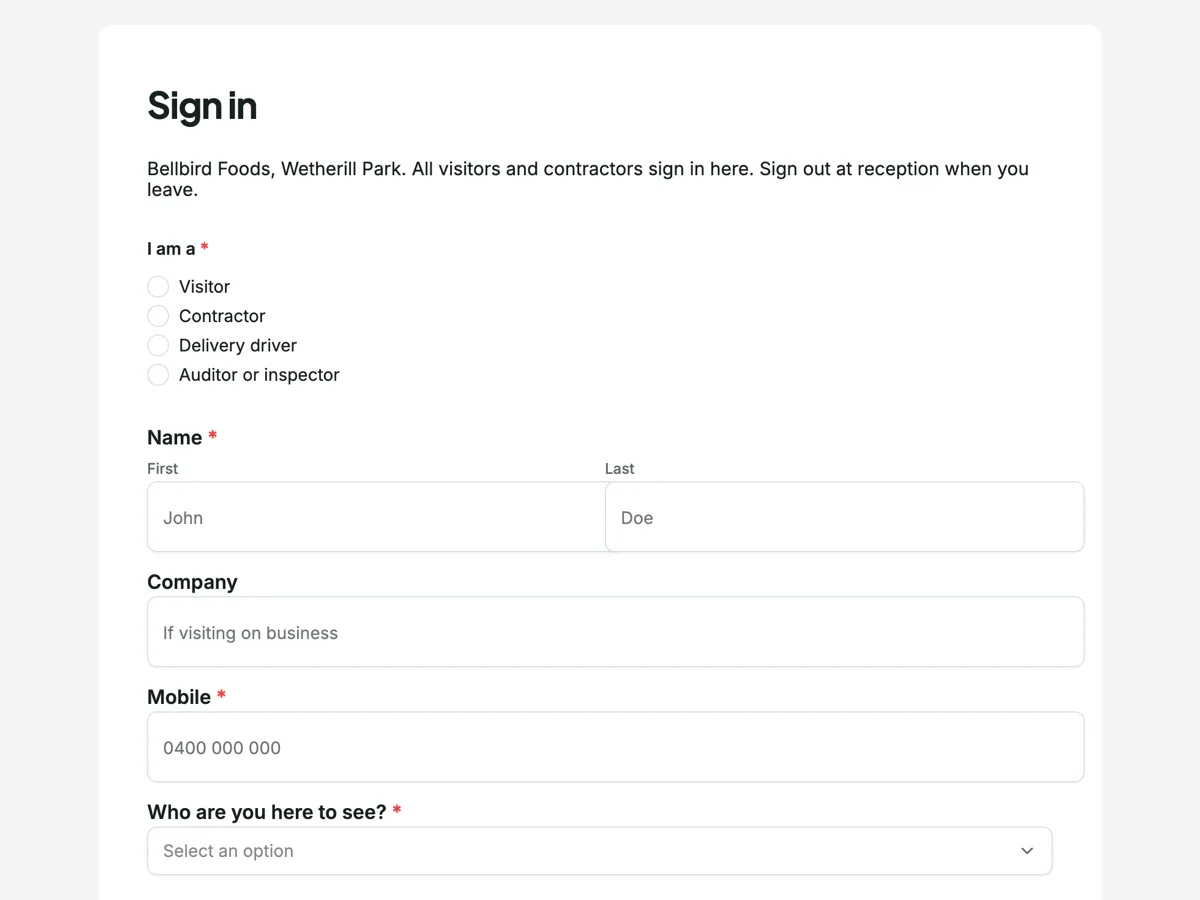
The form itself
A static copy of the finished form, exactly as it renders. Nothing here can be filled in or submitted, so read it as a reference and build your own from the button above.
Every field, and what it collects
The complete field list, in the order respondents meet it.
- I am aSingle choiceRequired
- Options: Visitor · Contractor · Delivery driver · Auditor or inspector
- NameNameRequired
- CompanyShort text
- MobileShort textRequired
- Who are you here to see?DropdownRequired
- Options: Reception will find them · Production · Quality · Warehouse · Office · Maintenance
- Vehicle registration, if parked on siteShort text
- LanyardMultiple choiceRequired
- Options: I will wear the visitor lanyard at all times
- EscortMultiple choiceRequired
- Options: I will stay with my host
- Production floorMultiple choiceRequired
- Options: I will not enter production without a hair net and coat
- EvacuationMultiple choiceRequired
- Options: I will follow the evacuation signs to the car park assembly point
- PhotographyMultiple choiceRequired
- Options: I will not photograph the production floor
- IllnessMultiple choiceRequired
- Options: I have not had vomiting or diarrhoea in the last 48 hours
- AllergensMultiple choiceRequired
- Options: I am not carrying nuts or nut products
- SignatureSignatureRequired
Site rules
Food safety declaration
What a visitor register is actually for
Three things, and the paper book fails all of them. Evacuation: the roll call needs today’s visitors on a phone at the assembly point, not in a book by the door everyone just evacuated past. Privacy: an open book publishes each visitor’s name, company and host to everyone who signs after them, which sits badly with the privacy principles governing how personal information is handled. Evidence: when an auditor asks whether visitors acknowledge the site rules, seven ticked boxes with a timestamp and a signature answer in one row. The QR code at the door costs a laminated sheet.
How to adapt this form
An office swaps the food safety declarations for an NDA acknowledgement, one checkbox with the sentence spelled out in a paragraph above it. A school adds a working with children check number field for contractors and visitors who will be near students. A construction site replaces the production floor rule with high-vis and white card lines and adds the card number. The structure never changes: who you are, who you are here for, the site’s specific promises ticked one by one, and a signature over the lot.
What makes this form work
Five rules, five deliberate ticks
Each site rule is a separate required checkbox, from the lanyard to the no-photography line, so the acknowledgement is five distinct taps rather than one tick over a block of text. When quality shows an auditor the record, every rule carries its own yes.
The food safety lines are the two an auditor asks about
No vomiting or diarrhoea in the last 48 hours; not carrying nut products. A food factory’s visitor risk is those two sentences, so the declaration is those two sentences, each its own required tick, and nothing else padding the minute.
Submit time is the sign in time, and the form says so
The last line states that time in is recorded on submission, so nobody types a time and nobody backdates one. The evacuation list, the reception call to the host and the record all hang off a timestamp the visitor cannot get wrong.
Questions people ask
How do visitors actually reach the form?
A QR code at the door and, for the phone-less, a tablet at reception open the same link. There is nothing to install; the form is a public web page. The dropdown of hosts and the one minute length matter more than the technology, because a queue at the door kills any sign in system.
Where is the sign out?
At reception, where the lanyard comes back, and the form says so twice rather than pretending otherwise. This form records arrival; a mirror-image second form can record departures if the site needs both timestamps. Honesty about what is recorded beats a fake in-out board.
Is a paper visitor book really a privacy problem?
An open book on a counter discloses every previous visitor’s personal information to every later one, and in Australia organisations covered by the Privacy Act are expected to handle personal information more carefully than that. A form record is seen by reception and nobody else, which is the whole difference.
How does this help in an evacuation?
The responses table filtered to today is the visitor roll call, readable on a phone at the assembly point. The submission timestamp is the time in, which is why the form prints that fact in its last line instead of asking anyone to type a time.
Why is each site rule its own checkbox?
Because a required checkbox is satisfied by ticking at least one option, so five rules inside one field could be acknowledged with a single tick. Five separate required checkboxes mean five deliberate ticks, and the record shows each rule was individually acknowledged, which is what the acknowledgement is for.
What extra do contractors need?
A current site induction card, which the rules paragraph states, and for regular contractors the full induction checklist linked from this page. The I am a question at the top exists so reception knows to ask for the card before the lanyard is handed over.
Build your own in about a minute
The button below opens the generator with this use case already described. Change the wording to match your own, generate, then edit anything you like.
Make one like thisOther form examples
Workplace incident report form built for the first hour
The first report of an incident is the one the regulator, the insurer and the investigation all rely on, and it is usually written by the most stressed person on site. This form asks for facts in the order they are known, keeps opinion out until the last field, and asks the one question that decides whether the regulator must be told.
Newsletter signup form
One field is the correct length for a newsletter signup, and everything beyond it has to earn its place by changing what gets sent. This one asks six questions: the address, an optional name, what somebody wants to hear about, how often, how they buy, and a consent line that starts unticked and names the sender. It is conversational, because six one line questions on six screens is faster on a phone than a block of them on one.
Tattoo consent form signed on a tablet before the needle
A tattoo consent form is a health questionnaire, an age check and a design confirmation, signed in the same minute. This one does all three on a tablet, asks the eight health questions an artist needs, takes a photo of the ID, and files a PDF the studio can produce two years later.
Want the steps in the builder? Read Form builder components, then Control who can fill in your form. For everything this generator can do, see the form maker.
Written and checked by the OneCraft team. Last checked .