Classic form
Job application form
A job application form template collects contact details, the role and employment type wanted, work rights, work history, education, a resume and referees, in the same shape for every applicant. This one covers five advertised roles and takes about eight minutes. It also asks for an earliest start date and an expected salary, and the questions that create discrimination risk are deliberately absent.
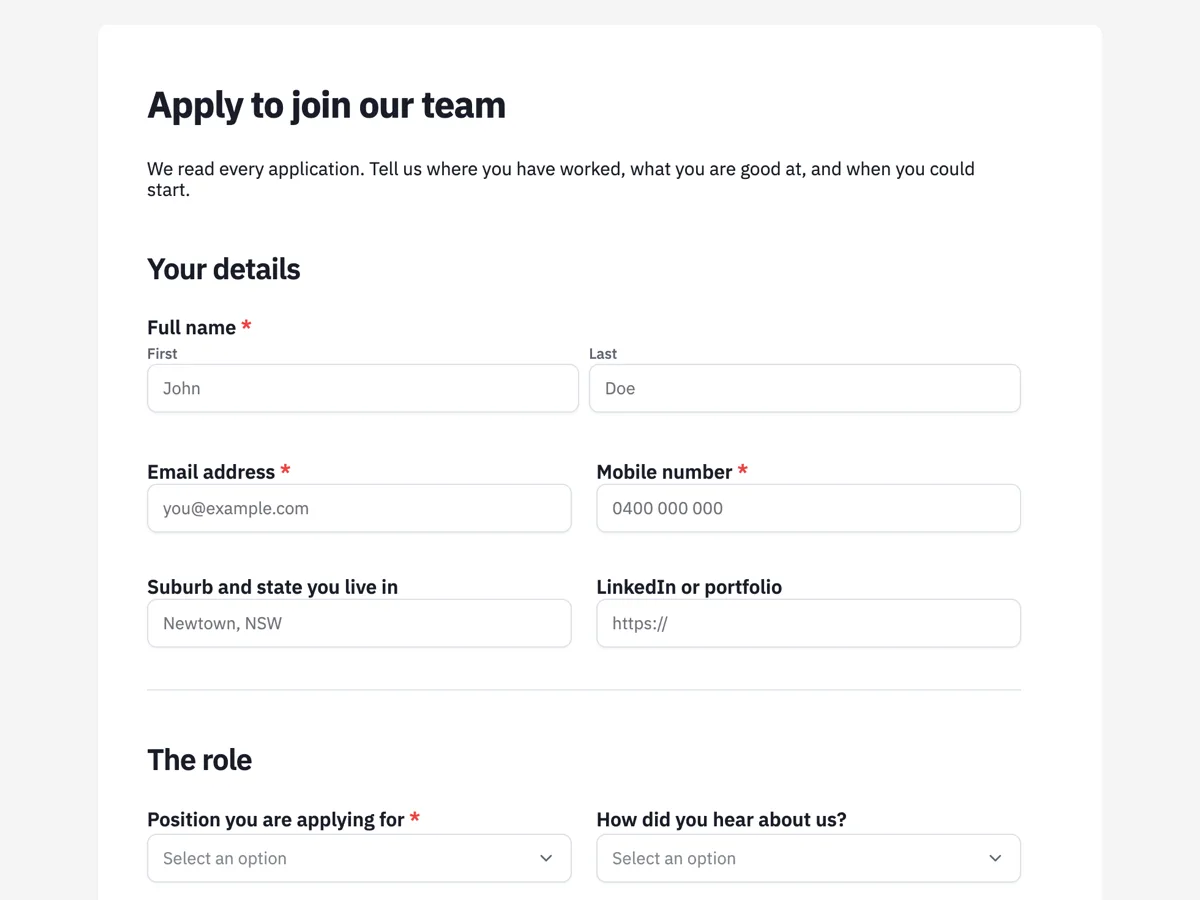
The form itself
A static copy of the finished form, exactly as it renders. Nothing here can be filled in or submitted, so read it as a reference and build your own from the button above.
Every field, and what it collects
The complete field list, in the order respondents meet it.
- Full nameNameRequired
- Email addressShort textRequired
- Mobile numberShort textRequired
- Suburb and state you live inShort text
- We ask for your area, not your street address.
- LinkedIn or portfolioShort text
- Position you are applying forDropdownRequired
- Options: Software Engineer · Senior Software Engineer · Product Designer · Customer Success Specialist · Operations Coordinator
- How did you hear about us?Dropdown
- Options: Our website · Seek · LinkedIn · A friend or colleague · A recruiter · Somewhere else
- What are you looking for?Single choiceRequired
- Options: Full time · Part time · Casual · Fixed term contract
- Earliest date you could startDate
- Expected annual salary, including superNumber
- A range is fine. We ask what you are looking for, never what you earn now.
- Are you legally entitled to work in Australia?Single choiceRequired
- Options: Yes · No
- Will you now or in the future require visa sponsorship?Single choiceRequired
- Options: Yes · No
- Work history, most recent firstTable
- Columns: Employer · Job title · From and to · What you were responsible for
- Education and qualificationsTable
- Columns: Qualification · Institution · Year completed
- What are you best at?Long textRequired
- Why this role?Long text
- ResumeFile uploadRequired
- PDF preferred.
- Cover letter or work samplesFile upload
- Optional. Up to three files.
- Two work refereesTable
- We will always ask before contacting anyone.
- Columns: Name · Company and role · Email or phone
- DeclarationMultiple choiceRequired
- Options: The information in this application is true and complete · I agree to my details being held for this recruitment process
Your details
The role
Work rights
Experience
Attachments and referees
What each section of this job application collects
Your details takes the name, email and mobile as required fields, then an optional suburb and state and an optional LinkedIn or portfolio link. The role section asks which of the five advertised positions the application is for, how the applicant heard about it, the employment type they want, the earliest start date and the expected salary. Work rights is two required yes or no questions. Experience is a work history table, an education table, a required question on what the applicant is best at and an optional one on why this role. The last section takes a required resume, optional cover letter or samples, a referee table and a two tick declaration.
Why ten of the twenty fields are required
The required ten are the ones a recruiter cannot shortlist without: name, email, mobile, the position, the employment type, both work rights answers, what the applicant is best at, the resume and the declaration. Everything else is optional because it is either in the resume already or only matters later. A start date, a salary figure and referees help, but an applicant who leaves them blank is still worth reading, and a form that forces them tends to get invented answers rather than true ones.
How to adapt this form
For a single role, replace the position dropdown with a paragraph describing it and move the employment type into that paragraph. For hourly or casual work, swap the salary number for a single choice of pay bands or an hourly figure, and add an availability grid of days against morning, afternoon and evening. For a graduate intake, make the education table required and drop the work history table to optional, because most applicants will have little to put in it.
What makes this form work
It asks for a suburb, not a home address
The only location field is labelled "Suburb and state you live in", so the label itself tells applicants the form wants their area, not their street address. Commute distance is all a full address tells a recruiter, and holding a street address for every unsuccessful applicant is data you have no use for.
Work rights are asked the legal way
The Work rights section has two required yes or no questions: "Are you legally entitled to work in Australia?" and "Will you now or in the future require visa sponsorship?" Both are fair to ask, and an employer can confirm the answer through VEVO. Citizenship, place of birth and date of birth are not on the form at all, since national extraction is a protected attribute under the Fair Work Act.
Expected salary, never salary history
The salary field is a number labelled "Expected annual salary, including super". It asks what the applicant is looking for, never what they earn now, and as a number field it takes one figure rather than a range. What somebody wants is a useful filter. What they earned last anchors offers unfairly and is banned as a question in many places.
Questions people ask
What questions are illegal on a job application?
Broadly: age beyond confirming an applicant is over 18, marital or family status, religion, citizenship or place of birth, disability before an offer, and in many places arrest records and salary history. Rules differ by jurisdiction, so check yours. In Australia the Fair Work Act lists the protected attributes, and state anti discrimination law adds its own, so a question that is fine interstate may not be fine here.
Can I ask about work authorisation?
Yes, if you ask it properly. "Are you legally entitled to work here" and "will you now or in the future require sponsorship" are both acceptable, and this form asks both as required yes or no questions. Asking about citizenship status is not. An Australian employer can confirm the answer through the Home Affairs visa checking service once an offer is close.
Should the resume be required?
On this form it is, and the work history table is filled in as well. The table is what makes applications comparable at a glance, which a stack of differently formatted PDFs never is. The resume carries the detail a table cannot, such as projects and achievements, so the two do different jobs and asking for both is not duplication.
Why are work history and education tables rather than text boxes?
The work history table has columns for employer, job title, dates and responsibilities, and the education table has qualification, institution and year. Every application arrives in the same shape, so a shortlist can be compared side by side. The resume upload sits alongside, and "What are you best at?" gives room for a personal answer.
Should a job application ask for expected salary?
Ask for what they are looking for, never what they earn now. This form asks for the expected annual salary including super as a number, so it takes one figure rather than a range; the midpoint of what someone would accept is the honest answer. Getting it early avoids the interview where both sides discover they were fifteen thousand apart, and it lets a small team be honest about a band.
Why ask how the applicant heard about the role?
Because it is the only reliable measure of which channel is working. This form asks it in the role section, after the position. Job boards, referrals and your own careers page produce different quality as well as different volume, and one question answered by every applicant beats any dashboard the boards give you.
Should a job application ask for a street address?
Rarely. A recruiter needs to know roughly where someone lives to judge a commute, and a suburb and state does that. A full street address for every unsuccessful applicant is personal information held for no reason, and it has to be protected and eventually destroyed. Ask for the full address with the employment contract, once somebody has accepted an offer.
How long should a job application take to fill in?
Under ten minutes for most roles, which is what this one aims at with eight. Every extra screen of questions loses applicants who already have a job and are browsing, and those are often the strongest candidates. Save anything needed only for a shortlist, such as referee details in full or a work sample task, for the second stage.
Build your own in about a minute
The button below opens the generator with this use case already described. Change the wording to match your own, generate, then edit anything you like.
Make one like thisOther form examples
Casual job application form built around an availability grid
Casual hiring turns on one thing, which is whether somebody is free when the roster has a hole. This twelve screen form puts a seven day by three shift grid at the centre, asks how many hours a week somebody actually wants, and treats the RSA, the work rights and the CV as things that change the roster rather than the decision.
Internship application form
An internship application has to do two things a job application does not: work for somebody with almost no employment history, and sort a large field quickly on things that are actually disqualifying. This one asks about study, availability and field readiness before it asks anybody to write 300 words. It is a classic form, because two PDF uploads and a referee table need one page where everything can be checked before sending. It is written for an Australian employer, where a placement that a course requires is treated differently under the Fair Work Act from one a student chooses to do.
Staff requisition form for a new role or a backfill
A staff requisition form asks approval to hire before a job ad goes out: which role, why it is needed, what it will cost and who signs off. This one separates a new position from a backfill, asks who is leaving when it is a backfill, and requires the position description as a PDF.
Want the steps in the builder? Read Create a form from scratch with AI, then View, export and manage your responses. For everything this generator can do, see the form maker.
Written and checked by the OneCraft team. Last checked .