Classic form
Patient intake form
A patient intake form template collects who the patient is, why they are coming in, their history, medicines and allergies, how they will pay and their signed consent, before the first appointment. This one is a new patient registration for an Australian general practice, filled in at home in about ten minutes. Seven sections walk from personal details and an emergency contact to the reason for the visit, medical and family history, a medicines table, lifestyle, health fund details with a card photo, and three consent ticks signed by the patient or a guardian.
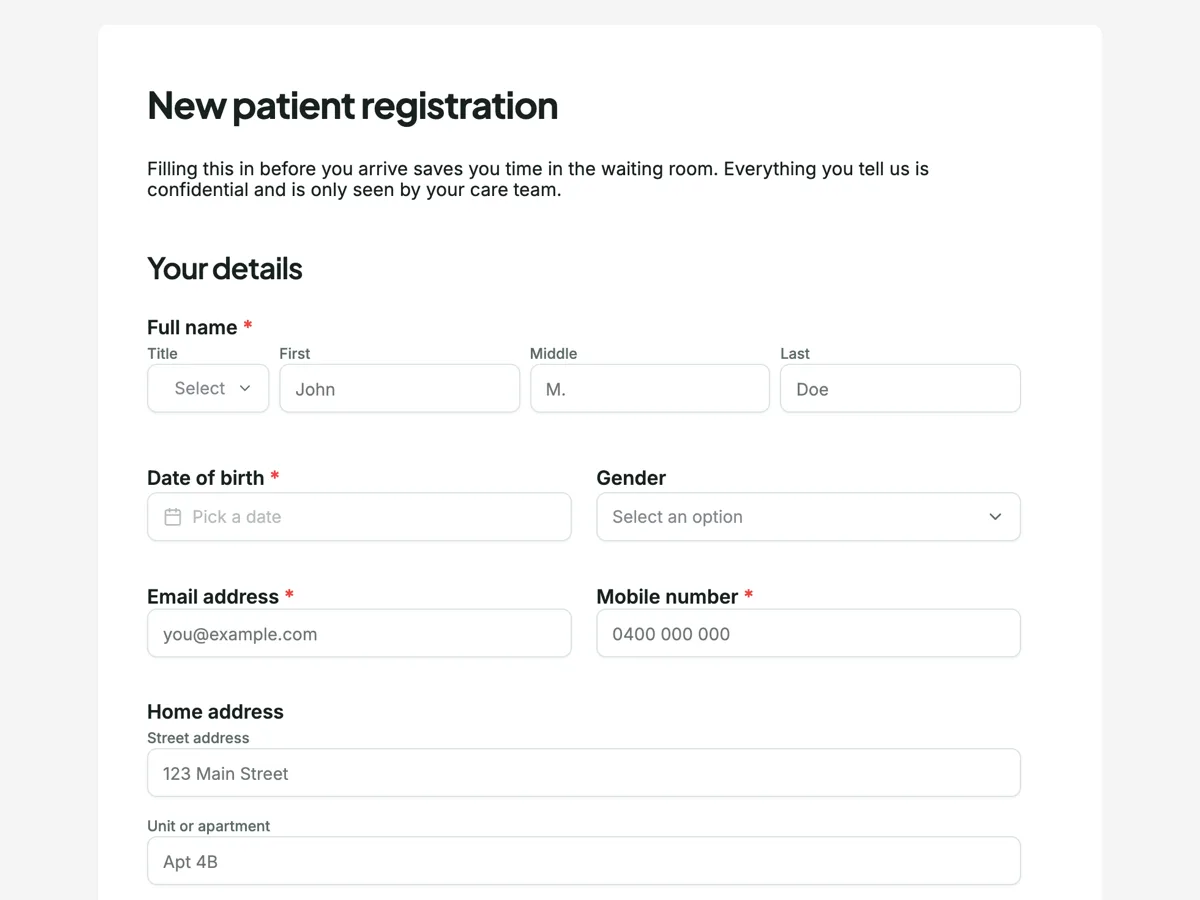
The form itself
A static copy of the finished form, exactly as it renders. Nothing here can be filled in or submitted, so read it as a reference and build your own from the button above.
Every field, and what it collects
The complete field list, in the order respondents meet it.
- Full nameNameRequired
- Date of birthDateRequired
- GenderDropdown
- Options: Female · Male · Non-binary · Prefer to self describe · Prefer not to say
- Email addressShort textRequired
- Mobile numberShort textRequired
- Home addressAddress
- Preferred languageShort text
- Tell us if you would like an interpreter and we will arrange one.
- Contact nameShort textRequired
- Relationship to youShort text
- Contact phoneShort textRequired
- What brings you in today?Long textRequired
- How long has this been going on?Short text
- How much is it affecting your day?Dropdown
- Options: Not much · A little · A fair bit · A lot · I cannot do my normal activities
- Have you ever been told you have any of these?Multiple choice
- Options: Asthma · Diabetes · High blood pressure · Heart disease · Stroke · Cancer · Thyroid condition · Depression or anxiety · Epilepsy · Kidney disease · Liver disease · None of these
- Past surgery or hospital staysLong text
- Medicines you take nowTable
- Include anything over the counter, vitamins and supplements.
- Columns: Medicine · Dose · How often
- AllergiesLong textRequired
- Has a parent, brother or sister had any of these?Multiple choice
- Options: Heart disease · Diabetes · Cancer · Stroke · High blood pressure · None of these
- Do you smoke?Single choice
- Options: Never · Used to · Yes, occasionally · Yes, daily
- AlcoholSingle choice
- Options: None · A few drinks a month · A few drinks a week · Most days
- Health fundShort text
- Member numberShort text
- Photo of your cardPhoto upload
- Optional. It saves us typing it in at the front desk.
- ConsentMultiple choiceRequired
- Options: I have received the practice privacy collection notice · I consent to assessment and treatment · I accept responsibility for any fees not covered by my fund
- Signed by patient or guardianSignatureRequired
Your details
Emergency contact
Why you are coming in
Medical history
Lifestyle
Insurance and payment
Privacy and consent
What each section of this intake form collects
Your details takes the full name, date of birth, gender, email, mobile, home address and preferred language. Emergency contact is a name, a relationship and a phone number. Why you are coming in asks the question in the patient's own words, then how long it has been going on and how much it affects the day. Medical history is a checklist of eleven conditions with a None of these option, past surgery or hospital stays, the medicines table, allergies and a family history checklist. Lifestyle is two four band questions on smoking and alcohol. Insurance and payment takes the fund, the member number and an optional photo of the card, and the last section is the consent paragraph, three ticks and a signature.
Why only ten of the twenty five fields are required
The required fields are the ones a clinic cannot safely start without: name, date of birth, email, mobile, an emergency contact name and phone, the reason for the visit, allergies, the consent ticks and the signature. Everything else is optional because a patient who does not know their family history or has no health fund should still be able to submit. A long form with every box required gets abandoned at home and filled in badly in the waiting room, which defeats the point of sending it ahead.
How to adapt this form
A specialist practice adds a referral upload in the first section and a referring doctor field, since a referral is what makes the visit claimable. A physiotherapy or allied health clinic replaces the medical history checklist with an injury history and a body chart question. A practice seeing children adds a guardian name field in the consent section, so the record shows who signed. Keep the reason for the visit as open text in every version, because it is the one answer the clinician reads first.
What makes this form work
The reason for the visit is asked in the patient's words
"What brings you in today?" is a required long text box, followed by "How long has this been going on?" and a five step dropdown on how much it is affecting daily life, from not much to cannot do normal activities. A dropdown of complaints returns the closest wrong one. An open answer plus duration and impact gives the clinician a real starting point.
Medications are a table, not a paragraph
The "Medicines you take now" table has three columns, Medicine, Dose and How often, and three rows. That is the shape a clinician and a pharmacist read, and it matches the medicines list format Australian safety guidance encourages patients to keep. A free text list arrives without the dose almost every time. On a classic form the table carries no helper line, so reception asks about vitamins and over the counter products at check in.
Consent is three separate lines
A paragraph above the Consent block says the information is true, that the privacy notice has been offered, and that consent to treatment can be withdrawn at any time. Then come three ticks: receipt of the privacy notice, consent to assessment and treatment, and responsibility for fees the health fund does not cover. Three agreements under one tick are easy to challenge later. Three separate lines are not.
Questions people ask
What has to be on a new patient form?
There is no fixed legal list. In practice a clinic needs identity and contact details, an emergency contact, the reason for the visit, relevant medical and family history, current medicines, allergies, how the visit will be paid for, and consent to treatment with an acknowledgement of how health information is handled. Anything beyond that should earn its place by changing the first consultation.
Does an Australian clinic need consent to collect this information?
Health information is sensitive information under the Privacy Act, so a practice generally needs consent to collect it and must tell patients why it is collected and who will see it. The paragraph above the consent ticks and the privacy notice tick cover that acknowledgement. Check the Australian Privacy Principles and your college standards before publishing the form, and link your privacy policy in the intro.
Why ask for allergies as free text?
Because the reaction matters as much as the substance. "Penicillin, brings on a rash" and "penicillin, anaphylaxis" are the same tick in a checklist and very different in a consulting room. The Allergies box is one of the ten required fields, so a patient with none has to write none, which is a clearer record than an empty checklist.
Why ask about family history and lifestyle on an intake form?
The family history checklist asks whether a parent, brother or sister has had heart disease, diabetes, cancer, stroke or high blood pressure, and the lifestyle section asks about smoking and alcohol in four plain bands each. Both are optional, and both shape what a doctor screens for at a first visit.
Should an intake form ask for a preferred language?
Yes, and this one asks it in the first section beside the contact details. Knowing before the appointment lets a clinic book an interpreter rather than discovering the need in the room. It is a single question that changes the length of the consultation and, more importantly, whether consent is genuinely informed.
Why ask for a photo of the health fund card?
Because typed member numbers are wrong often enough to matter. This form asks for the fund, the member number and a photo of the card. The photo settles any mismatch at the desk without a phone call, and it captures the fund details that patients rarely know off the top of their head.
Who can sign the intake form for a child?
A parent or legal guardian signs for a young child, which is why the signature is labelled for the patient or a guardian. Older teenagers can often consent to their own care in Australia, and many practices let a mature minor sign for themselves. Decide the practice's rule in advance and say it in the intro, so a sixteen year old filling this in alone knows what to do.
Build your own in about a minute
The button below opens the generator with this use case already described. Change the wording to match your own, generate, then edit anything you like.
Make one like thisOther form examples
Therapy intake form that asks the safety question properly
A counselling intake form does two things a medical one does not: it lets the client say in their own words why they came, and it asks about safety in a way that is honest about what happens to the answer. This form does both, then takes the consent to counselling and the cancellation terms before the first session.
Dental patient intake form the dentist can read before you sit down
A dentist needs ten medical facts before touching a patient, and a paper form on a clipboard in the waiting room gets them four minutes before the appointment. This form asks for them on the phone the day before, with the health fund and child benefit questions the front desk needs, and the consent lines signed once.
Gym membership form
A membership application for Ironbark Fitness that gets a new member from first visit to signed up in one sitting. Five sections cover personal details, an emergency contact, the membership plan and payment method, the seven question PAR-Q health screen as a yes or no grid, and a waiver signed on screen. About five minutes.
Want the steps in the builder? Read Create a form from scratch with AI, then Send a PDF for e-signature. For everything this generator can do, see the form maker.
Written and checked by the OneCraft team. Last checked .