Classic form
Photo print order form with sizes, paper and upload
A photo print order form has to say which photo is printed at which size, how many, on what paper and with what border, then take the files themselves. This one puts sizes, quantities and finish in a five row table, takes up to ten images in one upload, and asks pickup or post last.
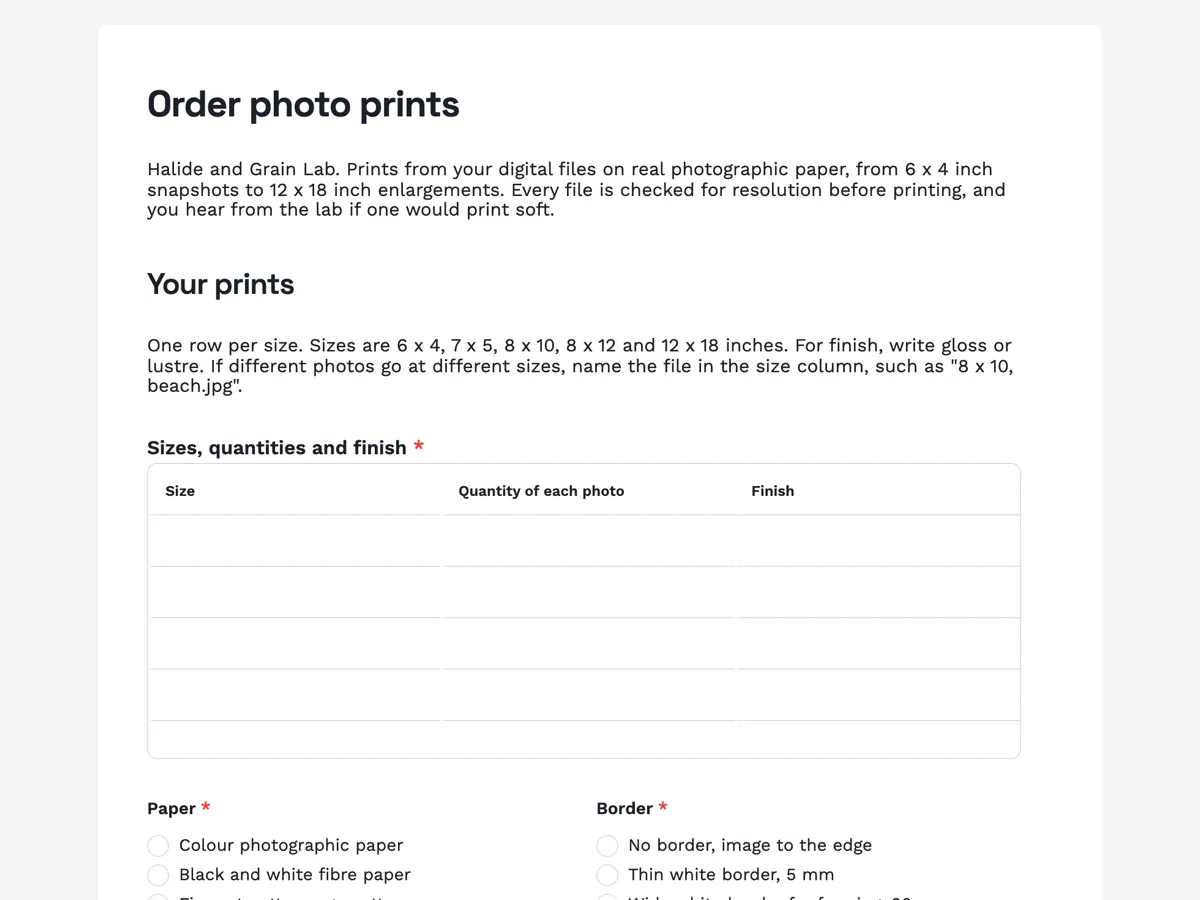
The form itself
A static copy of the finished form, exactly as it renders. Nothing here can be filled in or submitted, so read it as a reference and build your own from the button above.
Every field, and what it collects
The complete field list, in the order respondents meet it.
- Sizes, quantities and finishTableRequired
- Columns: Size · Quantity of each photo · Finish
- PaperSingle choiceRequired
- Options: Colour photographic paper · Black and white fibre paper · Fine art cotton rag, matte
- BorderSingle choiceRequired
- Options: No border, image to the edge · Thin white border, 5 mm · Wide white border for framing, 20 mm
- Your photosFile uploadRequired
- Up to ten JPEG or PNG files, 50 MB each. For an 8 x 10 inch print, a file around 2400 x 3000 pixels prints sharp. Phone photos print well up to 8 x 12.
- Pickup or post?Single choiceRequired
- Options: Pick up from the lab · Post flat in a rigid envelope · Post rolled in a tube, 12 x 18 only
- Postal address, if postingAddress
- Your nameNameRequired
- EmailShort textRequired
Your prints
Getting them back
What each field on this form collects
A paragraph lists the five print sizes in inches and explains how to name a file in the size column. Sizes, quantities and finish is a required five row table with three columns. Paper is a radio of three, colour photographic, black and white fibre and cotton rag, beside border, a radio of three from none to a 20 mm framing border. Your photos is a required upload of up to ten images at 50 MB each, and its description gives the pixel size for a sharp 8 x 10. Pickup or post is a radio of three, including a tube for the largest size. The postal address is optional, for posted orders. Name and email close it. Seven of the eight fields are required.
Why sizes and quantities are a table
A photo order is rarely one size. A family order is often twenty 6 x 4 snapshots, three 8 x 10 portraits and one 12 x 18 for the wall. A table with one row per size keeps that order in one place and in the shape the lab prints it, batch by size. The finish column sits in the same row, because gloss and lustre are chosen per size: gloss for snapshots, lustre for anything behind glass. The table has five rows and cannot add more, which matches the five sizes the lab offers.
How to adapt this form
A film lab adds a developing section before the prints: film format, number of rolls and push or pull processing. A canvas printer swaps paper for canvas depth and adds stretched or rolled. A school photo company replaces the upload with a student code, since the images are already at the lab.
What makes this form work
One row per size
Five rows of size, quantity of each photo and finish describe a mixed order exactly as the lab prints it, in batches by size, with the finish chosen per size.
Resolution is stated in pixels
The upload description says a file around 2400 x 3000 pixels prints a sharp 8 x 10, and phone photos print well up to 8 x 12. Customers can check before uploading.
Paper and border are separate choices
Three papers beside three borders, including a 20 mm border for framing. A print bought for a frame arrives with room for the mat, rather than trimmed to the edge.
Questions people ask
What resolution does a photo need for an 8 x 10 print?
About 300 pixels per inch at the print size, so roughly 2400 by 3000 pixels. A lower resolution still prints but looks soft at arm's length. The upload description gives that figure, and the thank-you screen says the lab checks each file and suggests the largest good size before printing.
What is the difference between gloss and lustre?
Gloss is shiny with deep blacks and strong colour, but shows fingerprints and reflects light. Lustre has a slight texture and a soft sheen, which hides fingerprints and reads well behind glass. The table puts finish in each row, so snapshots can be gloss and framed enlargements lustre in the same order.
Can someone upload more than ten photos?
Not on one submission. The upload field allows one to ten files, and this one is set to ten at 50 MB each, which suits most print orders. A larger order is split across two submissions, or the lab sends a shared folder link. Ten keeps the upload quick on a phone connection.
Why is the postal address optional?
Because a pickup order does not need one, and a required address would make every customer type one in. The label says if posting. The radio above it makes the choice, and the lab checks for an address on any order marked post before packing it. An empty address on a post order gets a quick email.
Why does the 12 x 18 print have its own post option?
Large prints posted flat need a rigid board envelope that is costly to send, so the lab offers a tube for that size. Rolling is fine for photographic paper as long as the print is flattened under weight on arrival. Smaller prints always go flat, so the tube option names the size it applies to.
Does the form show the order total?
No. The form records the sizes, quantities and files, and the lab confirms the price when it confirms the order. Photo print pricing depends on the size, paper and border chosen per row, which a form cannot add up. Payment happens at pickup or before posting, outside the form.
Build your own in about a minute
The button below opens the generator with this use case already described. Change the wording to match your own, generate, then edit anything you like.
Make one like thisOther form examples
Engraving order form with a text proof and font choice
An engraving order form has to get the exact words, spelled and spaced as they should be cut, because an engraved mistake cannot be fixed. This one limits each of two lines to 30 characters, asks the font and layout as named styles, and sends a proof for approval before any item is engraved.
T shirt order form with a size grid and print position
A t shirt order form has to collect how many of each size, which colour and where the print goes, because those three set the price and the screens. This one uses a six row size and quantity table, gives each print position its maximum width in centimetres, and takes the artwork as an upload with the file rules stated.
Printing order form with stock, finish and artwork
A printing order form has to pin down the product, the finished size, the paper, the sides, the finishes and the quantity, because a print shop cannot quote a job missing any one of them. This one asks all six in the order an estimator prices them, then takes the PDF, the proof choice and the date.
Want the steps in the builder? Read Form builder components, then View, export and manage your responses. For everything this generator can do, see the form maker.
Sources
Written and checked by the OneCraft team. Last checked .