Classic form
T shirt order form with a size grid and print position
A t shirt order form has to collect how many of each size, which colour and where the print goes, because those three set the price and the screens. This one uses a six row size and quantity table, gives each print position its maximum width in centimetres, and takes the artwork as an upload with the file rules stated.
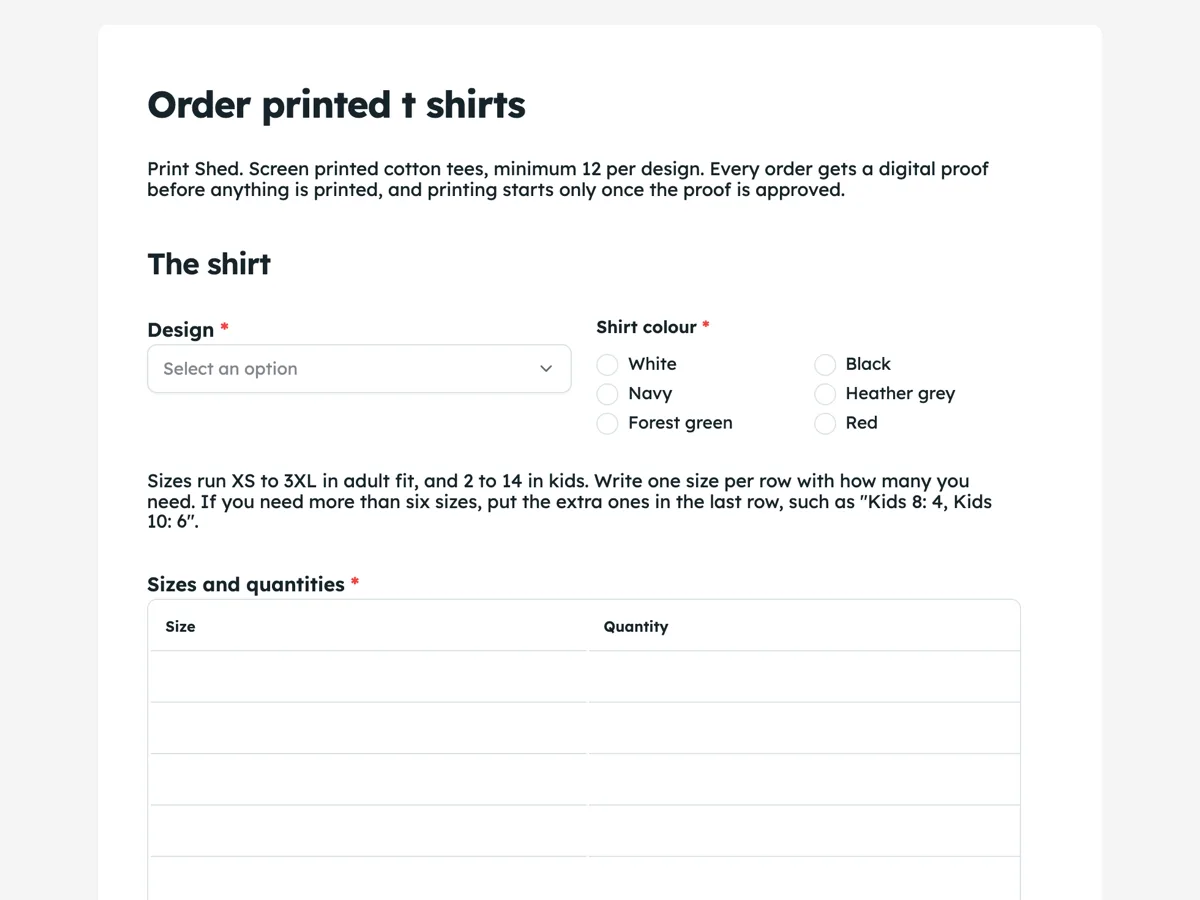
The form itself
A static copy of the finished form, exactly as it renders. Nothing here can be filled in or submitted, so read it as a reference and build your own from the button above.
Every field, and what it collects
The complete field list, in the order respondents meet it.
- DesignDropdownRequired
- Options: My own artwork, uploaded below · Text only, set in one of your fonts · A design from your stock range · I need a design made
- Shirt colourSingle choiceRequired
- Options: White · Black · Navy · Heather grey · Forest green · Red
- Sizes and quantitiesTableRequired
- Columns: Size · Quantity
- Print positionSingle choiceRequired
- Options: Front centre, up to 28 cm wide · Left chest, up to 10 cm wide · Full back, up to 30 cm wide · Left chest and full back, two prints
- ArtworkFile upload
- A PDF or a PNG at least 3000 pixels wide, with a transparent background. Leave this empty if you chose text only or a stock design.
- Needed byDateRequired
- Delivery addressAddressRequired
- Your nameNameRequired
- Email for the proofShort textRequired
- MobileShort textRequired
The shirt
Delivery
You
What each field on this form collects
Design is a dropdown of four: own artwork, text only, a stock design, or a design to be made. Shirt colour is a radio of six beside it. A paragraph lists the adult and kids size ranges and explains how to fit extra sizes into the last row. Sizes and quantities is a six row table with size and quantity columns. Print position is a radio of four, each with its maximum print width. Artwork is an optional upload of images or PDF, and its description, which shows on the published form, gives the file rules. Needed by is a date. Delivery address takes the street, the company or club name, city, region and postcode. Your name, an email for the proof and a mobile close it.
Why the sizes are a table and not one quantity box
A print shop orders blank shirts by size, so 40 shirts is not an order until it is 4 small, 12 medium, 14 large, 8 XL and 2 2XL. A single quantity field guarantees a follow up email. The table asks for exactly the breakdown the supplier order needs. It shows six rows and cannot add more, which covers most adult runs; the paragraph above says how to fit extra sizes into the last row. The form does not add the rows up or work out a price. The proof comes back with the total for every size, and the customer approves it before printing.
How to adapt this form
An embroidery shop replaces print position with logo placement and adds a stitch count note, since embroidery is priced by stitches. A hoodie and merch shop adds a garment type dropdown and lets each row of the table name the garment as well as the size. A charity event shirt order adds a pickup at the event option beside delivery and a question about whether the shirts are sold or given to volunteers.
What makes this form work
The size breakdown arrives with the order
Six rows of size and quantity give the print shop the exact blank shirt order. Nobody has to reply asking how many mediums, which is the email that usually delays a print run by days.
Print positions carry their maximum width
Front centre up to 28 cm, left chest up to 10 cm, full back up to 30 cm, or chest and back. The customer chooses a size, not just a place, and the proof matches what they pictured.
File rules sit on the upload
The artwork field's description asks for a PDF or a PNG at least 3000 pixels wide with a transparent background. The common bad file is stopped at the moment it is chosen, not discovered at proof stage.
Questions people ask
What artwork file does a t shirt printer need?
A vector PDF is best, because it prints sharp at any size. A PNG works if it is at least 3000 pixels wide with a transparent background, which the upload description says. A small JPEG from a website prints blurry at 28 centimetres wide. The proof shows the print at real size, which is when a weak file gets caught.
Why does each print position state a width?
Because a logo looks very different at 10 centimetres on the chest and 28 across the front, and the size changes the screen and the price. Writing the maximum width into each option tells the customer what they are choosing. The proof then shows the actual size before anything is printed.
Does this form calculate the order total?
No. It collects the sizes, colour and position, and the print shop sends a proof with the total for every size. A form records answers and does not price them. The intro and the thank-you screen both say the proof and the total come before printing, so nobody expects a figure at submit.
What if the order has more than six sizes?
The table shows six rows and cannot grow, so the paragraph above it says to put extra sizes into the last row with their counts, such as kids 8 and kids 10. A shop that regularly prints across adult and kids ranges can set the table to ten rows instead.
Why ask for a needed by date instead of an order date?
Because the date that matters is the event, not the day the form is sent. Printing takes seven business days from proof approval, so a needed by date tells the shop at once whether the order is tight. It also makes a slow approval visible: the clock runs from the customer's reply, not from the order.
Why is there a minimum of 12 shirts per design?
Screen printing sets up one screen per colour per print position, and that setup costs the same for 12 shirts as for 200. Below 12, the setup makes each shirt expensive. The intro states the minimum so a customer wanting three shirts knows before filling in the table, and can look for a print on demand service instead.
Build your own in about a minute
The button below opens the generator with this use case already described. Change the wording to match your own, generate, then edit anything you like.
Make one like thisOther form examples
Photo print order form with sizes, paper and upload
A photo print order form has to say which photo is printed at which size, how many, on what paper and with what border, then take the files themselves. This one puts sizes, quantities and finish in a five row table, takes up to ten images in one upload, and asks pickup or post last.
Printing order form with stock, finish and artwork
A printing order form has to pin down the product, the finished size, the paper, the sides, the finishes and the quantity, because a print shop cannot quote a job missing any one of them. This one asks all six in the order an estimator prices them, then takes the PDF, the proof choice and the date.
Engraving order form with a text proof and font choice
An engraving order form has to get the exact words, spelled and spaced as they should be cut, because an engraved mistake cannot be fixed. This one limits each of two lines to 30 characters, asks the font and layout as named styles, and sends a proof for approval before any item is engraved.
Want the steps in the builder? Read Form builder components, then View, export and manage your responses. For everything this generator can do, see the form maker.
Sources
Written and checked by the OneCraft team. Last checked .