Classic form
Printing order form with stock, finish and artwork
A printing order form has to pin down the product, the finished size, the paper, the sides, the finishes and the quantity, because a print shop cannot quote a job missing any one of them. This one asks all six in the order an estimator prices them, then takes the PDF, the proof choice and the date.
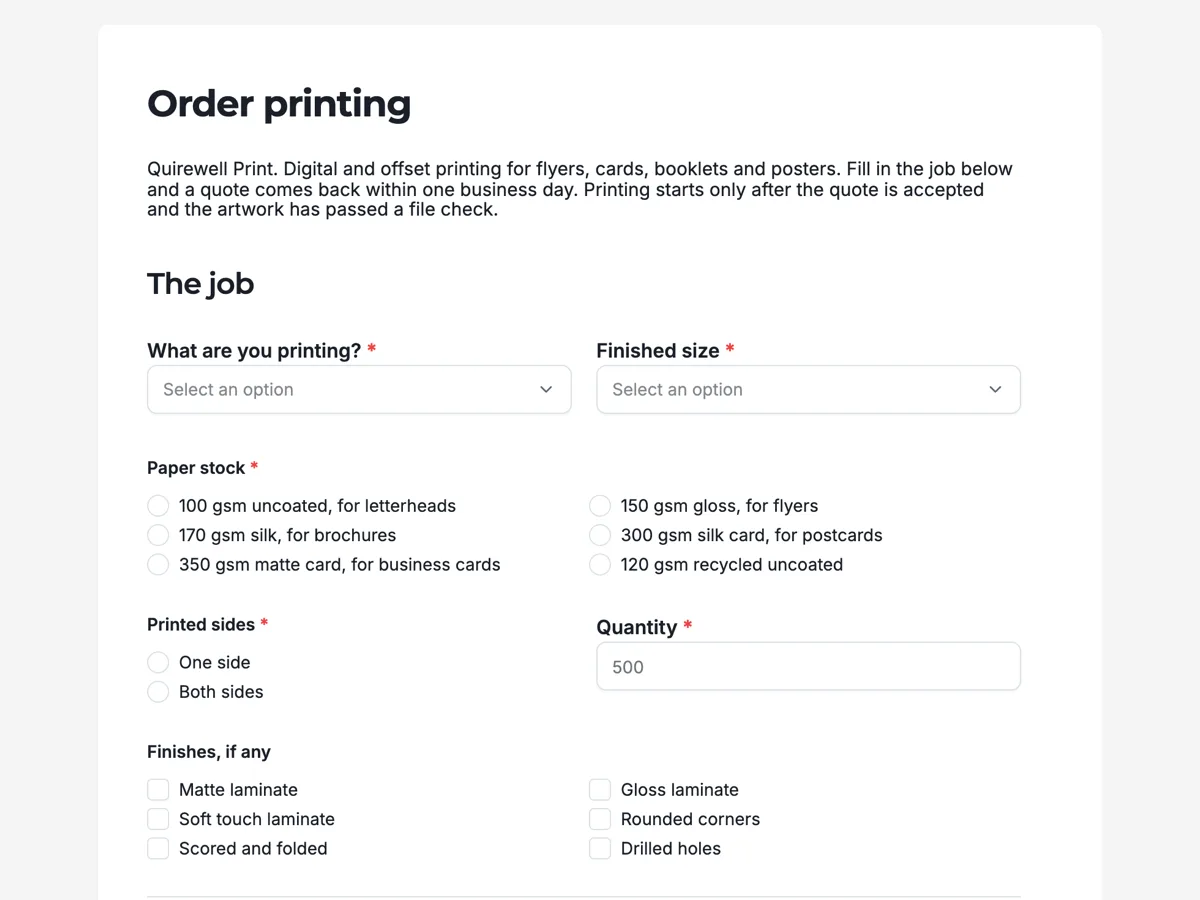
The form itself
A static copy of the finished form, exactly as it renders. Nothing here can be filled in or submitted, so read it as a reference and build your own from the button above.
Every field, and what it collects
The complete field list, in the order respondents meet it.
- What are you printing?DropdownRequired
- Options: Flyers · Business cards · Postcards · Folded brochures · Stapled booklets · Posters · Letterheads
- Finished sizeDropdownRequired
- Options: Business card, 90 x 55 mm · A6, 105 x 148 mm · DL, 99 x 210 mm · A5, 148 x 210 mm · A4, 210 x 297 mm · A3, 297 x 420 mm · A2, 420 x 594 mm
- Paper stockSingle choiceRequired
- Options: 100 gsm uncoated, for letterheads · 150 gsm gloss, for flyers · 170 gsm silk, for brochures · 300 gsm silk card, for postcards · 350 gsm matte card, for business cards · 120 gsm recycled uncoated
- Printed sidesSingle choiceRequired
- Options: One side · Both sides
- QuantityNumberRequired
- Finishes, if anyMultiple choice
- Options: Matte laminate · Gloss laminate · Soft touch laminate · Rounded corners · Scored and folded · Drilled holes
- Print ready artworkFile upload
- One PDF per design, at the finished size plus 3 mm bleed on every edge, images at 300 dpi and fonts embedded. Leave this empty if the file is still with your designer.
- Do you need a proof first?Single choiceRequired
- Options: PDF proof by email · Printed hard proof, adds one day · No proof, print as supplied
- Needed byDateRequired
- Your nameNameRequired
- Email for the quote and proofShort textRequired
- PhoneShort textRequired
The job
Artwork and timing
You
What each field on this form collects
Product is a dropdown of seven, from flyers to letterheads, and finished size sits beside it with seven sizes, each written in millimetres. Paper stock is a radio of six that names the weight in gsm and what it suits. Printed sides is one or both, beside a quantity with a minimum of 25. Finishes is an optional checkbox of six: three laminates, rounded corners, scoring and folding, and drilled holes. The artwork upload accepts PDF only, up to three files, and its description gives the bleed, resolution and font rules. The proof question offers a PDF proof, a printed proof or none. Needed by is a date. Name, email and phone close the form. Ten of the twelve fields are required; finishes and the artwork are optional.
Why the upload is optional and PDF only
A print shop quotes from the specification, not the file, so a customer whose designer is still working can send the order and get a price the same day. Making the upload required would stop that order at the last question. PDF only matches what presses print from: a PDF carries embedded fonts and exact page size, where a Word file reflows on another computer. The description states 3 mm of bleed and 300 dpi, the two faults that most often send artwork back. The file check after the quote acceptance catches what the description does not.
How to adapt this form
A large format printer swaps the size dropdown for width and height in centimetres and adds media such as vinyl, canvas and mesh. A booklet specialist adds page count and binding. A print broker taking jobs for clients adds a question asking whether the delivery is blind shipped, with no print shop name on the box.
What makes this form work
Sizes are written in millimetres
Every finished size names its dimensions, from 90 x 55 mm for a card to 420 x 594 mm for A2. A customer who says A5 and means a DL flyer is corrected by the option itself.
Stock names its use
Six papers, each with a gsm and a job: 150 gsm gloss for flyers, 350 gsm matte card for business cards. The choice is made by purpose, and the estimator gets an exact paper.
The file rules sit on the upload
The PDF upload description asks for 3 mm bleed, 300 dpi images and embedded fonts. Those three cause most rejected files, and they are stated at the moment the file is chosen.
Questions people ask
What does gsm mean on a print order?
Grams per square metre, the weight of the paper. Office paper is around 80 gsm, a flyer is usually 130 to 170, and a business card 300 or more. The stock question names the weight with a use beside each, so a customer who has never heard the term still picks a card thick enough for the job.
What is bleed and why does the artwork need it?
Bleed is extra image beyond the trim line, usually 3 mm on each edge. Sheets are printed larger and cut down, and the blade moves slightly. Without bleed, a background colour that should reach the edge can leave a thin white line. The upload description asks for it so the file check passes first time.
Is a printed proof worth the extra day?
For colour critical work, yes. A screen shows colour in light, and paper shows it in ink, so a brand colour can look different on a 350 gsm matte card. For a reprint or a simple flyer, a PDF proof checks the text, layout and trim, and the printed proof is not needed.
Does the form price the job?
No. It collects the specification, and the print shop replies with a quote within one business day, as the intro and the thank-you screen say. Print pricing depends on press time, paper stock on hand and finishing, which a form cannot work out. Printing starts only after the quote is accepted.
Why is there a minimum quantity of 25?
Below that the setup time costs more than the print. The number field carries a minimum of 25 and a maximum of 50,000, and the input carries both limits, so an order outside that range is refused when the form is submitted. A shop that prints single posters on demand lowers the minimum to one on the poster product.
Can a customer upload a Word or image file?
Not on this form. The file upload field offers two type toggles, images and PDF, and this one allows PDF only. A shop that accepts high resolution images for photo posters turns the images toggle on as well. Word files are never accepted, because their fonts and layout change between computers.
Build your own in about a minute
The button below opens the generator with this use case already described. Change the wording to match your own, generate, then edit anything you like.
Make one like thisOther form examples
Photo print order form with sizes, paper and upload
A photo print order form has to say which photo is printed at which size, how many, on what paper and with what border, then take the files themselves. This one puts sizes, quantities and finish in a five row table, takes up to ten images in one upload, and asks pickup or post last.
Engraving order form with a text proof and font choice
An engraving order form has to get the exact words, spelled and spaced as they should be cut, because an engraved mistake cannot be fixed. This one limits each of two lines to 30 characters, asks the font and layout as named styles, and sends a proof for approval before any item is engraved.
T shirt order form with a size grid and print position
A t shirt order form has to collect how many of each size, which colour and where the print goes, because those three set the price and the screens. This one uses a six row size and quantity table, gives each print position its maximum width in centimetres, and takes the artwork as an upload with the file rules stated.
Want the steps in the builder? Read Form builder components, then Automate your form with add-ons. For everything this generator can do, see the form maker.
Sources
Written and checked by the OneCraft team. Last checked .