Classic form
Repair request form with photos and warranty check
A repair request form gives a service team what it needs to book a repair: which product, its serial number, what is wrong and whether the warranty covers it. This one adds optional photos of the fault, a proof of purchase upload for warranty claims, and a choice between dropping the appliance off and a courier pickup.
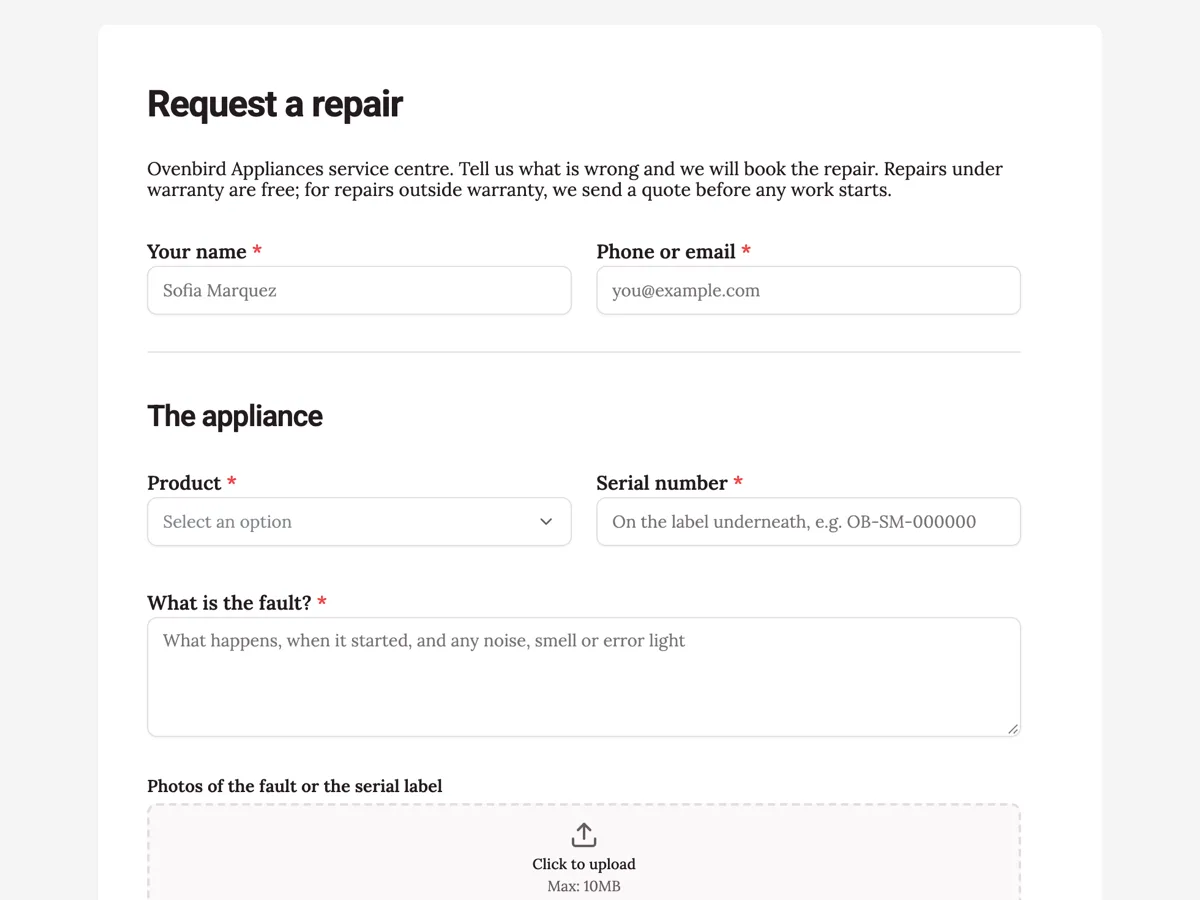
The form itself
A static copy of the finished form, exactly as it renders. Nothing here can be filled in or submitted, so read it as a reference and build your own from the button above.
Every field, and what it collects
The complete field list, in the order respondents meet it.
- Your nameShort textRequired
- Phone or emailShort textRequired
- ProductDropdownRequired
- Options: Stand mixer · Espresso machine · Kettle · Toaster · Blender · Air fryer
- Serial numberShort textRequired
- What is the fault?Long textRequired
- Photos of the fault or the serial labelFile upload
- Optional. Up to four images, 10 MB each.
- Is it under warranty?Single choiceRequired
- Options: Yes, bought within the last 2 years · No, it is older · Not sure
- Proof of purchaseFile upload
- Needed for a warranty repair: a receipt, invoice or bank statement line. Image or PDF, one file.
- Drop off or pickup?Single choiceRequired
- Options: I will drop it at a service centre · Please arrange a courier pickup
- Pickup address, if you chose a courierAddress
The appliance
Warranty
Getting it to us
What each field on this form collects
Name and a phone or email open the form. Product is a dropdown of six appliances, beside the serial number with a placeholder that says where the label is. The fault is a long text that prompts for symptoms, timing and error lights. Photos is an optional upload of up to four images. Warranty is a radio of yes, no or not sure. Proof of purchase is an optional upload, needed for a warranty repair. Drop off or pickup is a radio of two, and the pickup address is optional for those dropping off. Seven of the ten fields are required.
Why the serial number is required
The same model is often built in several batches with different parts. The serial number tells the service team which batch, which part to order and whether a known fault applies. It also confirms the warranty start date when there is no receipt. The placeholder says the label is underneath, because most people look on the back first. Photos are optional but useful: a picture of a cracked bowl or an error light saves a phone call.
Warranty and consumer rights
A manufacturer's warranty sits alongside the rights consumers already have by law, and in many countries those rights cannot be taken away by the warranty terms. The US Federal Trade Commission explains what a written warranty must say, and the UK government sets out consumer rights to a repair or replacement for faulty goods. The form asks for proof of purchase only for warranty repairs, and the intro says out of warranty repairs get a quote first, so nobody is charged without agreeing.
How to adapt this form
A bike shop replaces the product list with bike types and adds a preferred service date. A phone repair shop adds the device passcode question and a data backup tick. A furniture maker swaps courier pickup for an on site visit with the same address field.
What makes this form work
The serial label is easy to find
The placeholder says it is underneath and shows the format. Customers find the right number on the first try.
Not sure is a warranty answer
Yes, no or not sure means nobody guesses. The team checks the serial number when the customer cannot remember.
The address only when needed
The pickup address is optional and its label says it is for courier pickups. Customers dropping off skip it.
Questions people ask
What should a repair request form ask?
The product, its serial number, the fault in the customer's own words, whether it is under warranty, and how the item will reach the repairer. Photos and proof of purchase help but should not block a request. This form makes the first five required and leaves the uploads and address optional.
Why is proof of purchase optional?
Because many repairs are outside warranty and need no receipt. For a warranty repair, the upload description says it is needed, and the service team asks for it if the warranty radio says yes and nothing is attached. Making it required would block every out of warranty customer.
What if the customer does not know whether it is under warranty?
They choose not sure, and the service team checks the serial number and any receipt. Many people do not remember when they bought an appliance. The third option keeps the required question honest instead of forcing a guess that leads to a wrong charge or a refused claim.
Does the form give the customer a quote?
No. The intro says the service team sends a quote before any out of warranty work starts, and the thank-you screen says nothing is charged until the customer accepts. The form collects the request; the quote follows once a technician has read the fault and seen the photos.
Can the service team get each request straight away?
The owner can turn on an email alert so the service inbox receives each request with all the answers, or a webhook that sends it to a job management system. Both run when the form is submitted. The customer receives nothing automatically, so the team replies to the phone or email given.
Should the customer describe the fault or diagnose it?
Describe it. The fault placeholder asks what happens, when it started and any noise, smell or error light, which is what a technician needs. A guess such as the motor is broken can send the team down the wrong path. Plain symptoms, plus a photo of any error light, lead to the right part first time.
Build your own in about a minute
The button below opens the generator with this use case already described. Change the wording to match your own, generate, then edit anything you like.
Make one like thisOther form examples
Data access request form for an app
A data access request form lets a person ask an organisation for the personal data it holds about them, and gives the organisation enough to confirm who is asking. This one handles access, correction and deletion in one form for a hiking app, with an optional date range, an identity upload and a choice of delivery.
Document request form for a school office
A document request form tells an office which record someone needs, who it is about, why and how to send it, with proof that the person asking is allowed to have it. This one does that for an Australian secondary school, with five documents to choose from, an identity upload and a standard or urgent turnaround.
Freedom of information request form for a council
A freedom of information request form has to describe the documents clearly enough for an agency to find them, say who is asking and how they want access, and deal with the application fee. This one does that for a Victorian council, with a date range to narrow the search, a hardship waiver option and the four forms of access.
Want the steps in the builder? Read Form builder components, then Automate your form with add-ons. For everything this generator can do, see the form maker.
Written and checked by the OneCraft team. Last checked .