Presentations
Generate slides from text
The prompt box is not a search field. It holds 10,000 characters, which is about 1,300 words, so a whole brief fits and gets used. This page is about what happens to that text on the way to becoming slides.
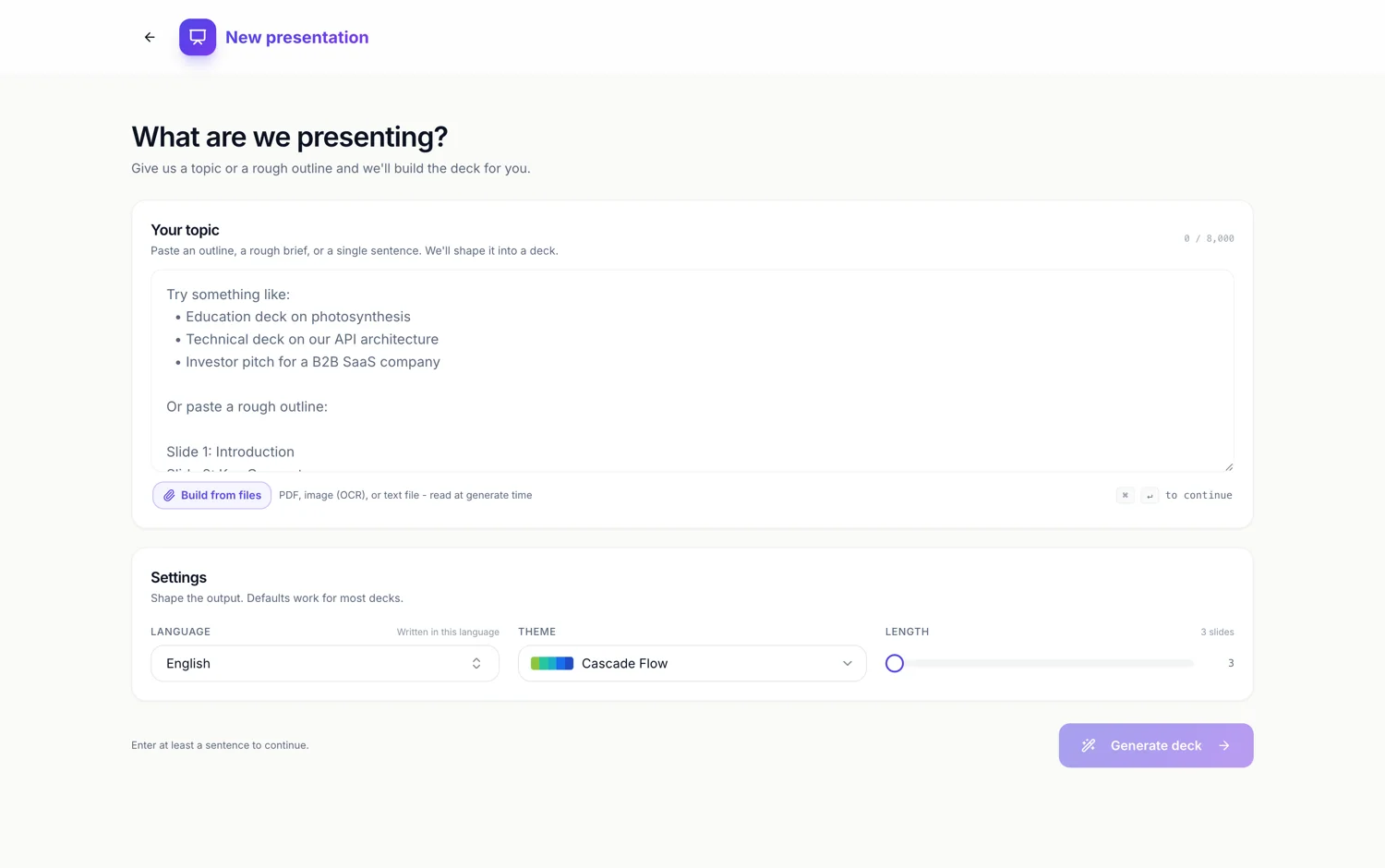
Your words are treated as instructions, not decoration
Text typed into the box is read as the brief itself. Names, figures, product terms and the order you put them in are carried through to the planning step and handed to the writer as the substance each slide must convey. The planner is told explicitly that thin planning produces thin slides, so the more specific your paste, the less generic invention you get back.
Paragraphs do not map one to one to slides
A 900 word brief does not become nine slides of 100 words. The planner reads the whole thing, decides how many ideas are actually in it, and distributes them across the slide count you asked for. Two short paragraphs about the same idea merge. One dense paragraph carrying three claims splits. The unit is the idea, not the paragraph break.
Numbers are kept, and not invented
Figures in your text are picked up and can be promoted to a pull quote on the slide, a large value with a short label beneath it. The rule the planner works under is blunt: never invent numbers, and return an empty list if there are no sourced figures. So a brief with real percentages gets stat callouts and a brief without them does not get fabricated ones.
Structure in your text is respected
If your paste already looks like an outline, with numbered points or lines beginning Slide 1, Slide 2, the planner follows it rather than reorganising. The prompt box placeholder shows exactly that shape as an accepted input. If your paste is unstructured prose, the planner imposes a narrative order instead, which is the right behaviour for a memo and the wrong one for a plan you already agreed.
What gets dropped
Anything that is scaffolding rather than content. Salutations, sign offs, meeting logistics, disclaimers and the sentence explaining what the document is. Slides carry claims, and a claim needs to survive being read in six seconds from the back of a room, so hedged multi clause sentences come back shorter than you wrote them.
How it works, in three steps
Step 1
Paste the text
The counter under the box shows how much of the 10,000 characters you have used.
Step 2
Say what it is for
Add one line naming the audience and the decision you want from them. It changes the tone more than any setting does.
Step 3
Set the slide count
The planner is told to hit your number exactly and only flex by one if the narrative demands it, so pick deliberately.
The full walkthrough with screenshots is in the guide Make a pitch presentation with AI.
Limits worth knowing
- 10,000 characters is the ceiling. Longer source material belongs in an attached file, which is a Starter feature.
- The box needs at least 8 characters before Generate will fire.
- Formatting is not read. Bold, headings and tables pasted from a word processor arrive as plain text.
- Slide count is capped at 6 on the free plan and 20 on paid plans.
See it on a finished piece

Questions people ask
How much text is 10,000 characters?
Roughly 1,300 words, or about three pages of typed prose. A live counter under the box tells you where you are.
Will it use my exact wording?
It uses your facts, names and figures. It rewrites the sentences, because slide copy has a character budget per box that ordinary prose will not meet.
What if my text is already an outline?
Then it is followed. Numbered points or lines starting Slide 1 are recognised as structure, and the deck comes back in that order.
Can I paste more than one document?
Concatenate them into the box if they fit, or attach up to five files on a Starter plan, which are read at generate time and treated as part of the prompt.
Make your own presentation
The button opens the generator with this use case already described. Change the wording to match yours, generate, then edit anything you like.
Create a presentation with OneCraftRelated pages
Write a proposal in another language
A proposal in another language should read as if it were written in that language, not translated line by line afterwards. Setting the language before the draft is written means the headings, the scope, the item descriptions and the terms all come out in it from the start.
SWOT analysis slide
A SWOT is four boxes and a discipline. The boxes are easy. The discipline is keeping each entry short enough to argue about and honest enough to be worth arguing about, which is mostly a writing problem rather than a design one.
Build a form in any language
The language picker sits under the prompt box. Choose a language and the whole form comes back in it: labels, descriptions, option lists, the button, the welcome screen and the thank-you screen, not just the questions.
More finished work of this kind is on the presentation examples hub.
Written and checked by the OneCraft team. Last checked .