Proposals
Write a proposal in another language
A proposal in another language should read as if it were written in that language, not translated line by line afterwards. Setting the language before the draft is written means the headings, the scope, the item descriptions and the terms all come out in it from the start.
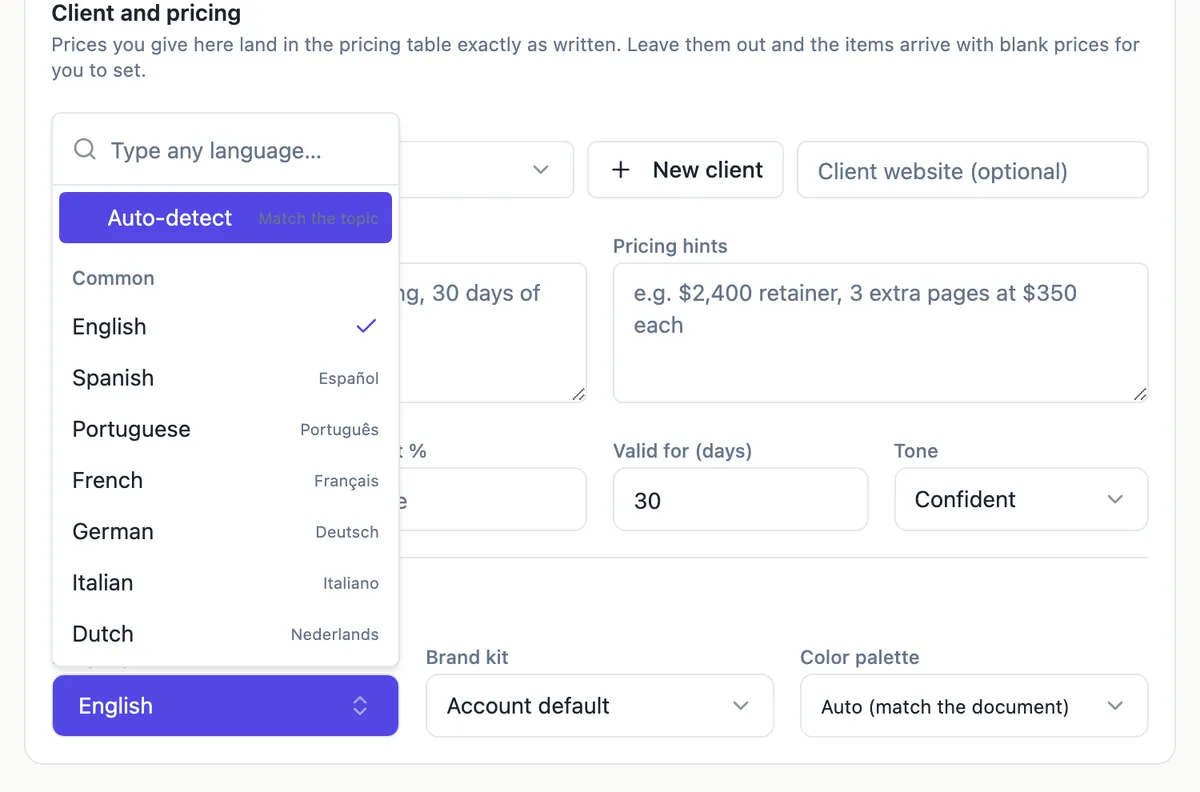
Pick, type or detect
The Language field in the generator options opens a searchable list. A Common group lists 33 suggestions with their native names, from Spanish and Arabic to Japanese, Tamil and Swahili. Type a language that is not listed and a Use option accepts it as written. Auto-detect, at the top of the list, leaves the choice to the brief, which suits a brief already written in the target language.
What is written in that language
The instruction is to write every user facing text in the chosen language: the headings, paragraphs, scope, item names and descriptions, and the numbered terms. Prices are numbers and are not translated, so a price hint of EUR 2,400 stays exactly that. The research step on the client still runs, and the findings are written up in the chosen language.
Currency and tax labels
Language and money are set separately. Choose the currency in the options; the tax label follows it, so AUD and NZD get GST, GBP and EUR get VAT, and other currencies get Tax. The labels themselves can be edited in the Pricing panel, which matters when the local term differs, such as IVA in Spain. Check that the label on the table matches what your client tax office expects.
Parts of the screen that stay in English
The proposal content is written in your language, but some surrounding text is fixed in English: the client view buttons such as Accept proposal and Decline, the consent sentence in the accept dialog, the pricing table column headings and summary labels, and the system emails. A client who reads only the target language will still see these, so mention it in your covering message if that matters.
Checking a language you do not read
If you cannot read the language, have a fluent speaker check the draft before sending, especially the terms. Models are strong in widely used languages and weaker in less common ones, and legal wording is where small errors matter most. Keep a version of the terms in a language you read so you know what you have agreed to.
How it works, in three steps
Step 1
Open Language and style
In the generator, open Options and find Language under Language and style.
Step 2
Choose the language
Pick from the Common list, type any other language, or leave Auto-detect to follow the brief.
Step 3
Generate and have it checked
Generate the proposal, then have a fluent reader check it, especially the terms, before you send.
The full walkthrough with screenshots is in the guide Send a proposal and get paid.
Limits worth knowing
- The language applies to the generated content; buttons, table labels and system emails stay in English.
- Prices and quantities are kept as given; currency is chosen separately.
- The tax label follows the currency and can be edited.
- The prompt and brief share the 8,000 character limit.
Questions people ask
Which languages can I use?
Any language you can type. The list suggests 33 common ones with native names, including Spanish, Portuguese, French, German, Italian, Dutch, Polish, Arabic, Hindi, Indonesian, Vietnamese, Thai, Japanese, Korean, Chinese in simplified and traditional script, and Swahili. Anything else can be typed into the search box and used as written.
Can I write the brief in English and get the proposal in French?
Yes. Write the description and options in English, set Language to French, and the generated proposal is written in French. The price hints and deliverables are read in English and their content appears in French in the scope and item descriptions. Prices stay exactly as typed.
Does the pricing table translate?
The item names and descriptions are written in the chosen language, because they are generated content. The column headings such as Item, Qty and Amount, and the summary lines such as Subtotal and Total, are fixed labels in English. The tax label is editable, so you can set the local term yourself in the Pricing panel.
Can the AI assistant edit a proposal in another language?
The assistant edits the text of the proposal as you instruct it, and you can ask it in English to rewrite a paragraph in the proposal language. Every change shows as a preview before you apply it. Pricing operations such as adding an item work the same whatever the language.
Will the PDF show the language correctly?
The PDF is rendered on the server from the same pages the builder shows, so text in the chosen language appears as it does on screen. Check scripts such as Arabic, Hebrew or Thai on screen before sending, since the document layout was designed around left to right text and right to left scripts may need manual adjustment.
Make your own proposal
The button opens the generator with this use case already described. Change the wording to match yours, generate, then edit anything you like.
Create a proposal with OneCraftRelated pages
Build a form in any language
The language picker sits under the prompt box. Choose a language and the whole form comes back in it: labels, descriptions, option lists, the button, the welcome screen and the thank-you screen, not just the questions.
Write a proposal from a brief, with your prices kept
Writing a proposal from a brief means turning what the client asked for into a scope, a price and terms they can accept. The brief supplies the problem and the constraints; you supply the deliverables and the prices; the proposal joins them in the client language.
Build a presentation in another language
The language control sits with the theme and length settings under the prompt box. What it does is not translation. The whole deck is planned and written in the language you name, which produces different sentences from writing it in English and translating afterwards.
More finished work of this kind is on the proposal examples hub.
Sources
Written and checked by the OneCraft team. Last checked .