Websites
Multi page website builder: pages, menus and addresses that stay linked
A multi page website gives each service, audience or topic its own page with its own address and search listing. The work is less in making pages than in keeping the menu, the links and the addresses consistent as the site grows, which is what a builder should do for you.
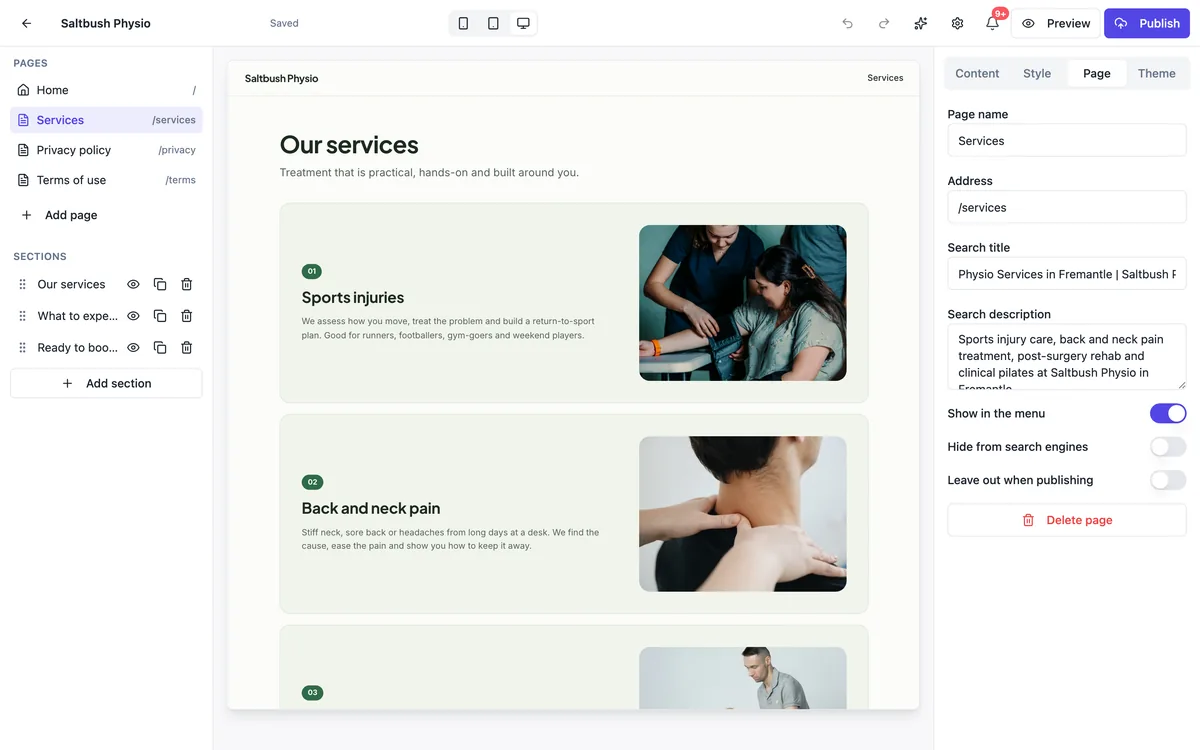
Each page is its own listing
Every page has a name, an address such as /services or /ev-chargers, its own search title and description, and two switches: show in the menu and hide from search engines. Published, each page gets a canonical address, its own Open Graph tags for shared links, and a line in the site sitemap. That is what lets a page about EV charger installs compete for that search on its own.
Links follow a renamed page
When you change a page address and leave the field, the builder rewrites every menu item, footer link and button that pointed at the old address, so nothing on the site breaks. Some addresses are reserved because the published site uses them: /cart, /products, /collections, /thank-you, /offline, /media, /api and a few more. The panel says so before you can save one.
Pages you can keep out of the way
Leave out when publishing keeps a draft page in the builder without putting it live, which is how you write a new services page over a week without visitors finding a half page. Hide from search engines keeps a page live but adds noindex, useful for a thank you page or a page meant only for existing clients. A page can also stay out of the menu and be linked from a button instead.
How many pages to start with
Home, one page per main service or product group, about, contact, plus the privacy and terms pages the generator adds. For most small businesses that is five to eight pages. More pages only help when each answers a different question someone searches for; a page per suburb with the same text is the kind of thin content search engines discount.
Moving between pages in the builder
The pages list sits above the section list on the left. Clicking a page loads it in the preview and lists its sections underneath; Add page creates a new one. Each page has its own sections, but the theme, menu and footer are shared, so a colour change applies everywhere at once. Undo and redo cover page changes as well as section edits.
How it works, in three steps
Step 1
Add page
Use Add page in the pages list and give it a name; the address is suggested from the name.
Step 2
Fill its settings
Set the search title and description, choose whether it shows in the menu, then add sections to it.
Step 3
Publish the site
One publish puts every visible page live, with the menu, sitemap and links updated together.
Limits worth knowing
- Reserved addresses such as /cart, /products, /thank-you and /api cannot be used for pages.
- Theme, menu and footer are shared by every page of a site.
- Hide from search engines adds noindex; the page is still reachable by anyone with the link.
- Each page lives in the same site, so it shares the site plan limits and publish count.
Questions people ask
Do multiple pages help with Google?
They help when each page answers a different search. A page for each service lets its title, description and copy match what people type for that service, and the site sitemap lists them all. Splitting one topic into several near identical pages does not help and can hurt, because the pages compete with each other.
Can two pages have the same address?
No. The builder checks every address against the other pages and the reserved list, and shows the problem in the Page tab before you can leave the field. Addresses use lower case letters, numbers and hyphens, and a page can sit under another, such as /services/ev-chargers.
What happens to links when I delete a page?
Deleting removes the page and its menu item; buttons elsewhere that pointed to it keep their old address and will lead to the not found page. Before deleting, change those buttons or rename another page to the old address. Renaming is safer than deleting, because the builder updates links on a rename.
Can different pages have different designs?
Each page has its own sections and each section has its own layout and style options, so pages can look quite different. The colours, fonts, corner style and spacing come from the site theme and apply to every page, which keeps the site feeling like one business.
Is there a limit on the number of pages?
The builder sets no page cap. The practical limits are the plan site cap, which counts sites rather than pages, and the time it takes to keep many pages accurate. A small business site with eight useful pages will usually serve visitors better than one with thirty thin ones.
Can a page sit under another page?
Yes. An address can have more than one part, such as /services/ev-chargers, which reads well and groups related pages. Link a nested page from a card or button on its parent page as well as from the menu, so visitors who land on the parent see where to go next.
Make your own website
The button opens the generator with this use case already described. Change the wording to match yours, generate, then edit anything you like.
Create a website with OneCraftRelated pages
Website SEO settings: what you set and what is done for you
Website SEO settings decide how your site appears in search results and when a link is shared: the title, the description, the small icon and the share image. The rest of technical SEO, such as a sitemap and canonical tags, should simply be right without you touching it.
Website visit stats: views, visitors and referrers, no cookies
Website visit stats answer three plain questions: how many people came, which pages they read and where they came from. For a small business site that is usually all you need to know whether a post, a flyer or a profile link is working.
Free website address: yourname.onecraft.live, and when to move on
A free website address is a subdomain on someone else's domain: your name in front, their name behind. It costs nothing and works straight away, and it is a sensible start as long as you know you can rename it and later add your own domain without breaking links.
More finished work of this kind is on the website examples hub.
Written and checked by the OneCraft team. Last checked .