Proposals
The proposal acceptance certificate, field by field
A proposal acceptance certificate is the page that proves an offer was accepted: by whom, when, from where and for exactly what. It is added to the PDF of the accepted proposal so the offer and its acceptance travel together.
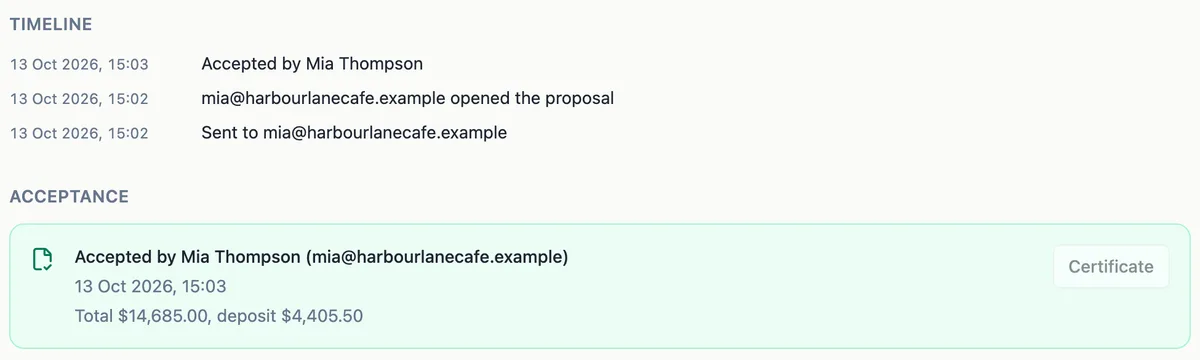
What the page records
The certificate is one extra page at the end of the PDF, sized like the proposal pages. It records the proposal title; who accepted it, by name and email; when, to the second; the IP address and the browser the acceptance came from; a hash of the accepted content; the items the client selected, with their totals; and the consent text the client agreed to. The drawn or typed signature image is part of the acceptance.
Why the content hash matters
When a proposal is sent, its document, layout, items and pricing settings are frozen as a version and fingerprinted with a SHA-256 hash. The certificate prints that hash. If anyone later claims the proposal said something else, the frozen version can be hashed again and compared: any change, even a single character, gives a different value.
The selection, not the menu
Because clients can tick optional extras and change quantities, the certificate lists the items actually selected at acceptance with the totals for that selection, not every line on offer. That is the figure the invoices are made from, so the certificate, the deposit invoice and the balance invoice all agree.
Where to find it
After acceptance, the PDF of the accepted version is rendered with the certificate page appended and emailed to you and to the client. The activity page shows the acceptance record, but its Certificate button does not open the file yet, so keep the emailed PDF with your records for the job.
How it works, in three steps
Step 1
Let the client accept
The client accepts from their link with a name, a signature and the consent box.
Step 2
Wait for the render
The accepted version is rendered to PDF with the certificate page appended, in the background.
Step 3
Open and file it
Keep the accepted PDF from the acceptance email with the job records.
The full walkthrough with screenshots is in the guide Send a proposal and get paid.
Limits worth knowing
- The certificate page is added when a client accepts online.
- The IP address is the one the server saw and can be a shared or mobile network address.
- The Certificate button on the activity page does not open the file yet; use the emailed PDF.
- The certificate lists the selected items only.
Questions people ask
Is the acceptance certificate a legal document?
It is evidence. It records the facts of the acceptance: the person, the time, the network address, the browser, the content hash, the selection and the consent sentence they agreed to. Whether the proposal itself forms an enforceable agreement depends on its terms and the governing law. The certificate makes it much easier to show what was accepted and when.
Can the client get a copy?
Yes. When they accept, the client is emailed the PDF of the accepted version with the certificate page, along with the issued invoices, so they hold the same record of the deal as you do.
What does the IP address prove?
It shows the network address the acceptance request came from, as the server saw it. It can be a home connection, an office network or a mobile carrier address shared by many people, so on its own it does not identify a person. Together with the name, email, browser and time, it helps show the acceptance is genuine.
Why does the certificate show a long string of letters and numbers?
That is the SHA-256 hash of the accepted version: its document, layout, items and pricing settings. It works as a fingerprint. Anyone holding the frozen version can compute the hash again, and if it matches, the content has not changed since acceptance. It is not a checksum of the PDF file itself.
Where do I find the certificate after a client accepts?
In the acceptance email. You and the client each get one with the accepted proposal attached as a PDF, and the certificate is its last page. The Certificate button on the activity page is not active yet, so save the emailed copy with the job.
Make your own proposal
The button opens the generator with this use case already described. Change the wording to match yours, generate, then edit anything you like.
Create a proposal with OneCraftRelated pages
Proposal to PDF without layout surprises
Turning a proposal into a PDF should give a file that matches the screen page for page, so the copy the client files is the copy they accepted. Here the PDF is rendered on a server in a headless browser from the same layout the builder and the client view use.
Accept a proposal online in one dialog
Accepting a proposal online should take the client a minute: confirm what they are buying, put their name to it and agree to the terms. The record of that moment needs to be strong enough to rely on later.
Proposal version history, one version per offer sent
Proposal version history is the record of each offer as the client received it. When a proposal goes back and forth, it answers the questions that matter later: which price did they see, and which one did they accept.
More finished work of this kind is on the proposal examples hub.
Written and checked by the OneCraft team. Last checked .