Documents · Alternative
A Microsoft Word alternative for business documents
Word is the standard because everyone has it and everyone can open what it makes. OneCraft does not try to replace the word processor: it writes a finished business document from a brief, themes it, exports a PDF and sends it for signature, and it cannot open or produce a .docx at all.
Updated , competitor details checked . Microsoft, Microsoft 365 and Word are trademarks of their owner. OneCraft is not affiliated with or endorsed by Microsoft, and every cell cites a public page or a source file.
Indunil Asanka · Co-founder
3 min read · Published
The short verdict
Word suits anyone who exchanges files with people who use Word, marks up drafts with track changes, or merges a mailing list into a batch of letters. OneCraft suits the person who wants the report, policy or agreement written for them from a brief, themed in seconds, exported as a PDF and signed, and who never needs to hand over an editable Word file.
| Feature | Microsoft Word | OneCraft |
|---|---|---|
| Subscription cost | Microsoft 365 Personal at $9.99 a month or $99.99 a year, Family at $12.99 or $129.99, Premium at $19.99 or $199.99, in US dollars checked 2026-09-20 | A free plan at $0 with 150 AI credits a month, then $8, $25 and $125 a month; generator file attachments open on the Starter plan |
| Buying it outright | Office Home 2024 as a one time purchase at $179.99, with Word, Excel, PowerPoint, Outlook and OneNote and no Copilot checked 2026-09-20 | No one time purchase. Plans are monthly and meter AI credits shared across documents, slides, flyers, forms and videos |
| Free option | Word for the web is free with 5 GB of cloud storage, and files must be saved in and shared from OneDrive checked 2026-09-20 | A free plan with 150 AI credits a month, enough for about 4 AI projects, including sending documents for signature |
| Marking up a draft | Track Changes marks deletions with a strikethrough and additions with an underline, colours each author differently, and changes are accepted or rejected from the Review tab checked 2026-09-20 | No tracked changes and no suggestion mode. Editing is direct, with saved versions to return to |
| Personalised batches | Mail merge lets you create a batch of documents that are personalised for each recipient from a data source checked 2026-09-20 | No mail merge and no data source binding. Each document is generated on its own from its own brief |
| Where the draft comes from | Advanced Copilot chat is included on Personal and Family, with extensive usage and agentic features on Premium checked 2026-09-20 | A brief of up to 10,000 characters, classified for texture, scale, structure, register and chrome, then written to that shape in one run |
| Look of the finished document | Not itemised on the plan comparison page, which lists the apps, storage and Copilot usage per plan checked 2026-09-20 | 10 theme presets plus a Theme Studio that generates a theme from a sentence, with 7 cover layouts and 4 letterhead styles |
| Blocks in the document | Not itemised on the plan comparison page; Excel and PowerPoint ship alongside Word in every listed plan checked 2026-09-20 | 45 component types covering tables, 6 chart types, 5 diagram variants, 4 callout variants and 4 key value layouts |
| Signing | No e-signature product is named among the apps on the plan comparison page checked 2026-09-20 | Signature block parties become envelope recipients, and the completed PDF is PAdES certified with DocMDP P equals 1 |
| Word files | The desktop apps Word, Excel, PowerPoint, Outlook and OneNote are included on Personal, Family and Premium checked 2026-09-20 | No .docx import and no .docx export. Generator attachments are PDF, TXT, PNG, JPG, WebP or GIF, so a Word file has to be saved as a PDF first |
| Working offline | Desktop apps are part of every paid consumer plan, and the free tier is the web and mobile versions only checked 2026-09-20 | A browser application signed into an account, with no desktop app and no offline editing |
| PDF output | Not itemised on the plan comparison page checked 2026-09-20 | PDF rendered server side with headless Chromium and polled until it is ready, so the file matches the editor canvas |
Where Microsoft Word is better
Track changes
Word marks every deletion and addition, colours each author, and lets a reviewer accept or reject line by line. Nothing here does that. Editing is direct and the fallback is a saved version, which is fine for a document one person writes and useless for one three people are arguing over.
The .docx round trip
Word is the application that reads and writes .docx, so a file can go out, come back marked up and go out again. The generator here accepts PDF, TXT and image attachments only and exports PDF only, so a Word file must be saved as a PDF on the way in and there is nothing editable to send back.
Mail merge
Word creates a batch of documents personalised for each recipient from a spreadsheet or contact list. There is no mail merge and no data source binding here, so a hundred personalised letters means a hundred separate generations. Anyone producing certificates, notices or letters in volume should stay with Word.
It works with no connection
The desktop apps come with every paid consumer plan, so Word keeps working on a plane or a building site, and the free web version still exists for light editing. OneCraft runs in a browser signed into an account, with no desktop app and no offline editing.
Everyone already has it
A Word file opens for almost every counterparty, and Word for the web is free with 5 GB of OneDrive storage. That reach is a genuine feature, and the trade here is a written document and a certified PDF rather than a format everybody can edit.
Where OneCraft is different
The document is written, not formatted
A brief becomes a finished report, policy or agreement in one run, after the generator has decided its texture, scale, structure, register and chrome. A long document is planned section by section rather than produced in one pass, and a contents page appears only where the headings justify it.
Themes instead of styles
Ten built in themes cover the usual registers and the Theme Studio generates a new one from a sentence describing the look. Seven cover layouts and four letterhead styles handle front matter, so restyling a report is a choice rather than a pass through a style gallery.
Charts and diagrams without another app
Six chart types and five diagram variants are components of the document itself, alongside tables, callouts and key value blocks. A budget chart and a delivery flow go in the report without a round trip through a spreadsheet or a presentation tool.
The document can be signed where it was written
A signature block carries its parties into a signing envelope, each with their own identity check, and the completed PDF is certified so a later edit breaks the seal. Behind it sit an 18 event hash chained log and a certificate of completion.
A finished example
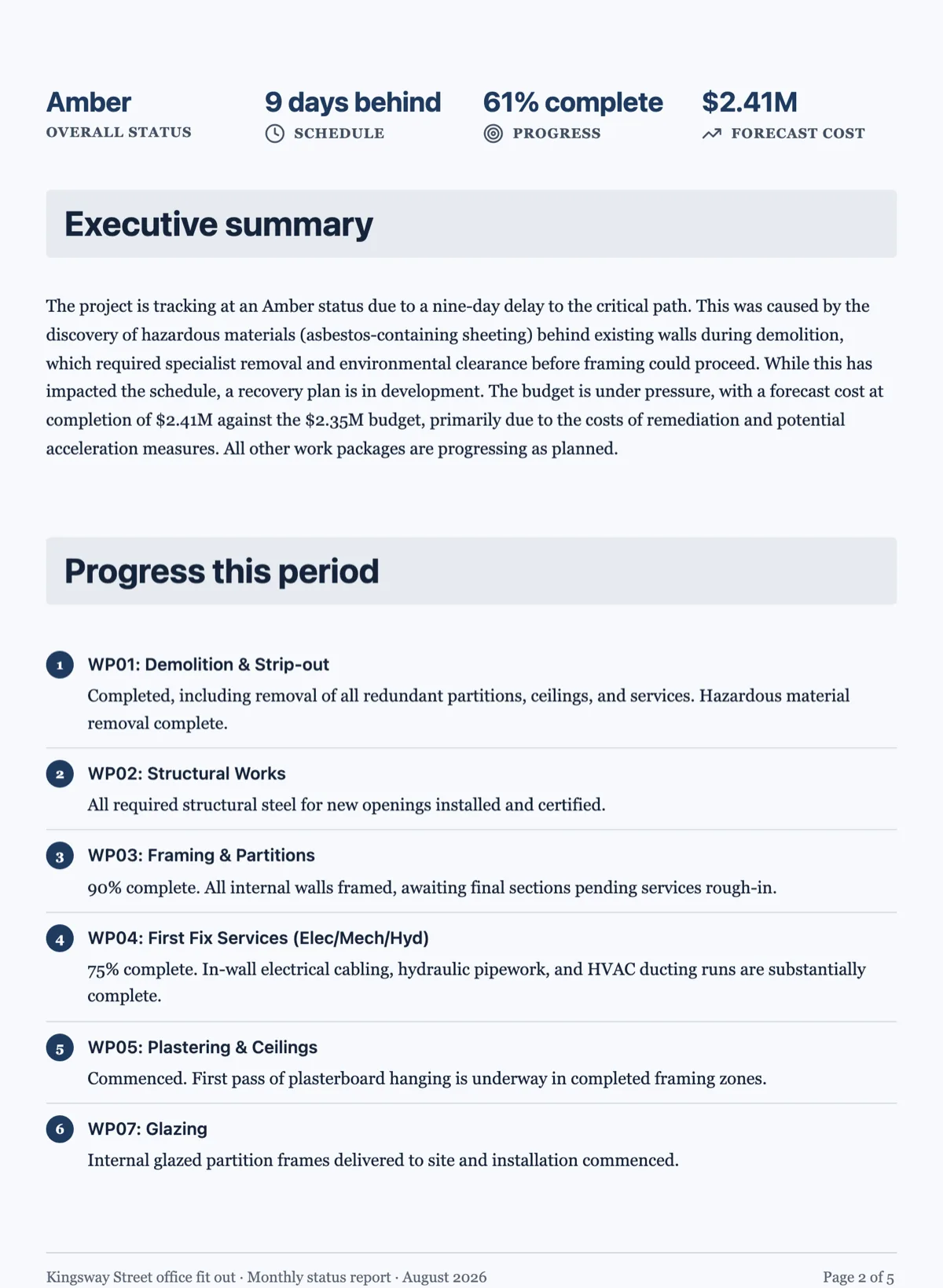 Project status report template with a RAG statusMade with OneCraft, exactly as the generator and editor left it. Open the page for the full breakdown.
Pricing in plain terms
Microsoft's plan comparison page, checked 20 September 2026, lists Microsoft 365 Personal at $9.99 a month or $99.99 a year, Family at $12.99 or $129.99, and Premium at $19.99 or $199.99, all in US dollars and all including the Word, Excel, PowerPoint, Outlook and OneNote desktop apps. Office Home 2024 is a one time purchase at $179.99 with no Copilot. Word for the web is free with 5 GB of OneDrive storage. OneCraft's pricing page lists Free at $0 with 150 AI credits a month, Starter at $8, Pro at $25 and Pro Plus at $125, with no one time purchase.
Moving a Word document across
Save the .docx as a PDF and attach it to the generator, which reads it for its headings, key points and labelled values. Paragraphs come back rewritten rather than copied, so paste any clause that must stay word for word into the prompt box. Styles, tracked changes, comments and field codes do not survive, because none of them exist here. A document that still has to go back to a counterparty in an editable format should not make the trip at all.
What could not be checked
Microsoft's consumer plan comparison page lists apps, storage and Copilot usage rather than itemising Word's document features, so the layout, blocks, signing and PDF rows say exactly that and cite the support pages where a feature is documented. Track changes and mail merge come from Microsoft's own support articles. Prices were served in US dollars and vary by region.
How the OneCraft side was verified
Each cell names a row in an internal ledger checked against the product's source code: the 8,000 character brief cap, the classification before writing, the 45 component types, the 6 chart types and 5 diagram variants, the 10 themes and the Theme Studio, the 7 cover layouts, the accepted attachment types, the server rendered PDF, and the handover that turns signature block parties into envelope recipients.
Who should stay with Microsoft Word
Stay with Word if drafts come back marked up with track changes, if .docx is the format your counterparties expect, if mail merge produces your letters, or if the work happens offline. This page is for the opposite case: a document written from a brief, themed, exported as a PDF and signed, with nothing to hand back in an editable format.
Questions people ask
Can I open a .docx file here?
No. The generator accepts five attachments of up to 10 MB each as PDF, TXT, PNG, JPG, WebP or GIF, so a Word file has to be saved as a PDF first. That PDF grounds the new document in your content, though its paragraphs are rewritten from key points, and the result is a new document rather than the original file with its styles intact.
Is there a way to export to Word?
No. Documents export as PDF only, rendered server side so the file matches the editor exactly. If a counterparty must receive something they can edit, that is a real reason to stay with Word. The PDF route suits reports, policies and agreements that go out finished rather than as a draft to mark up.
What replaces track changes?
Saved versions and direct editing. A document is written, edited and saved, and an earlier version can be opened again, but nothing records who changed which sentence or lets a reviewer accept and reject line by line. Documents that get negotiated are better drafted in Word and only finished here.
Can I produce a hundred personalised letters?
Not in one pass. There is no mail merge, no spreadsheet binding and no batch generation, so each letter would be its own generation from its own brief, spending credits each time. For certificates, notices or letters at volume, Word's mail merge with an Excel list is straightforwardly the better tool.
Does it work without an internet connection?
No. The builder is a browser application signed into an account, with no desktop version and no offline mode, and generation and PDF export both run on the server. Microsoft includes the desktop apps in every paid consumer plan, which is the answer for anyone who drafts away from a connection.
What does the signing add over a printed signature?
Each party gets an identity check, from a plain email link to an access code or a six digit emailed code, and the completed PDF is PAdES certified at DocMDP level one so a later edit breaks the seal. A certificate of completion records every signer, their method, IP address, consent and the full event log.
Try the document side of OneCraft
The button opens the generator with a starting prompt already filled in. Change the wording to match your own work before you run it.
Create a document with OneCraftMore comparisons
- A Google Docs alternative for contracts you can signA Google Docs alternative for contracts: numbered clauses written by AI, signature blocks, certified PDFs, and the collaboration Google Docs still does better.
- A Notion alternative for documents that print and signA Notion alternative for documents that are meant to be printed and signed: page breaks, covers, charts and certified signing, with the wiki gaps named.
- A Canva Docs alternative for contracts and reportsA Canva Docs alternative for contracts and reports: page based layout, numbered clauses, charts and certified signing, with Canva's template library named.
What the module actually does, feature by feature: the documents maker page.
Step by step in the builder: Create a document with AI, then Turn a PDF or photo into an editable document.
Sources
Written and checked by the OneCraft team. Last checked .