Conversational form
App feedback survey template for crashes, speed and missing features
An app feedback survey has to collect what developers can act on: which platform and version, how often it crashed, where it is slow and what users want next. This template asks those in eight short screens, counts crashes for this week only, and takes an optional screenshot of the problem.
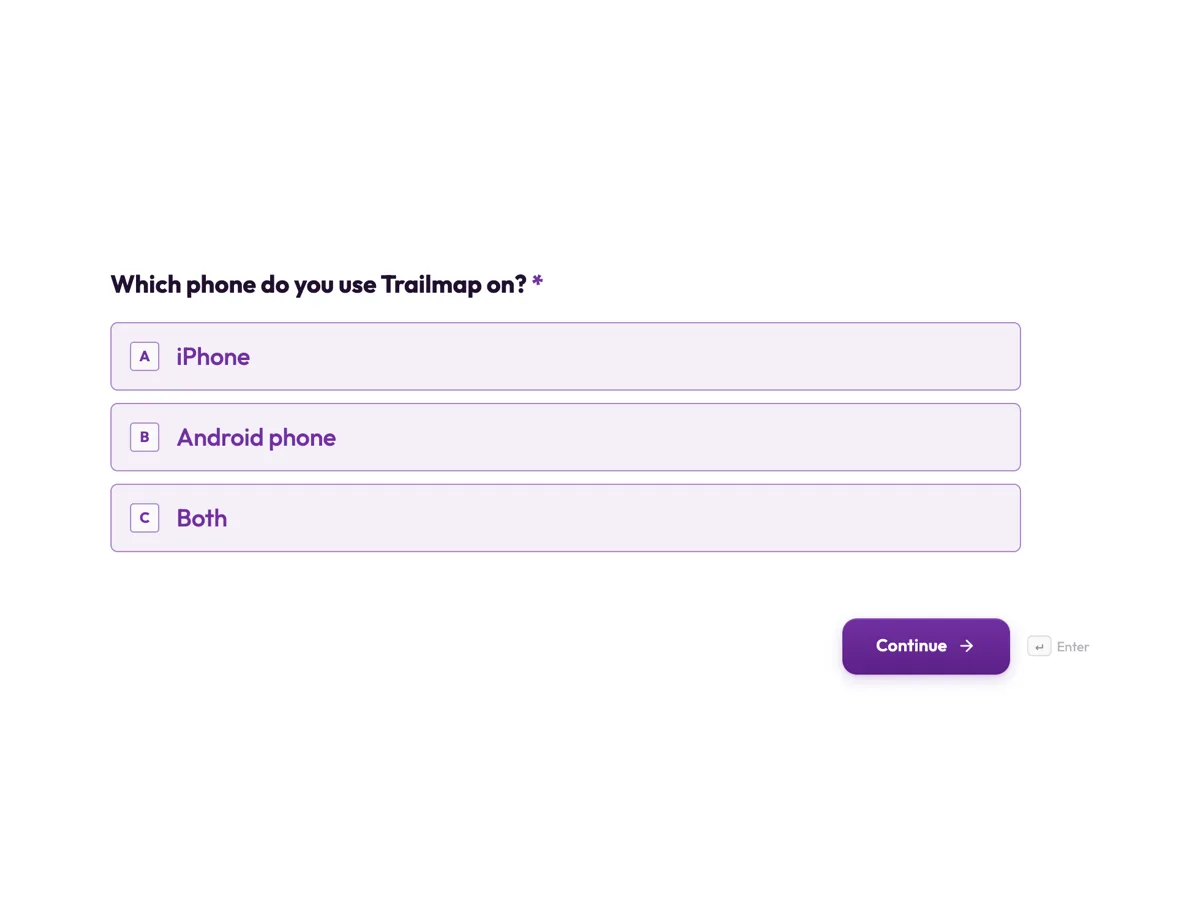
The form itself
The first screen of the form. A conversational form shows one question per screen, so the remaining screens are listed in the field table below. Nothing here can be filled in or submitted, so read it as a reference and build your own from the button above.
Every field, and what it collects
The complete field list, in the order respondents meet it.
- Which phone do you use Trailmap on?Single choiceRequired
- Options: iPhone · Android phone · Both
- Which app version are you on?Short text
- In Trailmap, open Settings and scroll to the bottom. Skip this if you cannot find it.
- How many times has Trailmap crashed or closed on its own this week?Single choiceRequired
- Options: Not at all · Once · Two to five times · More than five times
- How does Trailmap feel for speed?Single choiceRequired
- Think about opening the app and loading a map you have downloaded.
- Options: Fast · Fine · Slow to open · Slow to load maps · Slow everywhere
- Which screen do you use most?DropdownRequired
- Options: Map and navigation · Track recording · Trail search · Offline map downloads · Saved trips · Elevation profile
- What is missing that would make Trailmap better for you?Long text
- Got a screenshot of a problem?File upload
- Optional. A screenshot of an error or a wrong map tile helps the developers find it fast. Up to three images.
- Overall, how would you rate Trailmap?Single choiceRequired
- Options: 5, excellent · 4, good · 3, okay · 2, poor · 1, very poor
What each screen of this survey asks
Platform is iPhone, Android or both. App version is an optional short text, with help text saying where in the app to find it. Crashes this week is a radio of four bands, from not at all to more than five. Speed is a radio of five that separates slow to open from slow to load maps. Most used screen is a dropdown of six. What is missing is an optional long text with a concrete placeholder. The screenshot screen takes up to three images and is optional. The overall rating runs from 5, excellent, to 1, very poor. Five of the eight screens are required.
Why crashes are counted for this week
Ask whether an app has ever crashed and nearly everyone says yes, which tells developers nothing. A count for this week, in four bands, is recent enough to remember and specific enough to compare across releases. Paired with the platform and version, it points at a build: more than five crashes on Android in version 4.12 is a lead, a general complaint about crashing is not. Speed works the same way. Splitting slow to open from slow to load maps separates a startup problem from a map data problem, two different fixes owned by different people.
How to adapt this survey
A banking app adds a screen about login and identity checks, where most friction sits. A game asks about the level reached and in app purchases. An app with a web version adds web as a platform and asks which one the person uses more. A team running a beta program adds a screen asking whether the person is on the test build, so beta crashes are read apart from crashes in the store release.
What makes this form work
Every answer is tied to a build
Platform and app version come first, with help text on where to find the version. A crash count or speed complaint can be traced to the release that caused it.
Crashes are counted, not described
Four bands for this week, from not at all to more than five. Answers are comparable from one release to the next, so the team can see whether a fix worked.
A screenshot beats a paragraph
An optional upload of up to three images catches the error message or the wrong map tile exactly as the user saw it, which no description can.
Questions people ask
Should an app feedback survey run inside the app?
It can be linked from inside the app, which reaches active users while the experience is fresh. A conversational form opens in the phone's browser and shows one question per screen, which suits a small screen. Link it from settings or after a completed action, never in the middle of a task.
Why ask for the app version?
Because a crash or slowdown often belongs to one release. With the version, developers can check their crash reports for that build and see whether a fix already shipped. The question is optional and tells users where to find the number, since many do not know it and a required version would stop them.
Can users attach a screen recording instead of a screenshot?
Not on this form. The file upload field allows images and PDF only, so a video file cannot be attached. A screenshot of the error or the wrong map tile is usually enough. A conversational form can add a recording screen for a spoken or video answer, which this survey does not use.
How does this differ from an app store review?
App store reviews are public, short and skewed toward very happy or very unhappy users, and developers cannot ask follow up questions. A survey is private and structured, so crash counts and speed answers can be compared across versions. Many teams ask satisfied users for a store review after the survey.
Why separate slow to open from slow to load maps?
They usually have different causes. Slow opening points at startup code or the phone's storage, while slow maps point at map data and network. A single slow answer would leave developers guessing. Five options keep the question one tap while giving the team a starting place for the fix.
How many people need to answer before acting on it?
For crash and speed problems, even a handful of matching reports on one version is worth checking against crash logs. For feature requests, wait for a theme to repeat across users and platforms. The response export puts the platform and version beside every answer, which makes that filtering quick.
Build your own in about a minute
The button below opens the generator with this use case already described. Change the wording to match your own, generate, then edit anything you like.
Make one like thisOther form examples
Website feedback survey template: task, success and one fix
A website feedback survey should ask what the visitor came to do and whether they managed it, before asking how they feel about the site. This template does exactly that in seven screens, then asks how easy it was, the one thing that got in the way, the device and whether they would return.
Cancellation survey with a main reason and a pause offer
A cancellation survey has to capture why a subscriber is leaving in a form the business can act on, while the decision is still fresh. This one asks for a single main reason, then what would have kept them, where they are going instead, and whether a pause would do.
Customer effort score survey template for closed support tickets
A customer effort score survey asks how easy it was to get an issue handled, on a seven point agreement scale, straight after the ticket closes. This template pairs that one statement with the ticket number, the channel, what got in the way, whether the issue is actually fixed and how many contacts it took.
Want the steps in the builder? Read Create a conversational form with AI, then Design your welcome and thank-you screens. For everything this generator can do, see the form maker.
Written and checked by the OneCraft team. Last checked .