Conversational form
Bakery pre order form for pickup day and time
A bakery pre order form has to tell the bakers how many of each loaf and pastry to bake for which morning, and tell the counter whose bag goes on the shelf and when they will come. This one starts with an item and quantity table, asks the pickup day and an hourly window, and settles slicing and packing before the dough is shaped.
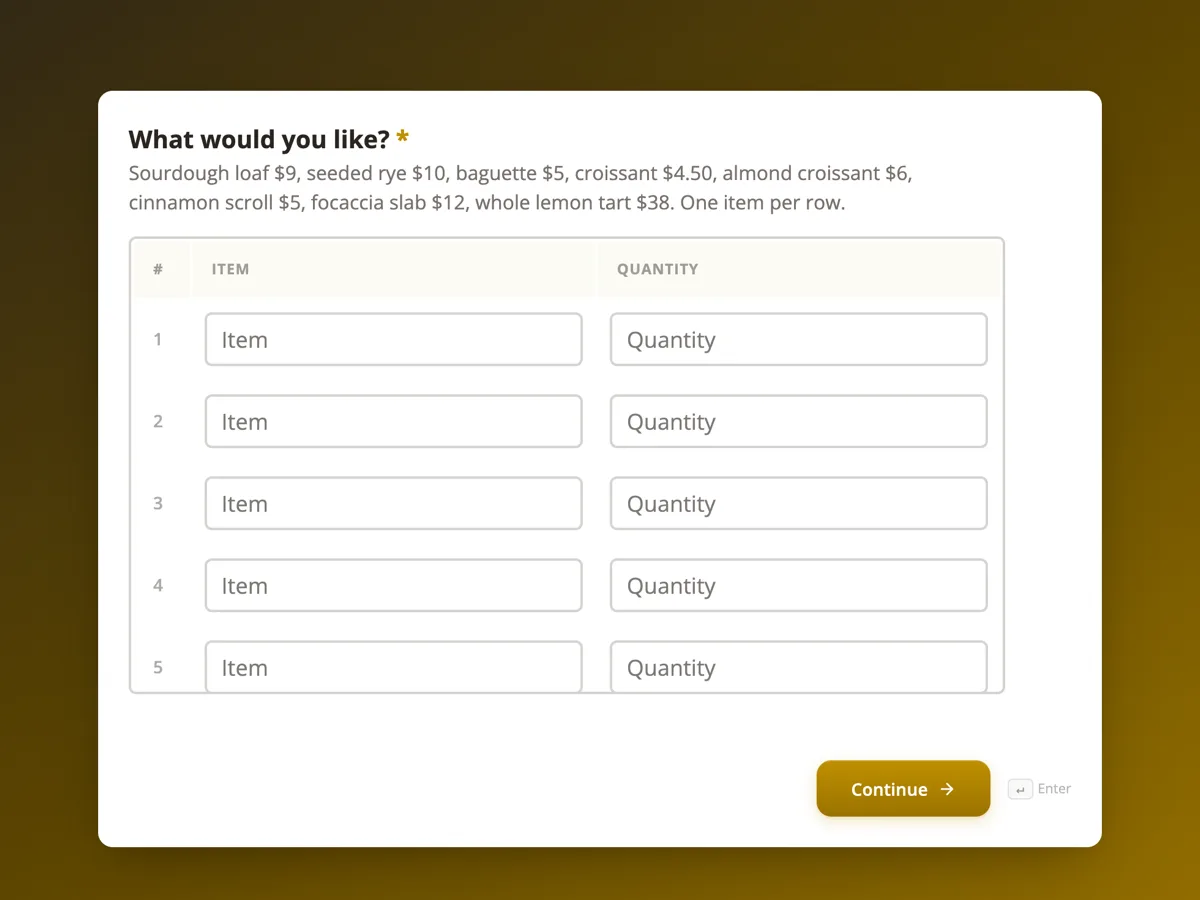
The form itself
The first screen of the form. A conversational form shows one question per screen, so the remaining screens are listed in the field table below. Nothing here can be filled in or submitted, so read it as a reference and build your own from the button above.
Every field, and what it collects
The complete field list, in the order respondents meet it.
- What would you like?TableRequired
- Sourdough loaf $9, seeded rye $10, baguette $5, croissant $4.50, almond croissant $6, cinnamon scroll $5, focaccia slab $12, whole lemon tart $38. One item per row.
- Columns: Item · Quantity
- Which day will you collect?DateRequired
- Open Tuesday to Sunday. Orders placed before 2 pm can be collected the next morning.
- What time will you collect?Single choiceRequired
- Options: 7 to 8 am · 8 to 9 am · 9 to 10 am · 10 am to 12 pm · 12 to 1 pm
- Should the loaves be sliced?Single choiceRequired
- Sliced bread goes stale faster. Whole loaves keep two days longer in a paper bag.
- Options: Whole, not sliced · Sliced thick · Sliced thin, for sandwiches · No loaves in my order
- How should it be packed?Single choiceRequired
- Options: Paper bags · I will bring my own bag or container · Cake box for the tart, bags for the rest
- Any allergies the bakers should know about?Long text
- This is read only by the person packing your order and used for nothing else. Everything is baked in one kitchen with wheat, nuts, sesame, eggs and milk, so nothing is allergen free.
- Whose name goes on the order?ProfileRequired
What each screen of this order asks, in order
Screen one is a five row numbered table with item and quantity columns, and its help text gives the prices of eight items from a $5 baguette to a $38 lemon tart. Screen two is the pickup day, with help text on opening days and the 2 pm cut off. Screen three is a pickup window, five slots from 7 am to 1 pm. Screen four asks whether loaves are sliced, with a no loaves answer for pastry only orders. Screen five is packing: paper bags, your own bag, or a cake box for the tart. Screen six is an optional allergies question with a note on privacy and the shared kitchen. Screen seven is a profile block taking a name for the pickup shelf and a mobile, with email switched off.
Why the order starts with the table
Most order forms start with who you are. A bakery pre order starts with what you want, because that is what the baker needs at 4 am and what the customer came to the form to say. The table makes the order a list the bakers can tally: five rows, item and quantity, nothing to interpret. A table shows its fixed rows and cannot grow, and five rows covers nearly every household order; a cafe ordering twenty lines would use a wholesale form. The form records the order but does not add up the bill, which is paid at the counter.
How to adapt this form
A bakery that takes cake orders adds a cake size, a flavour and the writing on top, with three days' notice in the date help text. A bakery doing a Christmas or Easter rush swaps the date screen for a radio of the three pickup days, so the bakers plan exactly three bakes. A wholesale version for cafes replaces the profile with a business name and a standing weekly order.
What makes this form work
The order comes first
Screen one is the item and quantity table with prices in the help text. The customer says what they came to say straight away, and the bakers get a list they can tally into the next morning's bake.
Slicing and packing are settled before baking
Two small screens, slicing with a no loaves answer and packing with a bring your own option. The counter packs forty orders at 6 am without a single question at pickup.
Allergy answers come with an honest note
The optional allergies screen says how the answer is used and that the kitchen handles wheat, nuts, sesame, eggs and milk. Customers get the truth about a shared kitchen before they rely on the bag.
Questions people ask
Why does a bakery pre order form need a pickup time?
Because bread is best within hours of baking and the shelf behind the counter is small. An hourly window lets the bakers time the last bake for the late collections and lets the counter plan space. The thank-you screen says uncollected orders go back on sale at 1 pm, which keeps the window meaningful.
Does the customer pay when ordering?
No. The welcome screen says pay when you collect, and the form takes no payment. The prices sit in the help text of the table so the customer knows roughly what to bring. A bakery that loses money on no shows can require prepayment instead by pointing the redirect add-on at a payment page.
Why ask about slicing before the order is baked?
Because slicing is done at packing, after the loaves cool, and a bakery with forty pre orders cannot ask each customer at the counter. The help text says sliced bread goes stale faster, which turns many slice requests into whole loaves. The no loaves option keeps the question honest for a pastry only order.
How is allergy information handled on this form?
The question is optional, and its help text says the answer is read only by the person packing the order and used for nothing else. It also says plainly that everything comes from one kitchen with wheat, nuts, sesame, eggs and milk, so a severe allergy should not rely on a bakery bag.
Why is there no email on the last screen?
A pre order needs a name for the shelf and a number to text if something runs out. Email would add a field the bakery never uses. The profile block has email switched off, so the last screen asks two things, which suits a form people fill in on a phone on the way home.
What happens if an item has sold out or the oven fails?
The bakery texts the mobile on the last screen, which is the reason the number is required. Pre orders are baked first, so a sell out affects walk in customers before pre orders. If something cannot be made, the text offers a swap or leaves it out of the bag, and the customer pays only for what is collected.
Build your own in about a minute
The button below opens the generator with this use case already described. Change the wording to match your own, generate, then edit anything you like.
Make one like thisOther form examples
Flower order form with the occasion, budget and card message
A flower order form has to settle what the flowers are for, how much to spend, what the card says and exactly where and when they arrive. This one asks each on its own screen, leaves the stems to the florist inside a style and colour brief, and separates the person receiving from the person paying.
Coffee bean subscription order form with grind and cadence
A coffee bean subscription order form has to match the grind to how the person brews and the delivery gap to how fast they drink, or the beans arrive stale or too late. This one asks both on their own screens, explains each choice in grams and cups, and sets the first roast date before taking the address.
T shirt order form with a size grid and print position
A t shirt order form has to collect how many of each size, which colour and where the print goes, because those three set the price and the screens. This one uses a six row size and quantity table, gives each print position its maximum width in centimetres, and takes the artwork as an upload with the file rules stated.
Want the steps in the builder? Read Create a conversational form with AI, then Form builder components. For everything this generator can do, see the form maker.
Sources
Written and checked by the OneCraft team. Last checked .